

Forti_New
Visitor III
August 17, 2022
Question

command fail. return code 49

  • August 17, 2022
  • 11 replies
  • 24600 views

hi guys,
we've got an error on updating ffdb database on our FortiGate.
our device (FG400E - forios 7.0) is in an isolated part of our network and we have to
update it manually. when I run the command for (ffdb update database) it says:
"command fail. return code 49".
would you please tell me what exactly this error means?
thanks.
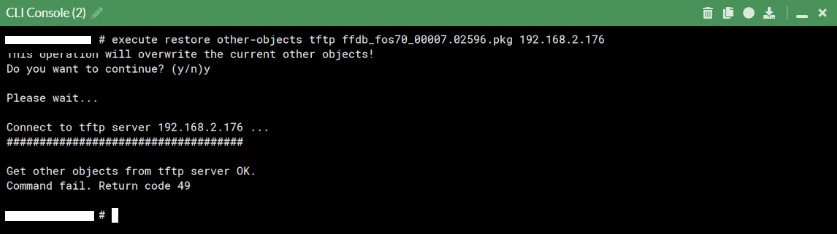

screenshot.png


11 replies

AEK
SuperUser
SuperUser
August 17, 2022

Hello

I think the issue may be related with some FTP compatibility issue.

Try the following:

- Check connection logs on FTP server

- Enable FTP debug on FGT and check what's wrong in the debug logs

- Then tune the FTP server or try with another one


AEK
Forti_New
Forti_NewAuthor
Visitor III
August 20, 2022

Hi AEK, thank you for your reply. 

i dont think this error is related to our tftp compatibility issue as it says (get other objects from tftp server OK). because the file has completely uploaded to the device and other files such as antivirus, application control and etc are updated correctly as well. just this ffdb file has this problem. 
any one else had face this problem?

Bodyak
Explorer
August 23, 2022

Hello. Also faced this problem. Did all sorts of ftp debugging. Since the volume of ffdb signatures has increased to 37mb since August, we cannot update. A device with firmware 7.0.3 build0237 is updated, but a device with firmware 7.0.6 is not.

AaronD_
Visitor III
August 23, 2022

Hi,

Does the update apply regardless of the error? I tried this today on 7.0.6 and got the same error but noticed the IPs were updated.

Forti_New
Forti_NewAuthor
Visitor III
August 24, 2022

Hi AaronD_,

would you please tell us which database is updating with ffdb package to check it is updated or not? we should check it by diag autoupdate versions command right? so what is the name of database that updates with ffdb package.

thanks.

AaronD_
Visitor III
August 24, 2022

This is what I see under diag autoupdate versions.


Internet-service Full Database
---------
Version: 7.02621
Contract Expiry Date: n/a
Last Updated using manual update on Wed Aug 24 07:45:00 2022
Last Update Attempt: Wed Aug 24 07:46:51 2022
Result: Connectivity failure

lol
Staff
Staff
August 24, 2022

Hello,


To reply to the initial question

> "command fail. return code 49".
> would you please tell me what exactly this error means?


The CLI error 49 actually means that the password must conform to the system password policy.
I'm not sure how accurate this error code is in this context here.
It could also be used as a catch all error code if something else during file transfer failed.


> just this ffdb file has this problem

Is the Internet-service Database still updating via TFTP as seen with "diagnose autoupdate versions | grep -A6 Inter" ?


Regards

New Contributor II
September 11, 2022

Same with 61e 6.4.10 trying updating ffdb database.

matrixfauly
New Member
September 13, 2022

So you got it Bodyak.. tftp supports no more then 32MB files.

Bodyak
Explorer
September 13, 2022

Hello. I have repeatedly written what we use to update the ftp server. And with the update from the ftp server, the problem is the same.
After an update with an error -49, the number of signatures shows 1623 and the version changes to the current one. Is it possible to say that despite the error, the update goes through?

otys
New Member
November 5, 2022

Hello,

I see the same error for a long time on some boxes when updating manually. Try to "diag debug app update -1". In my case the error was something like:


Connect to ftp server x.x.x.x ...
Get other objects from ftp server OK.
upd_manual_misc[391]-Updating misc objects
doInstallUpdatePackage[941]-Full obj found for FFDB011
doInstallUpdatePackage[951]-Updating obj FFDB
installUpdateObject[273]-Step 1:Unpack obj 31, Total=1, cur=0
installUpdateObject[302]-Step 2:Prepare temp file for obj 31
installUpdateObject[368]-Failed validation of obj 31
doInstallUpdatePackage[941]-Full obj found for FFDB009
doInstallUpdatePackage[951]-Updating obj FFDB
installUpdateObject[273]-Step 1:Unpack obj 31, Total=1, cur=0
installUpdateObject[302]-Step 2:Prepare temp file for obj 31
installUpdateObject[368]-Failed validation of obj 31
doInstallUpdatePackage[941]-Full obj found for FFDB010
doInstallUpdatePackage[951]-Updating obj FFDB
installUpdateObject[273]-Step 1:Unpack obj 31, Total=1, cur=0
installUpdateObject[302]-Step 2:Prepare temp file for obj 31
installUpdateObject[368]-Failed validation of obj 31
upd_status_save_status[131]-try to save on status file
upd_status_save_status[202]-Status file is up-to-date
upd_manual_misc[416]-Update failed on ffdb_low(31) (-6)
upd_manual_misc[416]-Update failed on ffdb_med(31) (-6)
upd_manual_misc[416]-Update failed on ffdb_high(31) (-6)
Command fail. Return code 49


The only solution I know is to reboot the firewall and try again. Looks like some app lock or resource problem.


Daniel

izhmurikov
New Member
December 8, 2022

hi, you problem solved?

how?

i have same


FGT-500E, fortis 7.0.8

i try: ftp; more old files; reboot 

problem is stil on


izhmurikov
New Member
December 8, 2022

answer:

error in CLI by signature is update!


usednet
Explorer
January 31, 2023

I have similar problem but with different error

After this - version number was updated, number of ISDB categories was changed but all of them are epmty

Fortigate 92D, FortiOS 6.2.12

photo_2023-01-31_14-44-16 (2).jpg

sferoz
Staff
Staff
February 9, 2023

Good Day,

The issue can be reproduced, and the reason  due to FFDB hang in error status or 

The parsing process may take a long time (up to about 30mins dependent on the model), and within that timeframe, it will not be updated on GUI.

If another ffdb try to load within that timeframe, validation will fail and the error will be given.


The issue has been fixed in 7.2.1. Tested in lab and was able to load ISDB package file using TFTP successfully. 


For validation to fail, it is caused by one of the following:
- package ffdb_app format version is wrong
- package ffdb_map format version is wrong
- ffdb_app and ffdb_map do not have the same format
- package platform is wrong
- an internet service database is already in the process of parsing


Kindly try the below before executing TFTP:
execute internet-service refresh/Reboot the FGT

Thanks.

usednet_llc
Visitor III
February 9, 2023

I have Fortigate 92D with 6.2.11

This platform can't support 6.4.x, 7.0.x, 7.2x

I have already reboot, refresh and other dances... It's not working 

yoohj
New Member
March 13, 2023

Please check the attached settings below.
If the setting is not "full",
It is suspected that some DBs fail and generate errors.


config system global
  set internet-service-database [version]
end


https://community.fortinet.com/t5/FortiGate/Technical-Tip-Configuring-and-checking-the-Internet-Service/ta-p/228143

usednet
Explorer
March 13, 2023

We have 6.2.11, not 7.0.x or 7.2.x
