ISOffice
New Member
December 2, 2014
Solved

Web Cache Not Working?

  • December 2, 2014
  • 14 replies
  • 27941 views

Hi All,

We have a FortiGate 100D Cluster (Active-Active), running Version 5.2.2 Build 642 (GA). We have several IPv4 Policies permitting access to the Internet from several different subnets. On each policy we have Web Cache enabled.

However, when I look at the Cache Monitor in WAN Opt & Cache, I see No Data, indicating that nothing is being cached. Could someone please give me some pointers on what I should look at next to troubleshoot this issue.


Many thanks,


JP
Best answer by Dave_Hall

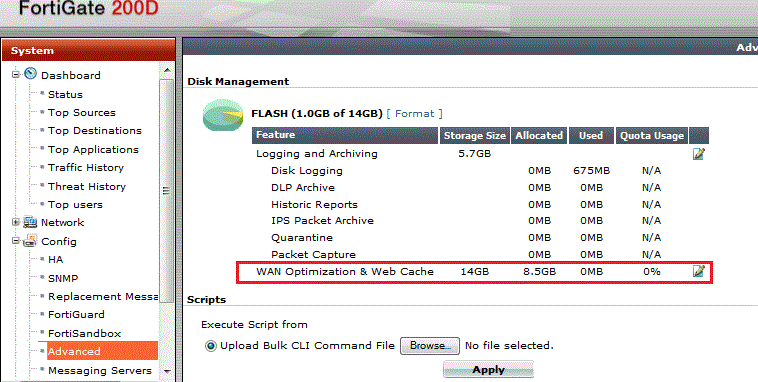
Check your cache settings to see if anything is actually allocated to it.  Also check to see if logging to disk is actually active.  See also Web Caching and HA.


14 replies

Dave_Hall
Dave_HallAnswer
New Member
December 2, 2014

Check your cache settings to see if anything is actually allocated to it.  Also check to see if logging to disk is actually active.  See also Web Caching and HA.


ISOffice
ISOfficeAuthor
New Member
December 3, 2014

Hi Dave,


Many thanks for your reply. We have had a few little problems following our upgrade to v5.2.2. This particular issue may lie in the fact that we are running the cluster in active-active mode, while the recommended set-up is active-passive. I will change the configuration to the recommended set-up as soon as possible.

However, in the meantime, I can confirm that logging to disk is enabled and that space has been allocated (8.5GB) for WAN Optimization & Web Cache.

I will post any updates.


Thanks again,


John

Carl_Wallmark
New Member
December 4, 2014

I have a FG100D standalone with 5.2.2 and I can´t get the webcache to work as well.

Nothing shows up in the monitor.

Carl_Wallmark
New Member
December 4, 2014

Ok, I found my problem,


I had a VIP going from port 80 to 9998 and you need to add a protocol-profile to include the 9998 port for HTTP.


ISOffice
ISOfficeAuthor
New Member
December 16, 2014

Hi Selective,


Many thanks for your input, but I think our issue is caused by something different. On the recommendation of Fortinet, I reformatted the log disk (#execute formatlogdisk), but this did not sort the issue. HTTP traffic still not being cached. Before I start banging my head of a wall, can I verify that all that is required to enable web caching is to turn on the 'Web Cache' option within a IPv4 policy?


JP

Carl_Wallmark
New Member
December 16, 2014

ISOffice wrote:

Hi Selective,


Many thanks for your input, but I think our issue is caused by something different. On the recommendation of Fortinet, I reformatted the log disk (#execute formatlogdisk), but this did not sort the issue. HTTP traffic still not being cached. Before I start banging my head of a wall, can I verify that all that is required to enable web caching is to turn on the 'Web Cache' option within a IPv4 policy?


JP[attachImg]https://forum.fortinet.com/download.axd?file=0;118398&where=message&f=IPv4_Policy.JPG[/attachImg]

Yes, it look good, however you have a service called "Nia-PublicServices", I guess HTTP is included ?


You also should allocate disk to webcache, by going to System -> Config -> Advanced and add some disk to webcache.

ISOffice
ISOfficeAuthor
New Member
December 16, 2014

Hi Selective,

Thanks again for your prompt reply. I can verify that 'NIA-PublicServices' consists of multiple protocols, HTTP, HTTPS, DNS etc. Also under System -> Config -> Advanced we have space allocated for caching. I have a support call open with Fortinet in relation to this. Hopefully they will come up with a solution soon.

JP

Carl_Wallmark
New Member
December 16, 2014

I hope you will solve this, and when you do, please share what was wrong ;)

ISOffice
ISOfficeAuthor
New Member
December 16, 2014

Will do.

Still finding my way around the FortiGates. They are a good product, we just need to sort out a few minor issues.

JP

Carl_Wallmark
New Member
December 16, 2014

ISOffice wrote:

Will do.

Still finding my way around the FortiGates. They are a good product, we just need to sort out a few minor issues.

JP

I have been working with them since 2006, and I have gone through alot with them, they are great! and since 5.2 they are much better in regards to bugs.


Please email me your issues and I´ll try to help. View my profile and email from there.

ISOffice
ISOfficeAuthor
New Member
February 13, 2015

Hi all,

Just a quick update on this issue. Unfortunately, despite their best efforts, Fortinet Support were unable to supply a solution. Their final recommendation is to re-image the appliances with the latest firmware version (5.2.2) or wait for version 5.2.3 which should be released "by end of February".

Will post any further developments.

John P

Shawn_W
New Member
February 18, 2015

Thanks let us know after you upgrade to new firmware. 

florinbro
New Member
February 27, 2015

I have FG80D and face same problem but because I look very carefully I can present you the perspective.

- I have like 15 firewall rules LAN > WAN. After basic setup I start enable functions and see "what is happening" :)

- after I enable Web Cache to all rules at the bandwidth here ... the machine beging to be quite load.

- I start disabling web cache till all rules was not using web cache. the machine load was back to normal again.

- after 5 days while I was investigate ALL Features ... I enable web cache again and .. NO DATA.

- I try to restart "the service" but no data continue.

I will try to restart the machine on a time of low usage of the network to see if something fix after reboot.