ISOffice
New Member
December 2, 2014
Solved

Web Cache Not Working?

  • December 2, 2014
  • 14 replies
  • 27916 views

Hi All,

We have a FortiGate 100D Cluster (Active-Active), running Version 5.2.2 Build 642 (GA). We have several IPv4 Policies permitting access to the Internet from several different subnets. On each policy we have Web Cache enabled.

However, when I look at the Cache Monitor in WAN Opt & Cache, I see No Data, indicating that nothing is being cached. Could someone please give me some pointers on what I should look at next to troubleshoot this issue.


Many thanks,


JP
Best answer by Dave_Hall

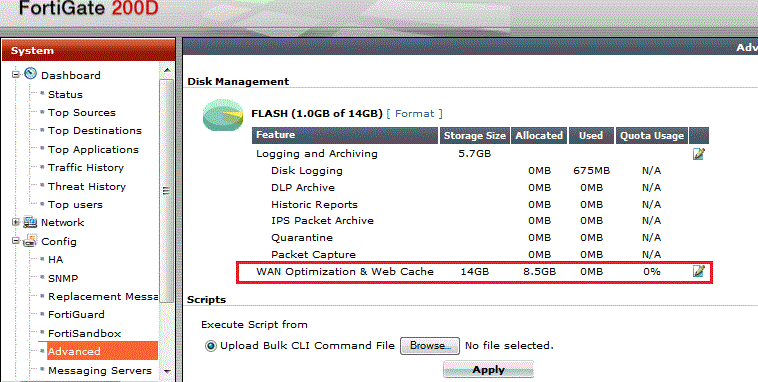
Check your cache settings to see if anything is actually allocated to it.  Also check to see if logging to disk is actually active.  See also Web Caching and HA.


14 replies

florinbro
New Member
February 28, 2015

even after machine reboot ... WEB CACHE still shows no data. After reboot the Traffic Shaping begin to show real shapers ... during installation I setup more and machine get crazy and not sowing up but after reboot shapers graphics are ok.

only WEB CACHE is making problems. what do we do ?

florinbro
New Member
February 28, 2015

"diagnose wacs stats" shows "wa_cs daemon is not running". great :)

"diagnose wacs restart" shows same result !


did anyone have idea how to restart wa_cs daemon  ?

 (rebooting machines few times not solved problem, formatting the disk (who delete logs and cache not fix problem too))

Ramesh_M
New Member
March 2, 2015

Hi All,


This is helpful for me to resolve the issue in my client network.


Regards / Ramesh M

ISOffice
ISOfficeAuthor
New Member
May 1, 2015

Hi all,


Just a quick update on our situation here. We ran a firmware upgrade and are now operating the 100D Cluster on Version 5.2.3, Build670 (GA).

After the upgrade web caching was still NOT working.

However, I created a WAN Opt. Profile for HTTP, Byte Caching only and applied this to a test IPv4 policy. Now I am seeing hits in my Cache Monitor where previously it had stated 'No Data'. I'm also seeing that space allocated to WAN Optimization & Web Cache is now being used (System > Config > Advanced - Disk Management).

To say I'm confused is an understatement. My understanding was that, to enable web caching, it was simply a case of switching on Web Cache within the IPv4 policy. No mention was made of creating a WAN Opt. Profile.

Has anybody any suggestions as to what may be happening here? Is there a field somewhere within a log file which may indicate that content has been returned from cache and not the Internet?

Also, please feel free to point out if I'm being an idiot in regard to this issue, constructive criticism is always welcome!!

Many thanks for your time,

John P

Paul_Dean
Visitor III
May 22, 2015

I'm running a pair of FG100D's with 5.0.11 and web caching enabled.


The Cache Monitor seems a little flakey. Occasionally the web cache will show "No Data". Clicking on Config Advanced and then going back to the Cahe Monitor sometimes fixes this for me at least.


When changing the Period the graph axis labels with often be incorrect too. Changing it back and forth can fix it.


It's good to see the caching working although I'd have to ask our clients if they notice any difference.


How do you test the web cache response times?