


Question
VNC
In a LAN protected by a FGT60 i have a pc (192.168.1.169) which run tightVNC (just like RealVNC) on port 5900. What i want to do is to connect to tightVNC on 192.168.1.169 from another pc external from my LAN and connected to the internet (of course). Here is the things i did: 1) under FIREWALL/service/custom i created my service in this way: 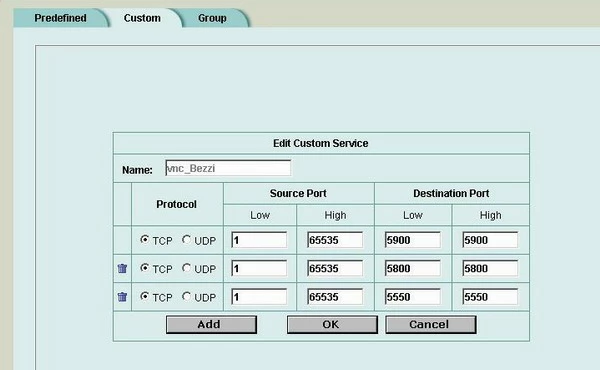 2) under FIREWALL/virtual IP i clicked on " new" (my external interface wan1 has IP 192.168.50.2/255.255.255.0 and wstation2 is pc running tightVNC server, IP of wstation2, as already said, is 192.168.1.169): Name --> vnc_su_wstation2 External interface --> wan1 Type --> static NAT (no port forwarding) External IP Address --> 192.168.50.33 (i set this class IP because i think it has to be on the same segment of wan1) Map To Ip --> 192.168.1.169 (wstation2 of course) 3) under FIRERWALL/policy and " from wan1 to internal" i set thi policy: Source --> wan1_all Destination --> vnc_su_wstation2 Schedule --> always Service --> vnc_Bezzi Action --> accept (of course) I have not flagged NAT because virtual IP already makes NAT, in this case from 192.168.50.33 to 192.168.1.169 No traffic shaping, no antivirus, no log Well, if i try to connect to my tightVNC server from an external pc opening thightVNC client (viewer) and inserting my public IP (80.17.*.* - i don' t want to say to you my IP
  ) i can' t connect and this message appear to me: " failed to connect" . Someone can tell me where i' m wrong?? Thanks in advice. PS: between FGT60 and internet there' s a cisco router, but mi isp said that by default all ports from EXT to INT are opened....
2) under FIREWALL/virtual IP i clicked on " new" (my external interface wan1 has IP 192.168.50.2/255.255.255.0 and wstation2 is pc running tightVNC server, IP of wstation2, as already said, is 192.168.1.169): Name --> vnc_su_wstation2 External interface --> wan1 Type --> static NAT (no port forwarding) External IP Address --> 192.168.50.33 (i set this class IP because i think it has to be on the same segment of wan1) Map To Ip --> 192.168.1.169 (wstation2 of course) 3) under FIRERWALL/policy and " from wan1 to internal" i set thi policy: Source --> wan1_all Destination --> vnc_su_wstation2 Schedule --> always Service --> vnc_Bezzi Action --> accept (of course) I have not flagged NAT because virtual IP already makes NAT, in this case from 192.168.50.33 to 192.168.1.169 No traffic shaping, no antivirus, no log Well, if i try to connect to my tightVNC server from an external pc opening thightVNC client (viewer) and inserting my public IP (80.17.*.* - i don' t want to say to you my IP ) i can' t connect and this message appear to me: " failed to connect" . Someone can tell me where i' m wrong?? Thanks in advice. PS: between FGT60 and internet there' s a cisco router, but mi isp said that by default all ports from EXT to INT are opened....
