chami
Explorer
September 27, 2024
Solved

Radius Authentication with Dynamic VLAN Assignment

  • September 27, 2024
  • 6 replies
  • 6916 views

I have a question regarding Radius Server with Dynamic Vlan Assignment for SSD profiles. 

Basically I would like to have Dynamic VLAN Assignment and VLAN pooling enabled. I am running 7.4.5 code version and whenever I enable Dynamic VLAN Assignment, it disabled the VLAN pooling. I did find a documentation that it is possible 7.4.1 version came that both dynamic vlan assignment and vlan pooling is possible, reference: 

https://docs.fortinet.com/document/fortigate/7.4.0/new-features/924614/support-dynamic-vlan-assignment-with-multiple-vlan-ids-per-name-tag-7-4-1

However; this is not working in code 7.4.5 code version. I would really like to have this feature that support vlan pooling with Radius because this setting in Cisco called RADIUS Server Overwrite interface, Meru called Radius With VLAN Pooling, allows us to have restricted access and unrestricted access at the same time based on the Network Policy server rules. This makes it easier to have users in groups tied to authentication where if a user is not allowed, will still have restricted access and allowed to have unrestricted access where server send a tag or called vlan id back to the controller to designate user in to a specific vlan. 

I would like this as a feature request if any engineer see this if this is not possible or if it is possible, how to achieve it. 


Thank You. 


Best answer by scitlak

Hi,


According to the referred guide/method by you at the beginning of the conversation, you do not need to enable this option.

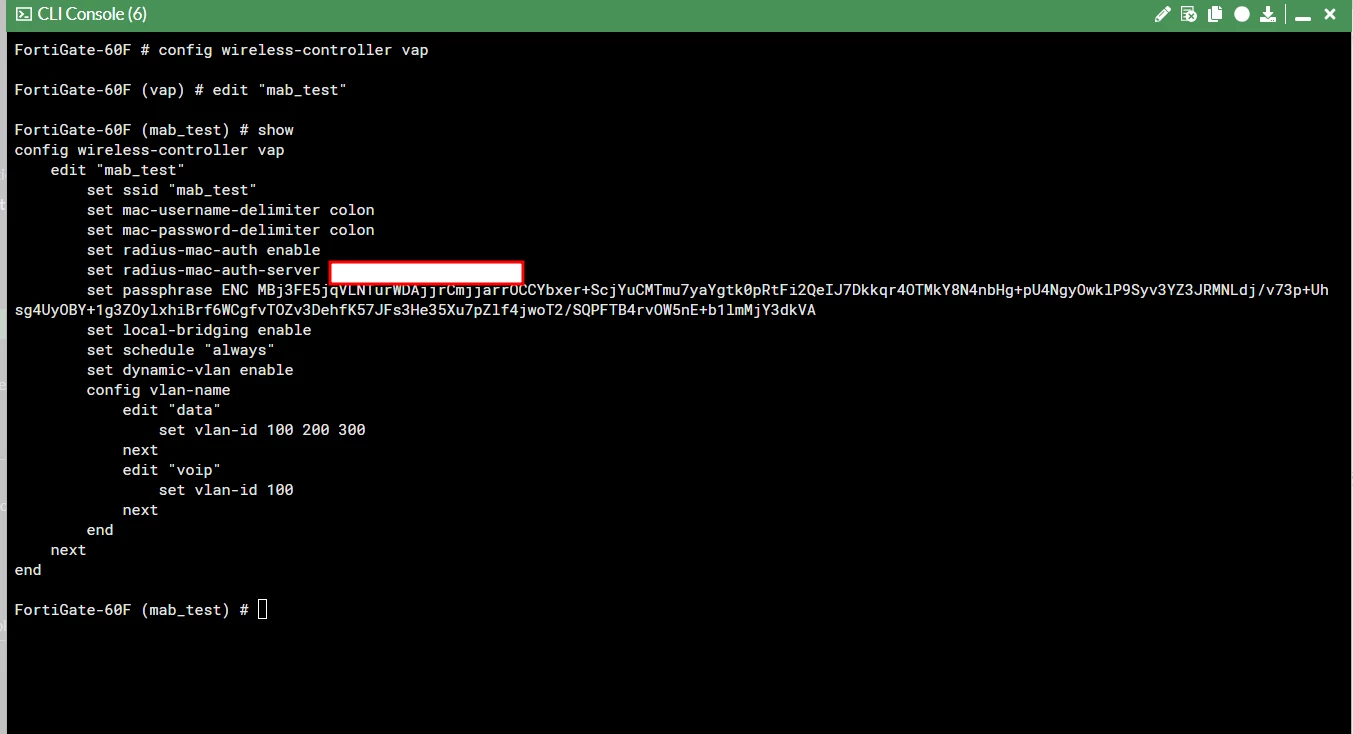
Please look at my config.
01.10.2024_16.33.42_REC.png

 01.10.2024_16.34.03_REC.png


01.10.2024_16.34.39_REC.png


01.10.2024_16.32.48_REC.png


However, if you would like to use "VLAN assignment by FortiAP group" or "VLAN assignment by VLAN pool", you will need it. Please look at the below docs.
https://docs.fortinet.com/document/fortiap/7.6.0/fortiwifi-and-fortiap-configuration-guide/153336/vlan-assignment-by-fortiap-group
https://docs.fortinet.com/document/fortiap/7.6.0/fortiwifi-and-fortiap-configuration-guide/84238/vlan-assignment-by-vlan-pool


6 replies

johnathan
Staff
Staff
September 27, 2024

Are you able to elaborate a bit more on what is not working when you have  Dynamic VLAN assignment enabled? As per the document, it should assign clients round-robin to the VLANs just like in VLAN Pooling. 

Never trust a computer you can't throw out a window.
chami
chamiAuthor
Explorer
September 27, 2024

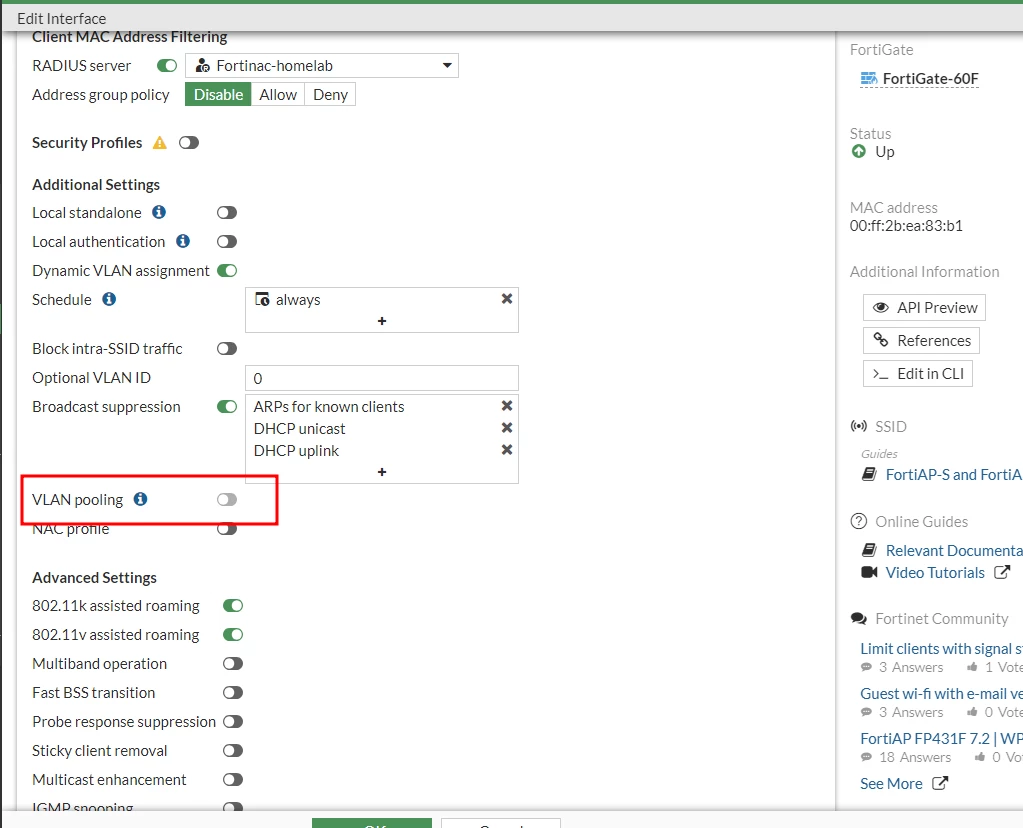
So, basically when I enable the Dynamic VLAN assignment, it turns off the VLAN pooling.

According to the link I pasted, you see for SSID interface, where we can enable dynamic vlan assignment and then specify the vlan pool which is not possible in 7.4.5 code version. 


This commands below is not possible in the code version 7.4.5 
config wireless-controller vap 
edit "wifi.fap.02"
set ssid "Example_SSID"
set dynamic-vlan enable config vlan-name edit "data" set vlan-id 100 200 300 next edit "voip" set vlan-id 100 next end next end

 To elaborate what is trying to accomplish that: there are two groups, Group A and Group B users in the windows server. Group A (Filtered Group with restriction, Group B Unfiltered) , When a user connect to 802.x , server will look at users in group and identify that this specific users is in filtered group and send the tag for example vlan 200 back to the controller, then controller process it and put the user in to vlan 200. Another example when a user connect who has full access, user connect to radius server and then the server looks up the policy and decide this user does have full access and then put in to vlan 300. 

Instead of user put in to one vlan, I need multiple filtered vlans that a user have limited right to be placed on by the Radius server. That is the question, what configuration would accomplish this both to have multiple restricted vlans that a user can be placed on based based on the Radius server NPS policy defined to pass a tag called 300 if user found to be unfiltered. 


ebilcari
Staff
Staff
October 1, 2024

Just by having 'Dynamic VLAN assignment' enabled is enough to move hosts to the desired VLANs based on the policies in the RADIUS server. All the necessary host grouping is done through the RADIUS server policies. VLAN pooling is some basic technique to share the hosts in different VLANs just randomly to distribute the load.

Emirjon
chami
chamiAuthor
Explorer
October 1, 2024

When radius server sends the override tag let's say place a user to filtered vlan, controller has to place the client in to the desired vlan which vlan-pooling will full fill the function. So, as it is without using VLAN Pooling, suppose we have filtered vlans 100,200,300, 400 vlans and does this mean that user will be always placed only in vlan 100 , not 200, 300, 400 filtered vlans if according to the policy of radius server put a client to filtered vlan? Therefore; like you said the load balancing option is not available. 

scitlak
Staff
Staff
September 29, 2024

Hi,


I have tested the below-explained configuration in my lab with FOS 7.4.5 and it works properly.

FGT 60 F  Version 7.4.5

Radius FortiNAC

https://docs.fortinet.com/document/fortigate/7.4.0/new-features/924614/support-dynamic-vlan-assignment-with-multiple-vlan-ids-per-name-tag-7-4-1


The below part of the configuration is just to assign the VLAN ID by a Round-robin method from the pool to ensure optimal utilization of VLAN resources.

29.09.2024_17.42.24_REC.png

config vlan-name       edit "data"         set vlan-id 100 200 300       next       edit "voip"         set vlan-id 100       next

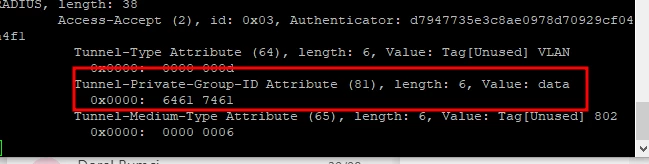
When you use the configuration, you need to send from the Radius server "data" or "VoIP" values with the "tunnel-private-group-id" attribute instead of sending a VLAN ID.


On the other hand, you do not have to use "config vlan-name" configuration. In that case, you just need to send a VLAN ID with "tunnel-private-group-id", the host will have the VLAN ID directly sent by Radius "tunnel-private-group-id".


chami
chamiAuthor
Explorer
September 30, 2024

Hello!


        You do not have this command defined- 

set dynamic-vlan enable

In GUI, if I enable dyamic vlan, it disables vlan pooling. So, without defining set dynamic vlan enable and have vlan ids define like you tested, would send radius override tag still  work? Also, set vlan id 100 200 300 , does this enable vlan pooling or if not where to enable vlan pooling? My understanding is set dynamic-vlan enable will enable radius to send the tag id and select any vlan defined by set vlan-id 100 200 300 command. 

scitlak
Staff
Staff
September 30, 2024

Hi,

I have configured "set dynamic-vlan enable" and "config vlan-name". I checked it again and disabled and enabled "set dynamic-vlan enable" option via GUI but it did not remove any config under SSID.
If you have only "set dynamic-vlan enable", you need to send the VLAN ID directly from your Radius with "Tunnel-private-group-ID".
If you have "set dynamic-vlan enable" and "config vlan-name", you need to send tag like "data" or whatever you configured.
When you use the "config vlan-name", FGT should assign the next VLAN to the next client like below.
Client 1 --> VLAN 100

Client 2 --> VLAN 200

Client 3 -->VLAN 300

Client 4--> VLAN 100


However when you set just "set dynamic-vlan enable", you need to send VLAN ID directly and it should be assigned to the client.


chami
chamiAuthor
Explorer
September 30, 2024

What I am saying is if you enable dynamic-vlan enable in the GUI, it disable vlan pooling slider. That prevents assign multiple vlans in the 7.4.5 code version. Have you tried that?

chami
chamiAuthor
Explorer
September 30, 2024

When I enable Radius Server slider in the GUI and enable dynamic vlan assignment, it says vlan pooling is not available when dynamic vlan assignment is enable.

We need both dynamic vlan assignment and vlan pooling at the same time. 7.4.5 documentation says it is possible but when you actually try to enable dynamic vlan assignment, it disabled vlan pooling. If you do that in GUI, you will see it slider gets turned off.

scitlak
Staff
scitlakAnswer
Staff
October 1, 2024

Hi,


According to the referred guide/method by you at the beginning of the conversation, you do not need to enable this option.

Please look at my config.
01.10.2024_16.33.42_REC.png

 01.10.2024_16.34.03_REC.png


01.10.2024_16.34.39_REC.png


01.10.2024_16.32.48_REC.png


However, if you would like to use "VLAN assignment by FortiAP group" or "VLAN assignment by VLAN pool", you will need it. Please look at the below docs.
https://docs.fortinet.com/document/fortiap/7.6.0/fortiwifi-and-fortiap-configuration-guide/153336/vlan-assignment-by-fortiap-group
https://docs.fortinet.com/document/fortiap/7.6.0/fortiwifi-and-fortiap-configuration-guide/84238/vlan-assignment-by-vlan-pool


chami
chamiAuthor
Explorer
October 3, 2024

Thank You. It is clear.