

michael_horne
New Member
November 16, 2017
Solved

Probe Failing when adding device

  • November 16, 2017
  • 2 replies
  • 44531 views

Hello All,


I want to show a customer the advantages of FortiManager. I installed FortiManager VM and a Fortigate VM using VM Workstation.  When I try and add the Fortitgate device to the FortiManager I get "Probe Failed" message. 


Both FortiManager and Fortigate are running 5.6 and are in there Trial license period. I have network connectivity to the Fortigate as I can ping it from FortiManager. I have Centralised Management on the Fortigate set to FortiManager:


When I check in the logs I can see a successful connection using TCP/541 from the FortiManager to the Fortigate. The only blocked traffic I see is on TCP/542 from the FortiManager to the Fortigate. 
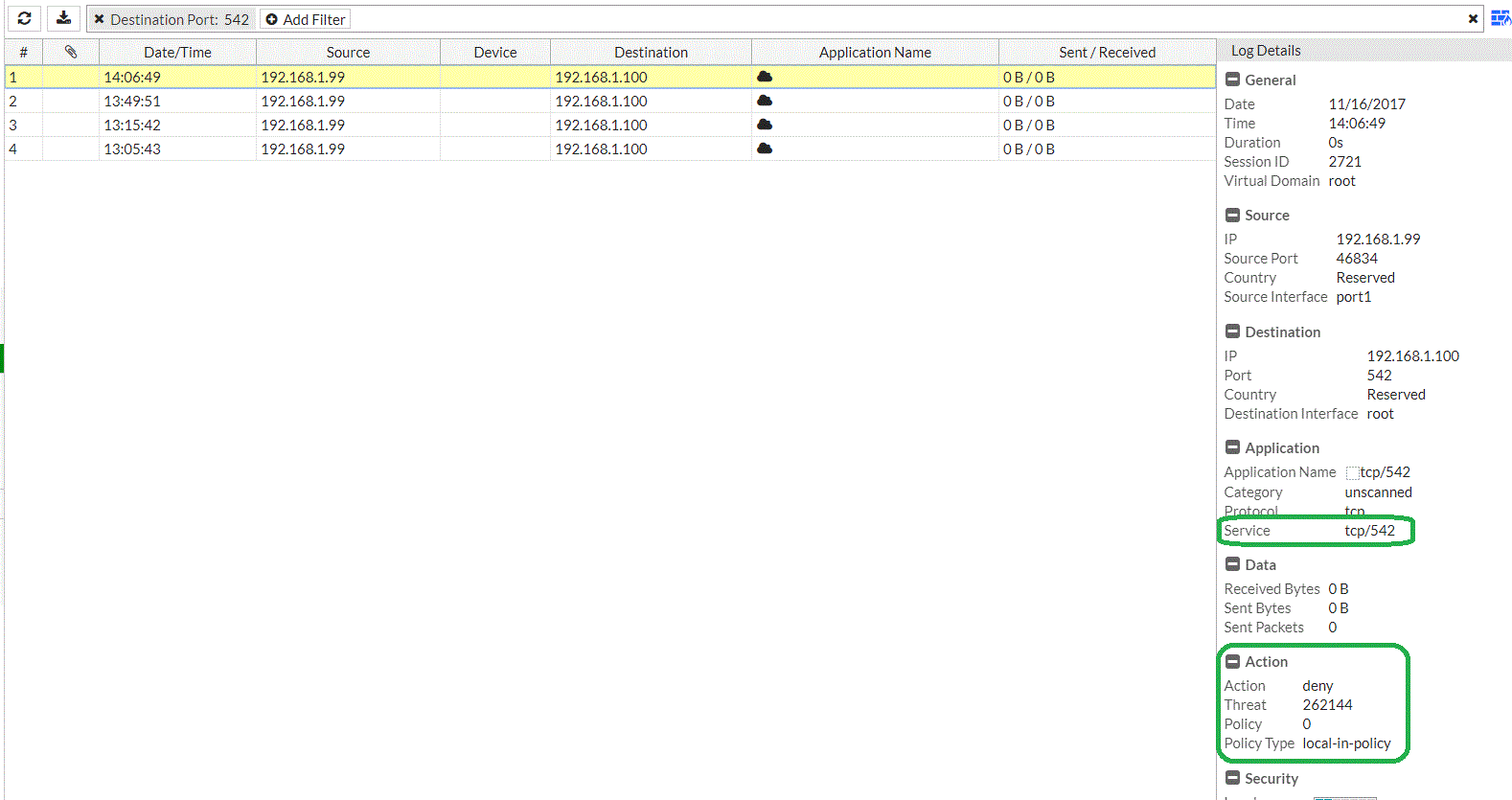
TCP/542 is not listed in the Local In Policy. Checking the Fortinet Documentation about TCP/542, this port seems to be related to IPv6.


If someone can offer some assistance as to why adding the device is failing. It would be appreciated.




Best answer by chall_FTNT

> FortiManager and Fortigate are running 5.6


FortiManager 5.6.0 only support FortiOS 5.6.0 but not any later FortiOS patches like 5.6.1 & 5.6.2.  This will be addressed with the release of  FortiManager 5.6.1.  What patch of FortiOS is loaded on the FortiGate VM?

2 replies

chall_FTNT
Staff
Staff
November 16, 2017

> FortiManager and Fortigate are running 5.6


FortiManager 5.6.0 only support FortiOS 5.6.0 but not any later FortiOS patches like 5.6.1 & 5.6.2.  This will be addressed with the release of  FortiManager 5.6.1.  What patch of FortiOS is loaded on the FortiGate VM?

scao_FTNT
Staff
Staff
November 16, 2017

for 5.6 FGT, if no license, then is in LENC mode. 5.6 LENC FGT is not supported by FMG 5.6.0, but will be supported by FMG 5.6.1.


Thanks


Simon

michael_horne
New Member
November 17, 2017

Hi All,


Thanks for both of the feedback. There was a problem with version as in my VM environment I downloaded the lates Fortigate 5.6.2, not think that FortiManager is 5.6.0.


Also if the FortiManager does not support The Fortigate in "trial" mode, then this will never work and I will stop banging my head against the wall. I will have to go find a licensed Fortigate that I can use for my demonstration.


Many thanks

MERANA
New Member
April 2, 2019

I am having the same issue and looks like evaluation mode it won't even add device to FMG for testing? 

rhoneil_manahan
New Member
August 9, 2019

Hi, Im having a same issue. I already enabled the FMG-access and still prompt "probe failed". 

And running at the same Forti OS version. 

rhoneil_manahan
New Member
August 14, 2019

Hello,

I've solved my problem, setting enc-algorithm of Fortigate to "default" and setting enc-algorithm of Fortianalyzer into "low". Also fgfm-ssl-protocol to "sslv3".

You can also refer to this link also "https://forum.fortinet.com/tm.aspx?m=173981".


Thanks.