


Aneeq_Ahmed
New Member
February 11, 2026
Question

Probe Failed Error

  • February 11, 2026
  • 3 replies
  • 369 views
 

I am trying a lot to add fortigate kvm in fortimanager but it shows "Probe Failed". When i tried to connect fortimanager from my fortigate firewall it shows the following error. I want to deploy the proper lab for my certification but couldn't get success. Quick support is required to resolve the issue. I have also observer that firewall serial number is missing in subject field of certificate. How to resolve?
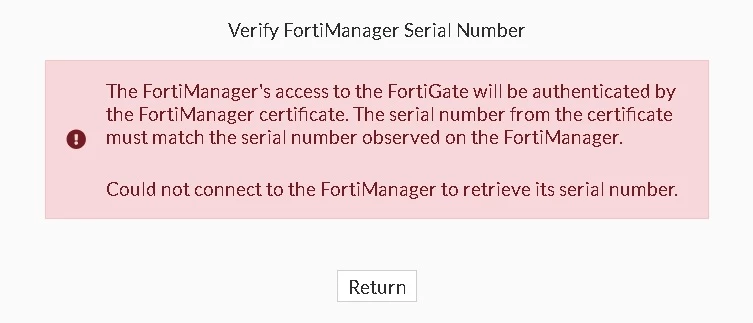
cert error.jpg

3 replies

sw2090
SuperUser
SuperUser
February 11, 2026

Yep sometimes the error handling in FortiManager is very unhelpful. Probe failed can mean a lot of things.


- the interface on the FGT you use to add the FGT to the Manager doesn't have FGFM Protocoll enabled.

- I also had cases were I got this when more than one interface on the FGT had FGFM enabled.

- you are missing routing and/or policies so the Manager cannot reach the Fortigate

- ... there is more reasons but I don't currently remember.


you could open a cli on FGT and  run the FGFM debug log:


diag debug application fgfm 255

diag debug enable


(not sure if it was fgfm or fgfmd but xou could write fgf and use tab-completion though)


Then try to add the FGT to FMG again and look at the log.

Unfortunately it is rather annyoing to debug the FMG Side that way if you have more FGT in there because that is causing loads of FGFM Traffic then...


hth

Sebastian

Aneeq_Ahmed
New Member
February 12, 2026

I have tried all the possible things but no avail. Issue is with my fortigate certificate. The certificate does not have serial number in its subject how to resolve this issue?


sw2090
SuperUser
SuperUser
February 12, 2026

you could set the local certificate that the FGT uses. For whtever reason on the FGT itself this can only be done on CLI:


config system central-management
set local-cert ''
end


Also i often have issues with the FGT not beeing able to autoselect the correct interface. In this case the option "set fmg-source-ip <ipofinterface>"  (also not availabe in FGT Gui) helped me.


Aneeq_Ahmed
New Member
February 14, 2026

Dear Douglas Adams, 


Thank you for your support. But nothing worked fine.


Regards,

Aneeq Ahmed