vazexa
Visitor III
April 10, 2022
Solved

Multiple port forward

  • April 10, 2022
  • 19 replies
  • 42382 views

Hello,


I am a beginner with Fortigate and i am trying to connect an H.323 video conference system in my office in order to make conferences with remote locations but since i will connect the system behind NAT, i have to forward several ports to the video conference IP address.


After looking at the forums, etc. i understood how to forward a single port to an IP, using VIP but i cannot understand how to forward multiple ports or ports range to a single IP. 


Can someone help me please?


thank you very much in advance!

Best answer by akristof

Hi,

It has

akristof_0-1649664057166.png

"-" is separator.

19 replies

akristof
Staff
Staff
April 11, 2022

Hi,


Thank you for your question. You can create multiple VIPs with same external/internal IPs but with different forward ports. So you will have 1 VIP for HTTP traffic, 1 VIP for HTTPS, etc.

vazexa
vazexaAuthor
Visitor III
April 11, 2022

Hi Ardian,

Thank you very much for your answer.

it is understood when i want to forward single ports but how can i forward a port range? i.e. 30000 to 30999? Of course i cannot make 999 separate VIPs :)

akristof
Staff
Staff
April 11, 2022

Hi,


Like this:

akristof_0-1649660654163.png

Or if you want to forward multiple different ports to one port:

akristof_1-1649660753630.png


vazexa
vazexaAuthor
Visitor III
April 11, 2022

thank you very much, as i do not want to forward multiple different ports to one port i will use the 1st option.

Is it possible to do it via gui or only via cli?

akristof
Staff
Staff
April 11, 2022

Hi,


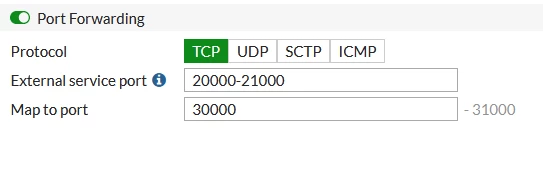
You can do it via GUI or CLI, I just showed how it looks from CLI. From GUI, if you will configure range of ports, it will automatically calculate the range based on first forward port. So in my example, I specified external ports 20000-21000, GUI will allow you to specify first mapped port, 30000 and it will automatically calculate last port based on the range. Just a note.

vazexa
vazexaAuthor
Visitor III
April 11, 2022

my GUI does not have the selection to forward port range, it only has port forward single external to single internal with selection of tcp, udp, sctp and icmp

akristof
Staff
akristofAnswer
Staff
April 11, 2022

Hi,

It has

akristof_0-1649664057166.png

"-" is separator.

vazexa
vazexaAuthor
Visitor III
April 11, 2022

ok i will try it and i will let you know!


can you please also help me with something else? while i was trying to make the port forwarding work, i must have enabled a policy and accidentally forwarded all traffic of port 80 to an IP address different from the management port of the fortigate so now, although the router operates ok, I have no access at all at the GUI.


Can you please let me know if it possible to connect via console and disable this firewall policy?

akristof
Staff
Staff
April 11, 2022

Hi,


You can try SSH if it is enabled on your management port. Then you can just go into firewall policy and disable it:

config firewall policy

edit <id>

set status disable

end


vazexa
vazexaAuthor
Visitor III
April 11, 2022

thank you!

Can you please let me know if SSH if it is enabled or disabled on the management port by default?

akristof
Staff
Staff
April 11, 2022

Hi,

Yes, SSH, HTTP, HTTPS and Ping are default protocols that are allowed.

vazexa
vazexaAuthor
Visitor III
April 11, 2022

one last question, how do i know which is the id of the policy i want to disable?

akristof
Staff
Staff
April 11, 2022

Hi,

Well, you can list them and identify it based on name/VIP/interfaces, etc.

show firewall policy


Also, usually, last policy is with the highest ID and it is last. So this can help you too.

vazexa
vazexaAuthor
Visitor III
April 11, 2022

you are very helpful!

Is it possible to tell me the CLI commands of how to list the policies?

EEHC
Explorer III
April 11, 2022

First I want to explain something related to VOIP having two types of traffic. Signaling (H323 in your case) for call setup. RTP for conversation. The firewall listens to the call setup to know the RTP ports that should be opened. After call ends it close it.

I have a question, why you need to forward specific ports? do you use the same public IP for different applications or change the ports? If you create VIP, all coming traffic will be forwarded without changing the ports. I prefer to make VIP and control the ports from the policy.

vazexa
vazexaAuthor
Visitor III
April 12, 2022

Thank you very much for your feedback.

I want to operate an SVC video conference by Aver that supports H.323. I have made the port forwarding the user manual states (see below photo) but it does not operate ok. i.e. although I can see and hear the remote party, my camera and microphone are not being transmitted remotely. Do you think this has something to do with the firewall?


2022-04-12 (2).png

EEHC
Explorer III
April 17, 2022

It is a famous problem in VOIP "one-way audio". If you search for these words you will find several links for solving it. Here is one "http://info.teledynamics.com/blog/how-to-troubleshoot-one-way-and-no-way-audio-on-voip-calls"

You don't have to follow the exact steps. you need to get an idea about the root cause.

The problem is that the packets from one end don't reach the other end. The reason may be a routing problem that sends the packets in the wrong direction. Or it may be a firewall policy missed that allows these packets.

This is the idea. Keep in mind that the VOIP conversation be directly between the two ends not through the central call manager.

Thought Leadership Security Summit. Outpace New Threats with AI - enhanced defense. Tuesday, Septmeber 15, 8:30 AM - 2:30 PM PT. The Golf Club at Newcastle, WA.
Virtual event | September 2026. SASE summit. The age of autonomous trust. Register here!