

MadDog_2023
Explorer
March 6, 2024
Solved

MFA for admin access

  • March 6, 2024
  • 3 replies
  • 4617 views

Hi All,

There is a FortiGate 60E.

I set up MFA the way shown on the screenshot. 
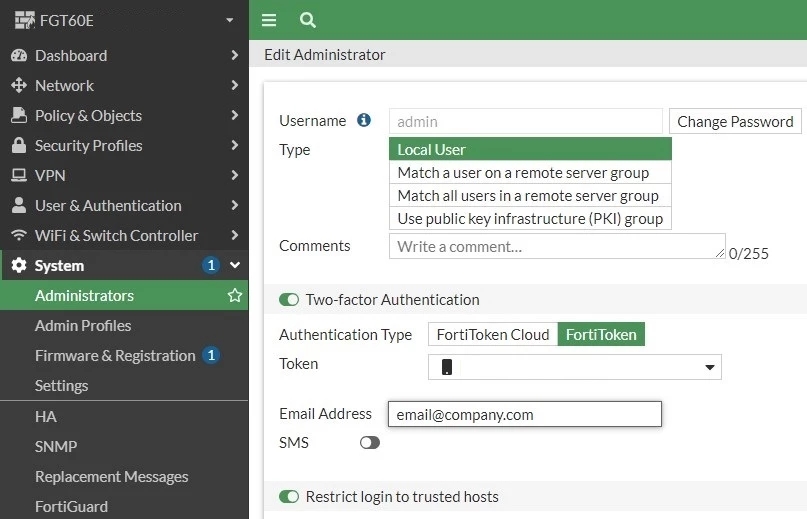
 

FG MFA.jpg


The drawback of this method is that it requires FortiToken Mobile.

It means if I'm not available nobody can access the router.

Is it possible to set up MFA for admin access in some other way that wouldn't be linked to someone mobile device?  

Best answer by ozkanaltas

Hello @MadDog_2023 ,


Firstly, I agree with @AEK. You should create more than one admin account on your FortiGate for traceability. 


But if you don't want this. You can use email as a 2FA or you can configure a remote radius admin user on your FortiGate. After that, you can control the 2FA option on the Radius server. 


If you want to use email as 2FA. You can use these commands. 


config system admin 	edit admin 		set two-factor email 	next end

3 replies

AEK
SuperUser
SuperUser
March 6, 2024

Hello

Yes, just create multiple nominative users.

Actually the good practice is never share one account with many admins (at least for traceability), each admin has his own account. Other very serious companies even disable admin account.

AEK
vikhral10
New Member
March 6, 2024

works great, authlite was the best true 2fa we found. Administration is easy. Essentially your User account used for DA wont have DA privilege's until you sign in with your 2fa (yubikey) once successful you're granted DA. We also did this with our LocalserverAdmin groups as well.

ozkanaltas
Valued Contributor III
March 6, 2024

Hello @MadDog_2023 ,


Firstly, I agree with @AEK. You should create more than one admin account on your FortiGate for traceability. 


But if you don't want this. You can use email as a 2FA or you can configure a remote radius admin user on your FortiGate. After that, you can control the 2FA option on the Radius server. 


If you want to use email as 2FA. You can use these commands. 


config system admin 	edit admin 		set two-factor email 	next end
MadDog_2023
Explorer
March 6, 2024

Thanks guys for you replies.


@ozkanaltas thanks heaps.

Exactly what I was after. 

The full command set was:


config system admin
edit admin
set two-factor email

set email-to address@company.com
next
end

