
penguruh
New Member
July 24, 2017
Question

"Last Used" from CLI?

  • July 24, 2017
  • 5 replies
  • 12238 views

Hi,


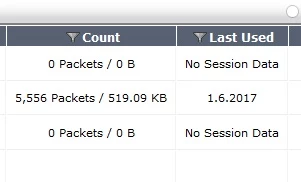
It is possible to get the "last used" Counter from the CLI? I want that to do automated by scripting ...
 

Best Regards,



    5 replies

    jhouvenaghel_FTNT
    Staff
    Staff
    July 24, 2017

    Hello,


    I am not aware of a way to get it from CLI but you can use snmp polling to get the info. It may help


    Regards

    Jocelyn

    emnoc
    New Member
    July 24, 2017

    I would say diagnose firewall iprope show  100004 <policyid> will give you if the policy was hit , but the last_used date/time is not included. Maybe support has alternative  for diagnose firewall iprope


    As far as last use, you should write a log parser and use the UUIDs for the firewallpolicy in your parse jobs.


    So example the order would be


    To run a list of the policyid  from the get  or show of a firewall. This would be you seed file that you  based the foundations off off. Since each policyid is unique and outside of add/changes, you only need to update the seed list before running the parse job.


    ( building a seed from  vd=root )


    echo -e "config vdom\n \n edit root\n show firewall policy | grep edit\n " | ssh 1.1.1.1 | awk '{print$2}'


    1.1.1.1 would be your  firewall address


    Than build   "diagnose firewall iprope show  100004" loop based on the policy-id in the seed  and  weed out any thing that has 0/0 for bytes


    e.g


    FWWALL (root) # diagnose firewall iprope show  100004  1 2 8 9 11 idx=1 pkts/bytes=0/0 asic_pkts/asic_bytes=0/0 flag=0x0 idx=2 pkts/bytes=0/0 asic_pkts/asic_bytes=0/0 flag=0x0 idx=8 pkts/bytes=0/0 asic_pkts/asic_bytes=0/0 flag=0x0 idx=9 pkts/bytes=8120/5371085 asic_pkts/asic_bytes=0/0 flag=0x0

    idx=11 pkts/bytes=1899920/2389353456 asic_pkts/asic_bytes=0/0 flag=0x0


    and

    FWWALL (root) # diagnose firewall iprope show  100004  1 2 8 9 11| grep -v "pkts/bytes=0/0" idx=9 pkts/bytes=8120/5371085 asic_pkts/asic_bytes=0/0 flag=0x0

    idx=11 pkts/bytes=1899920/2389353456 asic_pkts/asic_bytes=0/0 flag=0x0


    So know you just need the UUID for firewallpolicy #5 and parse your logs.


    echo -e " config vdom\n edit root\n show firewall policy 8 | grep uuid \n" | ssh 1.1.1.1 | grep set  | cut -d "#" -f 2


    Outside of that, no easy way. The above suggestion would require you have


    1: traffic log

    2: probably logging off disk/memory

    3: Spunk , sawmill ,  ELKstack or loggly would be   great for this btw

    4: have access to the uuid  information


    Once you have the uuid , it's straight forward to write queries for  date/time-ranges.


    BTW, this is how we audit  fw Ole'school and manually. This helps determining if policies are used or when last-used and track any changes for policies that where working & now that has stopped.


    Ken


    penguruh
    penguruhAuthor
    New Member
    July 25, 2017

    thx for your Tips

    Thought Leadership. Security Summit. Thursday, November 12th, PGA National Resort, Palm Beach Gardens, FL.
    Thought Leadership. Security Summit. Thursday, October 8th. Disney's Grand Californian Hotel & SPA, Anaheim, CA.
    Security Operations Summit: Modernize SecOps. Operate AI-Native.AMER: November 4 | 9:00 AM PST. India and SAARC: November 5 | 10:00 AM IST. EMEA: November 5 | 10:30 AM CET. APAC: November 5 | 11:00 AM SGT


