

Ruelb2214
Explorer
September 12, 2024
Question

LAG connection setup

  • September 12, 2024
  • 3 replies
  • 1767 views

Hi,


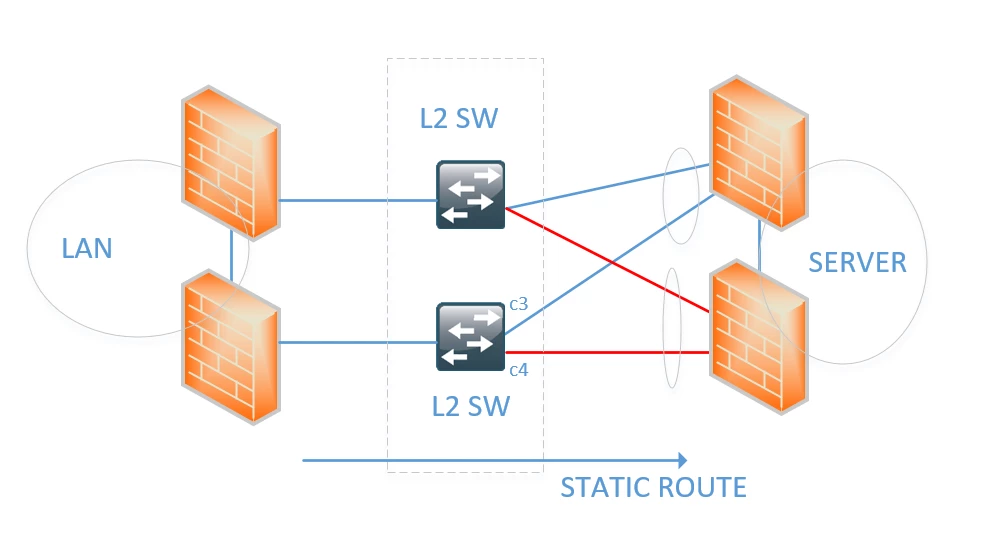
would like to seek for your advise for the current setup attached, basically we have another firewall on the right side of the diagram that connect to L2 switch, and on the FW side the port is configured as LAG while on the switch is under port-channel, but take note the switches are two separate standalone (not on stack).


every time we connect the cable c3 and c4 the network is disrupted, is it because the aggregated ID is different from the firewall perspective?


I always see this setup as common, but they always use stack switches.
FW-HA SETUP.png

3 replies

pmeet
Staff
Staff
September 12, 2024

Hence both the switches are working independently a LACP or port channel will not form , from your topology your 2 LACP ports from the FGT are also connecting to 2 different switch here,


your solution would be either use one switch , or stack the switches or using only a single link 

pmeet
Staff
Staff
September 12, 2024

I'm not recommending to use redundant link setup on FortiGate because  when you place this interface in monitor interface on HA on fortigate it will not go down until both link fails

nathan_h
Staff & Editor
Staff & Editor
September 12, 2024
Hi Ruelb2214,
I understand that Fortigates on the right side are on HA. Since the switch is not a stack, you won't be able to cross connect the LACP. See guidelines below.


Preview

