
Soheil187
New Member
May 3, 2022
Question

HTTP 400 Bad Request

  • May 3, 2022
  • 5 replies
  • 18212 views

Hi All,


I`m using Forticlient(VPN) version 7.0.3.0193 on a Windows 10 Enterprise Build 19042.1645.

Since a week i`m getting the following error HTTP 400 error.jpg.
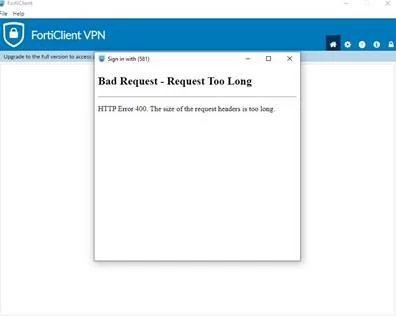
 

Does anyone have a solution or a reason why i`m getting this error.

5 replies

peisenberg
Staff
Staff
May 3, 2022

Hi
could you please describe more symptoms? When do you see this error? Is this a new installation? did you manage to replicate it? 
thanks
Pavol

Soheil187
Soheil187Author
New Member
May 3, 2022

Issue is happening since a week, a havent use the vpn a lot last months. 

I`m getting this error while trying to login, i need to try it couple of time. 

Finally i will get in. 

Actions already taken:

Removed application

Installed version 7.0.3.0193

Soheil187
Soheil187Author
New Member
May 6, 2022

Does anyone have a clue

seshuganesh
Staff
Staff
May 9, 2022

Hi Team,

Could you please let me know if you are using SAML.

If so, please execute these commands at the time of issue in fortigate firewall:

diag debug application samld -1

diag debug enable


Once you execute the commands please try to replicate the issue, once you replicated please disable the logs by executing this command "diag debug disable"


If you are not using SAML, please let us know how you are exactly logging to the firewall like fortipush or some other way

Soheil187
Soheil187Author
New Member
May 9, 2022

Hi there,


We are using SAML, could explain were i need to do the changes.

seshuganesh
Staff
Staff
May 9, 2022

Hi Team,


You do not need to make any changes, please open console of the firewall and execute these commands:

diag debug application samld -1

diag debug enable


Then try to connect to SSL VPN through forticlient, once the issue is reporduced you can disable debug by executing this command "diag debug disable"


please share logs with us

Soheil187
Soheil187Author
New Member
May 9, 2022

Do you mean somewhere over here? 

Soheil187_0-1652101385033.png


seshuganesh
Staff
Staff
May 9, 2022

No, you need to open console of the fortigate firewall and then enter those commands.

Please execute those commands and share us the generated output

Soheil187
Soheil187Author
New Member
May 10, 2022

Is this avaible if i`m using the simple version of forticlient at home. Do you perhaps have screenshots so i can see where i need to go?

seshuganesh
Staff
Staff
May 10, 2022

Hi Team,


Open the fortigate firewall and click on this icon on top right:

seshuganesh_0-1652162020516.png


Then execute the above mentioned commands and reproduce the issue.

It will generate some output, you can share it with us

Soheil187
Soheil187Author
New Member
May 10, 2022

Well that something that i dont have. This is what i have 

Soheil187_0-1652162871249.png


Can i find this in C:\Program Files\Fortinet\FortiClient????