

dkonate
Explorer
October 28, 2024
Question

HA Issues

  • October 28, 2024
  • 7 replies
  • 6539 views

Hello Everyone,


we have a problem with the configuration of our HA, the HA is well configured and synchronized but the problem is that the master works well, but as soon as there is a problem on the master and we switch to the slave there is no traffic passing through the slave and we lose all access to the internet until the master is restored.


a lacp conf has been set up (the master and the slave belong to the same LACP aggregate on the switch side).

Initially, when I plugged the ports, they were all UP, but the slave ports went down later after a LACP negotiation I guess.
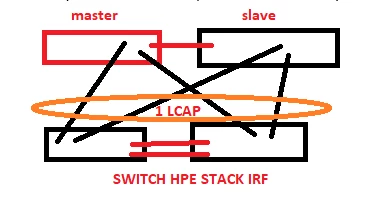


Architecture.PNG

https://docs.fortinet.com/document/fortigate/6.4.15/administration-guide/666376 

7 replies

AEK
SuperUser
SuperUser
October 28, 2024

Hello

I think it has something to do with the fact that HA gives the same MAC address to active and passive nodes.

Can you try create on your HPE stack two LACP groups (one for each FG) instead of a unique group?

AEK
dkonate
dkonateAuthor
Explorer
October 28, 2024

Hello,

Thank you for your response.


How can we verify that HA gives the same MAC address to active and passive nodes ?


Yes indeed we thought about creating two LACP groups on your HPE stack (one for each FG) instead of a single group, we will set up this configuration to see if it works.

AEK
SuperUser
SuperUser
October 28, 2024

Hello

In HA, each interface is given a virtual MAC address that is owned by the active node. The MAC will migrate to the second node on fail-over.

There is a Please check this document.

https://docs.fortinet.com/document/fortigate/7.2.9/administration-guide/564710


AEK
Toshi_Esumi
SuperUser
SuperUser
October 28, 2024

I would make those four links at the stacked HPE switches 2 LAG/LACP links to simplify. It would be much simpler and reliable.
LACP1: "master" FGT
LACP2: "slave" FGT

Toshi

dkonate
dkonateAuthor
Explorer
November 12, 2024

Hello,

I come back to you following the configuration that we carried out, so as suggested I created two LACPs for each fortigate but after this configuration, once we connected the secondary cables to the switch we automatically lost all access to the internet and the cables had to be removed to regain internet access


Toshi_Esumi
SuperUser
SuperUser
November 12, 2024

Likely you created an L2 loop. You made it like below on the HPE switches, right?
HA-LACP.png

Toshi

dkonate
dkonateAuthor
Explorer
November 12, 2024

Hello Toshi,

yes, we did exactly that

Toshi_Esumi
SuperUser
SuperUser
November 12, 2024

then when did you lose "everything"? Which connection did you connect at that time? The internet connection was not in your original diagram. But is it connected to the same stack of HPE switches as well?


Toshi

dkonate
dkonateAuthor
Explorer
November 13, 2024

Hello Toshi,


sorry for the delay.


so to understand only one of the slave ports was connected to the switch in stack but once we connected the second port which goes to the switch we instantly lost internet access.


no other port on the fortigate is connected to the stacked switch.


for the internet lines the fortigate is connected to another switch on which there is the arrival of the internet line

Toshi_Esumi
SuperUser
SuperUser
November 13, 2024

Why do you want to connect the slave ports first? In A-P HA, slave/secondary FGT(s) doesn't pass any packets. You want to connect the primary first to bring up the connection through the master/primary FGT. Then after confirmed it's working, you want to bring up the secondary LACP.


Toshi

dkonate
dkonateAuthor
Explorer
November 13, 2024

the problem is that since configuring the ha, it doesn't work, and when the slave ports are plugged in we lose internet access, so to recover internet access we disconnected the slave ports to recover internet access while waiting to resolve the HA problem

Hemin88
Explorer III
November 20, 2024

Hi @dkonate 


Can you share the output of the following commands

1. di sys link-monitor status
2. get sys ha status

dkonate
dkonateAuthor
Explorer
November 20, 2024

Hello,


below the output of the commands:


fw1 # diagnose sys link-monitor status

fw1 # get system ha status
HA Health Status: OK
Model: FortiGate-1101E
Mode: HA A-P
Group: 0
Debug: 0
Cluster Uptime: 0 days 19:29:18
Cluster state change time: 2024-11-19 18:07:55
Primary selected using:
<2024/11/19 18:07:55> FG10E1 is selected as the primary because it has the largest value of override pr
iority.
<2024/11/19 18:03:58> FG10E1 is selected as the primary because it's the only member in the cluster.
ses_pickup: disable
override: disable
Configuration Status:
FG10E1(updated 3 seconds ago): in-sync
FG10E1(updated 2 seconds ago): in-sync
System Usage stats:
FG10E1(updated 3 seconds ago):
sessions=89418, average-cpu-user/nice/system/idle=3%/0%/5%/90%, memory=49%
FG10E1(updated 2 seconds ago):
sessions=0, average-cpu-user/nice/system/idle=1%/0%/0%/98%, memory=32%
HBDEV stats:
FG10E1(updated 3 seconds ago):
ha: physical/1000auto, up, rx-bytes/packets/dropped/errors=241182508/586184/0/0, tx=525872520/1425049/0/0
FG10E1(updated 2 seconds ago):
ha: physical/1000auto, up, rx-bytes/packets/dropped/errors=525154181/1423780/0/0, tx=238300951/548820/0/0
MONDEV stats:
FG10E1(updated 3 seconds ago):
LAN_GENES: aggregate/00, up, rx-bytes/packets/dropped/errors=361372988422/1011492711/0/0, tx=780920810340/125
4371795/0/0
TOR-DATACENTER: aggregate/00, up, rx-bytes/packets/dropped/errors=508650687759/1102948589/0/0, tx=45573173966
9/1055327810/0/0
WAN-RENATER: aggregate/00, up, rx-bytes/packets/dropped/errors=418812907934/387705802/0/0, tx=109625066959/23
9398427/0/0
FG10E1(updated 2 seconds ago):
LAN_GENES: aggregate/00, up, rx-bytes/packets/dropped/errors=1453997498/7880114/0/0, tx=504064/3938/0/0
TOR-DATACENTER: aggregate/00, up, rx-bytes/packets/dropped/errors=2287558/9356/0/0, tx=256/2/0/0
WAN-RENATER: aggregate/00, up, rx-bytes/packets/dropped/errors=1084836/4676/0/0, tx=0/0/0/0
Primary : fw1 , FG10E1, HA cluster index = 0
Secondary : fw2 , FG10E1, HA cluster index = 1
number of vcluster: 1
vcluster 1: work 169.254.0.1
Primary: FG10E1, HA operating index = 0
Secondary: FG10E1, HA operating index = 1

fw1#

Toshi_Esumi
SuperUser
SuperUser
November 21, 2024

This is only for the primary one - fw1. But HA is in sync so fw2 should have a mirror imaged output.
Then how "config sys ha" is configured? Are you monitoring interfaces? Then when fw1 is down, what's in this ha status on fw2?
Mostlikely your switch's vlans are misconfigured on the fw2 side and the fw2 itself is operating as primary without any problem.
Can you ping any internal devices from fw2 when fw1 is down?

Toshi

CSOS
Explorer
November 26, 2024

Hello,


below the output of the commands:

diag sys ha dump-by group

dkonate
dkonateAuthor
Explorer
November 26, 2024

Hello,


fw1 # diagnose sys ha dump-by group
<hatalk> HA information.
group-id=0, group-name='HA-cluster'
has_no_hmac_password_member=0
has_no_aes128_gcm_sha256_member=0

gmember_nr=2
'FGXXX3': ha_ip_idx=1, hb_packet_version=291, last_hb_jiffies=58351446, linkfails=25, weight/o=0/0, support
_hmac_password=1, support_aes128_gcm_sha256=1
hbdev_nr=1: ha(mac=e023..a3, last_hb_jiffies=58351446, hb_lost=0),
'FGXXX1': ha_ip_idx=0, hb_packet_version=3, last_hb_jiffies=0, linkfails=0, weight/o=0/0, support_hmac_pass
word=1, support_aes128_gcm_sha256=1

vcluster_nr=1
vcluster_0: start_time=1732035818(2024-11-19 18:03:38), state/o/chg_time=2(work)/2(work)/1732035838(2024-11-19 18:03:
58)
pingsvr_flip_timeout/expire=3600s/0s
mondev: LAN_GE(prio=50,is_aggr=1,status=1) TOR-DATACENTER(prio=50,is_aggr=1,status=1) WAN-TER(prio=50,
is_aggr=1,status=1)
'FGXXX3': ha_prio/o=1/1, link_failure=0, pingsvr_failure=0, flag=0x00000000, uptime/reset_cnt=8/0
'FGXXX1': ha_prio/o=0/0, link_failure=0, pingsvr_failure=0, flag=0x00000001, uptime/reset_cnt=257/0