rcpdkc
Explorer II
May 31, 2024 1:34 PM UTC
Solved

Fortinet SSO Install Problem

I get this error when installing Fortinet SSO, what could be the reason?
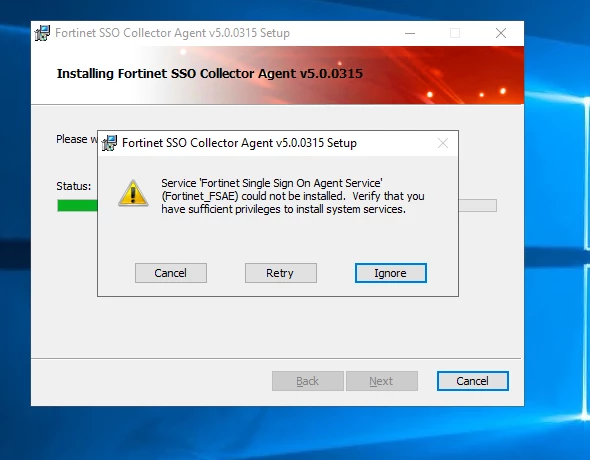
 

fsso.PNG

rcpdkc
rcpdkcAnswer
Explorer II
Jun 3, 2024 6:53 AM UTC

I created a new admin user and logged into this session and the problem was fixed.

7 replies

HarshChavda
Staff
Staff
May 31, 2024 1:40 PM UTC

Hello @rcpdkc ,


Can you check and confirm if you're running the installer with administrative privileges. Right-click the installer file and select "Run as administrator." 

You can refer this document: https://community.fortinet.com/t5/FortiGate/Technical-Tip-How-to-install-the-FSSO-Collector-Agent/ta-p/252983

rcpdkc
rcpdkcAuthor
Explorer II
May 31, 2024 1:46 PM UTC

Hello. I run the file as administrator but same again.

ozkanaltas
Valued Contributor III
May 31, 2024 1:47 PM UTC

Hello @rcpdkc ,


FSSO collector agent needs some privileges. If your user does not have this privilege, your installation will fail. You can run with admin privilege that setup. If you don't want to run with admin rights, you can restrict FSSO service users. You can follow this document to restrict user rights.


https://community.fortinet.com/t5/FortiGate/Technical-Tip-Restricting-a-Fortinet-Single-Sign-On-Agent/ta-p/198065


rcpdkc
rcpdkcAuthor
Explorer II
May 31, 2024 1:49 PM UTC

User administrator account.

ozkanaltas
Valued Contributor III
May 31, 2024 1:51 PM UTC

Hello @rcpdkc ,


Which user account did you use in this step?


image.png


rcpdkc
rcpdkcAuthorAnswer
Explorer II
Jun 3, 2024 6:53 AM UTC

I created a new admin user and logged into this session and the problem was fixed.

Thought Leadership. Security Summit. Thursday, November 12th, PGA National Resort, Palm Beach Gardens, FL.
Security Operations Summit: Modernize SecOps. Operate AI-Native.AMER: November 4 | 9:00 AM PST. India and SAARC: November 5 | 10:00 AM IST. EMEA: November 5 | 10:30 AM CET. APAC: November 5 | 11:00 AM SGT


