

rzanella
Explorer
December 4, 2024
Solved

Fortinac, CLI error message: -bash: show: command not found

  • December 4, 2024
  • 1 reply
  • 1327 views

Hi,
on CLI console I want check interfaces configuration without success.

admin@fortinac:~
> show system interface
-bash: show: command not found


admin@fortinac:~
> execute show system interface
-bash: execute: command not found

I try also with root user without success.

With command get the result is the same.

Fortinac appliance is a virtual machine.

Could you help me? 


Thanks
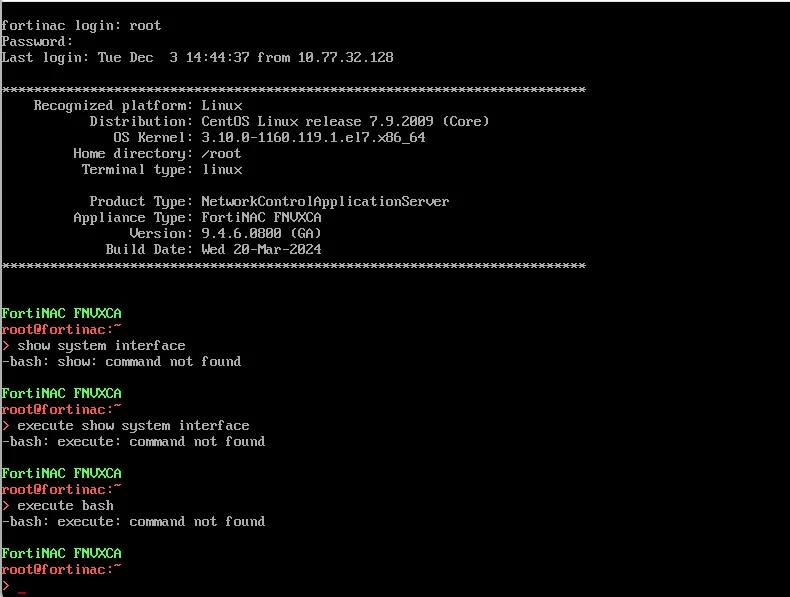
 

FNAC_CLI.jpg


Best answer by ebilcari

FNAC running in CentOS allows to create aliases for commands if needed but I'm not aware of having those commands created by default.
I'm sure that you don't need the 'set allowaccess' in this setup. If the telnet works it means that the FNAC is listening and the port is open.
To troubleshoot the agent you can check the agent logs in the end host, most probably the PA is not able to locate the server or the certificate is not trusted.

1 reply

ebilcari
Staff
Staff
December 4, 2024

This setup is running the CentOS version. The new command of FNAC-OS don't apply here.

You can verify the interfaces with Linux classic commands like:
> ifconfig

> ip add

> ip route

Emirjon
rzanella
rzanellaAuthor
Explorer
December 4, 2024

Hi ebilcari,
I remembered using those commands when I did the initial setup.
I was double-checking the port settings as I have problems with the Persistent Agent and I found  documentation where it says to check that the command has been given:

set allowaccess https ping http dns dhcp nac-agent.

I done check using telnet to fortinac on port 4568 and works.


ebilcari
Staff
ebilcariAnswer
Staff
December 4, 2024

FNAC running in CentOS allows to create aliases for commands if needed but I'm not aware of having those commands created by default.
I'm sure that you don't need the 'set allowaccess' in this setup. If the telnet works it means that the FNAC is listening and the port is open.
To troubleshoot the agent you can check the agent logs in the end host, most probably the PA is not able to locate the server or the certificate is not trusted.

Emirjon