
ArifS
New Member
September 13, 2022
Solved

Enforcing 2FA

  • September 13, 2022
  • 1 reply
  • 1335 views

I am using Parallels RAS with FortiAuthenticator. Right now it shows 2FA for all the users who are imported into FortiAuthenticator but allow login to other users without 2FA. How to enforce 2FA for all users and deny if they are not imported into FortiAuthencator. I can't find any settings of Parallels side to restrict.

Best answer by pminarik

Can you clarify which authentication protocol/method you're using in this case?

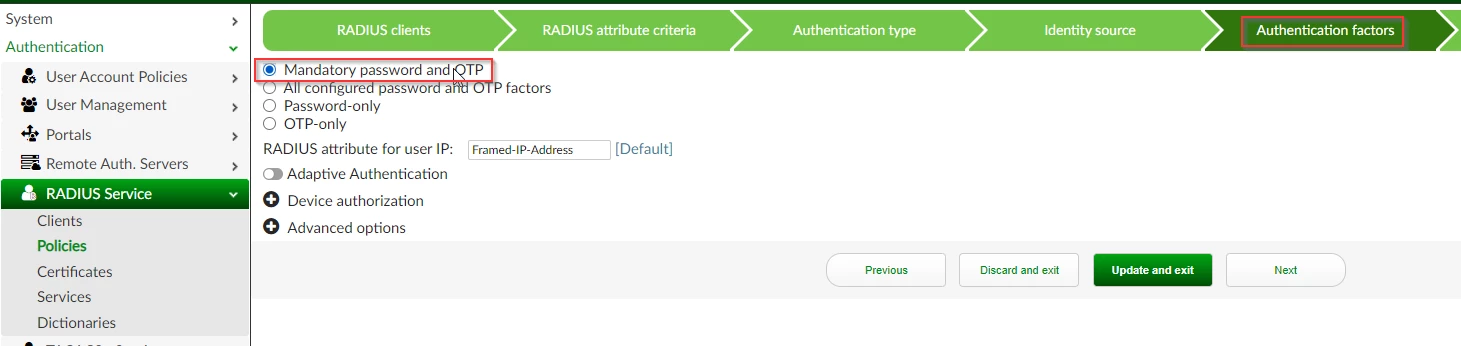
If it's RADIUS, you need to edit the matching RADIUS policy, and in the "Authentication factors" section switch it to "Mandatory password and OTP".

FAC GUI - RADIUS policy authentication factorsFAC GUI - RADIUS policy authentication factors


docs reference 

1 reply

pminarik
Staff
pminarikAnswer
Staff
September 13, 2022

Can you clarify which authentication protocol/method you're using in this case?

If it's RADIUS, you need to edit the matching RADIUS policy, and in the "Authentication factors" section switch it to "Mandatory password and OTP".

FAC GUI - RADIUS policy authentication factorsFAC GUI - RADIUS policy authentication factors


docs reference 

ArifS
ArifSAuthor
New Member
September 13, 2022

It stops login after setting authentication to Mandatory password and OTP. 

It gives the following error, is there a way to customize message.

ArifS_0-1663108056686.png


pminarik
Staff
Staff
September 14, 2022

FAC doesn't advertise the failure reason being a missing token in the Access-Reject. (that is a potential information leak to an attacker)


You could perhaps try changing the error to something like "if you don't have a token assigned, talk to IT" (just an example), but as to how to do that, you'd need to check with whoever is responsible for the UI that generates that error message.


