


HS08
Visitor III
April 25, 2025
Question

Different Path

  • April 25, 2025
  • 1 reply
  • 1007 views


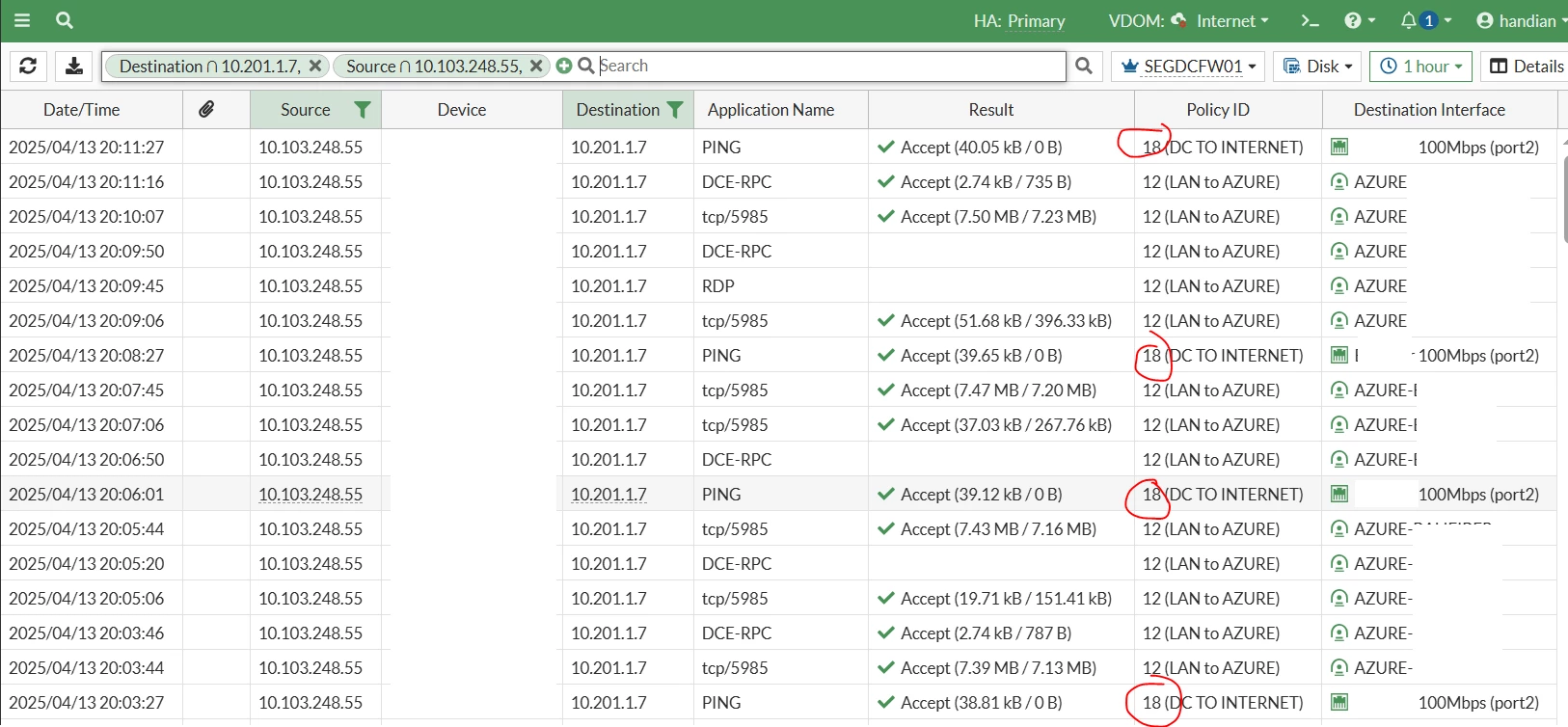
Some time i got anomaly traffic like below pic.

We can see below my NPM server (10.103.248.55) monitor on of my VM on azure (10.201.1.7).

All non PING traffic have right path where the traffic routed to Azure Tunnel Interface.

But PING traffic routed to the internet so my NPM server detect this VM as down.

If we restart the NPM server then the PING traffic routed to the right interface.

Anyone ever facing same issue with me?
ft1 (1).PNG

1 reply

syordanov
Staff
Staff
April 25, 2025

Dear HS08,


My suggestion is to check the session list for source IP 10.103.248.55 and destination IP 10.201.1.7 and compare the ingress/egress interface + duration of the session.
It could be possible that the non working traffic (allowed by policy No18 ) is allowed when the IPSec tunnel AZURE was down and traffic was allowed by your 'lan to WAN' policy and routed via the default route . Do you have a blackhole route for 10.202.1.7 , if not try to configure and see if this one will fix the observed behaviour.


diag sys session filter src 10.103.248.55 <---- source IP

diag sys session filter dst 10.201.1.7 <---- destination IP

diag sys session list

More information for regarding a blackhole route you can find bellow :


https://docs.fortinet.com/document/fortigate/7.0.0/sd-wan-sd-branch-deployment-guide/285357/creating-a-blackhole-route


https://community.fortinet.com/t5/FortiGate/Technical-Tip-Use-of-Black-hole-route-in-site-to-site-IPsec-VPN/ta-p/192526


Fortinet

HS08
HS08Author
Visitor III
April 25, 2025

Hi @syordanov 

Thanks for your reply.

Currently i use hub and spoke with BGP and SDWAN enabled. The hub connect to 5 spoke and every spoke have ipsec tunnel also to the azure.  Below my subnet :

  • Hub : 10.100.0.0/16
  • spoke1 : 10.101.0.0/16
  • spoke2 : 10.102.0.0/16
  • spoke3 : 10.103.0.0/16
  • spoke4 : 10.104.0.0/16
  • spoke5 : 10.105.0.0/16
  • azure : 10.201.0.0/16

With this condition where i should apply the blackhole? 

Can i make blackhole with destination 10.0.0.0/8?

syordanov
Staff
Staff
April 25, 2025

Dear @HS08,


On the Azure you can configure a blackhole route for the HUBs 10.100.0.0/16, and for the rest of the spokes 10.10x.0.0/16 , same need to be done every spoke and the HUB.

Yes, also is possible to configure 10.0.0.0/8 blackhole route .

Just before that change, please make sure that you have the scenario mentioned in my previous post -> IPSec is down, then traffic for 10.201.1.7 is routed via the default route.


Best regards,


Fortinet

Thought Leadership Security Summit. Outpace New Threats with AI - enhanced defense. Tuesday, Septmeber 15, 8:30 AM - 2:30 PM PT. The Golf Club at Newcastle, WA.


