
johnlloyd_13
Explorer III
February 10, 2023
Solved

Firmware Upgrade Path

  • February 10, 2023
  • 7 replies
  • 21113 views

hi,

just started learning and managing fortigate FW so apologies for being a noob.

i got a FG-40F with firmware version 6.4.6 build6083.

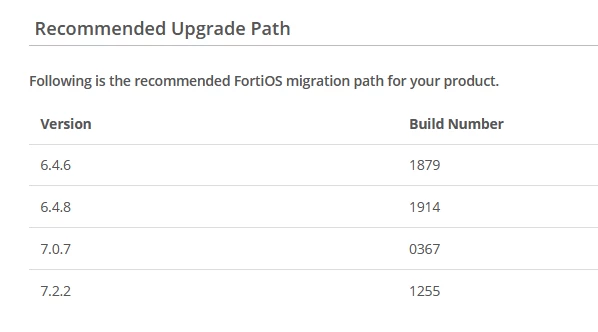
i used the upgrade path tool and gave me this:
 

johnlloyd_13_0-1676034874998.png

my question is, do i strictly need to follow up this path or can i jump straight to our standard 7.2.2.

note this just a lab FW. thanks in advance!


Best answer by bmiranda

The next upgrade step would be to 6.4.8.

The reason why you see a difference between the build number installed in your device from the one in the support portal is simply that depending on the Hardware model a specific firmware version will have a specific build version too, this means that in the end they are still the same exact versions only optimized slightly differently for each of the hardware models.

7 replies

bmiranda
Staff
Staff
February 10, 2023

You should always follow the upgrade path, and do each upgrade step-by-step.

Jumping directly from 6.4.6 to 7.2.2 may result in configuration corruption.

johnlloyd_13
Explorer III
February 10, 2023

hi,

thanks for your reply! as previously mentioned, this is just a lab FW and not in production.

so do i still follow the upgrade path even though it's not fully configured yet?

bmiranda
Staff
Staff
February 10, 2023

Yes definitely! LAB environment or PROD environment, all should follow the same process.

Some of the configuration settings "locations" change depending on the version you upgrade to, meaning that you could be bypassing these changes by jumping directly ahead, which could result in the upgrade to have unforeseeable outcomes.

bmiranda
Staff
bmirandaAnswer
Staff
February 10, 2023

The next upgrade step would be to 6.4.8.

The reason why you see a difference between the build number installed in your device from the one in the support portal is simply that depending on the Hardware model a specific firmware version will have a specific build version too, this means that in the end they are still the same exact versions only optimized slightly differently for each of the hardware models.

MarTek
Explorer II
August 3, 2023

How come the "specific firmware version", such as the aforementioned build 6083 for the 40f,  is not shown in the fortinet support downloads page? 

bmiranda
Staff
Staff
August 4, 2023

Hi!


Upon reviewing our internal build database, I've found that build 6083 is actually a special build not available to the general public. It's likely that our TAC (Technical Assistance Center) team provided this specific build to the original poster as a tailored solution to a bug or issue they were experiencing, especially when a public GA (General Availability) release containing the same fix was not yet available.

If you happen to have one of these special non-public builds on any of your FGT units, rest assured that the solution originally provided should still be applicable.


Best regards,

Bruno Miranda

Thought Leadership Security Summit. Outpace New Threats with AI - enhanced defense. Tuesday, Septmeber 15, 8:30 AM - 2:30 PM PT. The Golf Club at Newcastle, WA.
Fortinet Flag the Hack. Wednesday, August 26, 9:00 AM - 5:00 PM ET, COSM, Atlanta, GA.
Virtual event | September 2026. SASE summit. The age of autonomous trust. Register here!

