

ratha_chum
New Member
September 12, 2014
Question

Intervlan Routing

  • September 12, 2014
  • 2 replies
  • 45844 views
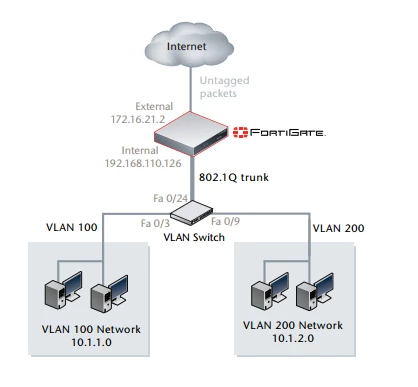
I have problem VLAN routing on fortigate 60D. I have create 2 subinterface (vlan100 and 200) in internal interface and cisco catalyst 2960s I have create 2 vlan (vlan100 and 200) with a trunk interface. and configure policy and firewall object for internet access, for vlan 100 can access internet and network is working normally, but vlan 200 cannot communicate with fortigate. I have verify that trunk interface is correctly configure on Cisco Switch. for topology as the image attachment here. Could anyone can recommend me what is missing, while one vlan is working normal and other vlan cannot communicate with fortigate. Thank for support
    2 replies

    hklb
    Visitor III
    September 12, 2014
    Hello, Could you please post your configuration of cisco switch port FA0/24 ? and port internal of your fortigate ? You probably a vlan mismatch..
    emnoc
    New Member
    September 12, 2014
    Also include the output of the show mac add dyn int fas 0/24 you should see the same mac_address for vlan100/200 of that of the forttigate Also a show int fas 0/24 trunk would validate you are trunking and spanning the vlans. ut if I had to guess you didn' t allow the other vlan over the trunk. Your cfg should be like this; (cisco) interface fas 0/24 description to fortiagte port XYZ switchport switchport trunk allowed vlan 100.200 switchport mode trunk logging event link-status logging event bundle-status logging event spanning-tree status load-interval 30 spanning-tree link-type point-to-point fortigate config sys interface edit vlan100intf set vdom root set type vlan set vlanid 100 set ip a.a.a.a.a/xx set interface port1 next edit vlan200intf set vdom root set type vlan set vlanid 200 set ip b.b.b.b/xx set interface port1 next
    cool01
    New Member
    February 11, 2018

    By using the above diagram, we also put port forwarding unfortunately we have failed response. Any idea?


    On cisco switch we had 2 vlans, our network design is also the same.


    Thanks

    hung_hoang
    New Member
    February 23, 2018

    Hi all,

    I have same issue by using the above diagram with fortigate 100D, just internal network can access to internet.

    My network: 

    VLAN1: 192.168.40.0/22 ( management vlan)

    VLAN10: 172.16.142.0/24 ( Office vlan)

    Could you tell me which steps i need to config on mine fortigate 100D to all of vlan can access to internet.


    I had configured but they not work, on Switch Alcatel OS6860E i configured trunk link.

    - create interface vlan10 on Lan interface

    - create static route from vlan 10 to vlan 1.

    - create policy from vlan 10 to all