


Technical Tip: How to manually update the Virus Definition database or AntiVirus Engine
Description
This article describes how to manually update the Antivirus Definition and Engine for a FortiGate.
Scope
FortiGate, FortiManager.
Solution
It is recommended to enable automatic updates in either the FortiGate or the FortiManager that manages updates for the FortiGates without internet access.
Doing so allows the FortiGates to benefit from the latest virus definition packages as soon as they are updated.
To update the definitions manually instead:
Log in to the Customer Service & Support web portal at Support.
Navigate to Support -> Service updates -> Download and find the FortiGate device model to update.
Select the corresponding link for 'Virus Definition' and download the '.ETDB' file after completing the security check.
Optionally, verify the file integrity (Technical Tip: How to verify downloaded firmware checksum) by comparing the locally generated MD5 hash of the file with the one provided at the (MD5) link.
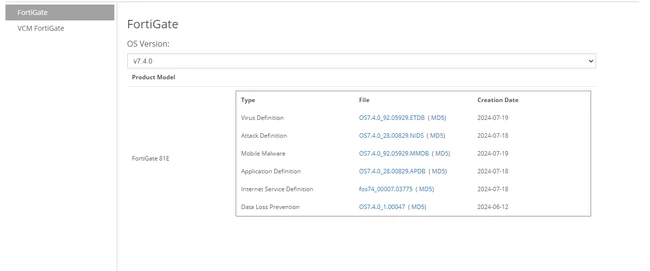
This process will upgrade both the Antivirus definitions and the Antivirus engine.
The Antivirus engines are not publicly available for download. They are usually provided through technical support cases to help address certain unwanted behaviors.
How to check current versions:
In the Web GUI:
Navigate to System -> FortiGuard -> Antivirus Definitions.
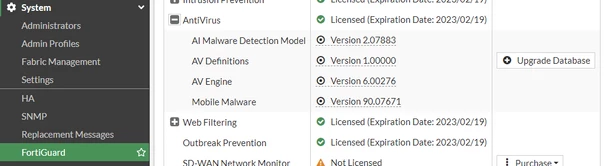
In the CLI:
Run the following command to check the current Antivirus definition or engine versions:
diagnose autoupdate versions | grep Virus -A2
diagnose autoupdate versions | grep Engine -A2
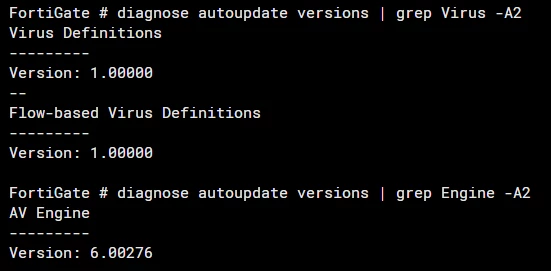
In this case, the Virus Definitions version is 0, and the Antivirus engine shows (6.)276 (the same as in the GUI example).
The 6. is not relevant - this is only used to identify the FortiOS version that it comes with.
Updating the Antivirus Definition or Antivirus engine can only be done through the Web GUI after selecting 'Upgrade Database':
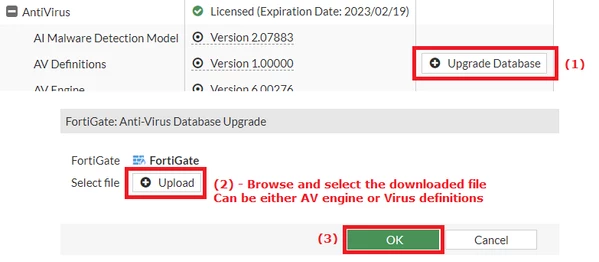
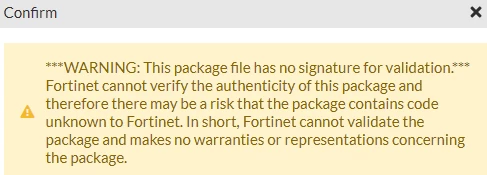
Sometimes, for the AntiVirus engines provided by support representatives, there may be a warning that requires confirmation:
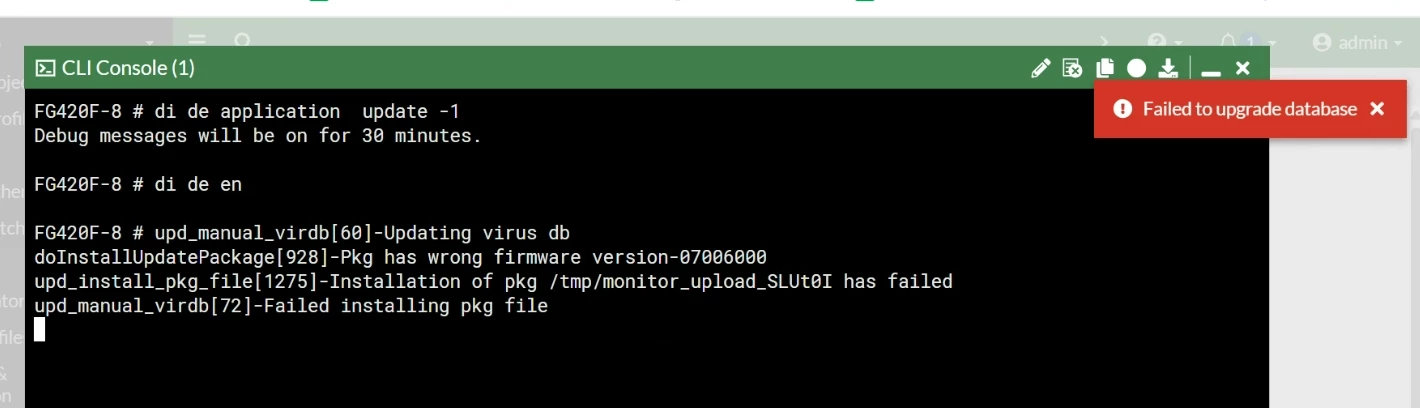
In some cases, the 'Failed to upgrade database' may appear:

This occurs if the AntiVirus engine is not meant to be used in the FortiOS version currently being run, or, less likely, if the file integrity has been compromised (usually due to incomplete downloads).
AntiVirus Package file names:
vsigupdate-OS7.60_7.049_GA_signed_ENG_ALL.pkg <---- This pkg file is valid for FortiOS v7.6.x.
vsigupdate-OS7.40_7.051_GA_signed_ENG_ALL.pkg <----- This pkg file is valid for FortiOS v7.4.x.
In this example, an upgrade is performed from version 276 to 283:

The following message appears briefly:

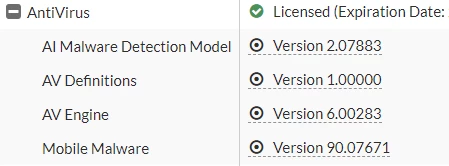
After refreshing, the version change is reflected in the AntiVirus status.
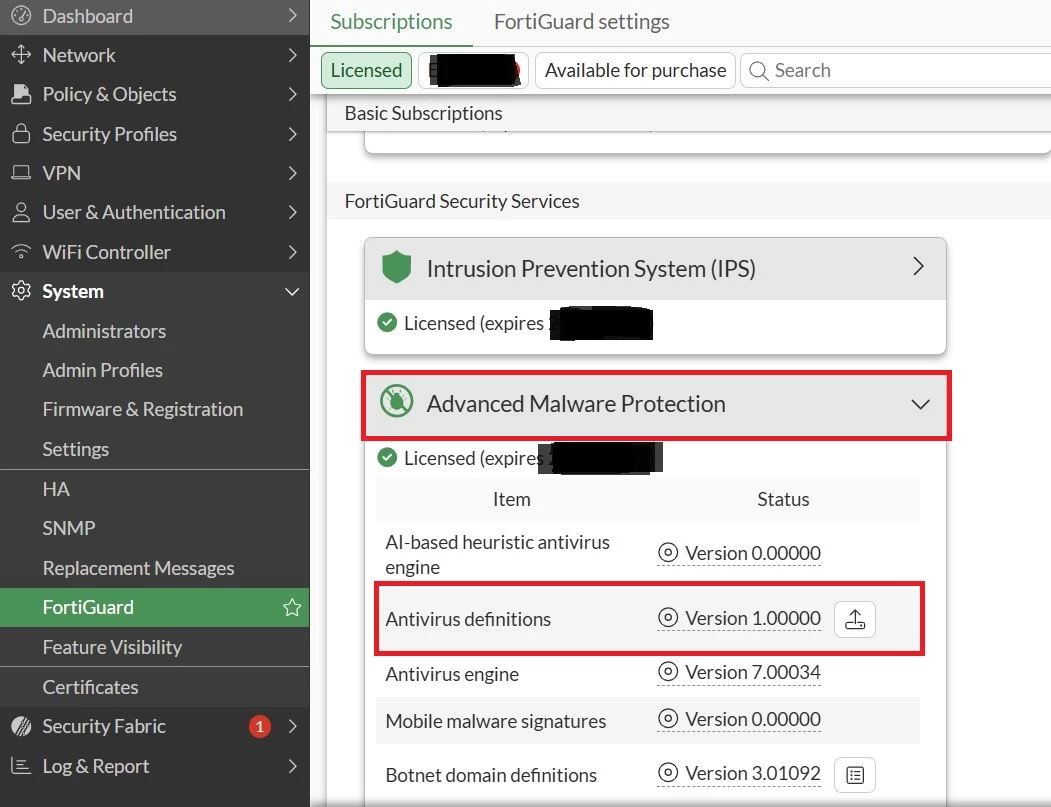
FortiOSv7.4.x: The option for updating the Antivirus Definition has changed; it has been moved under the 'Advanced Malware Protection':
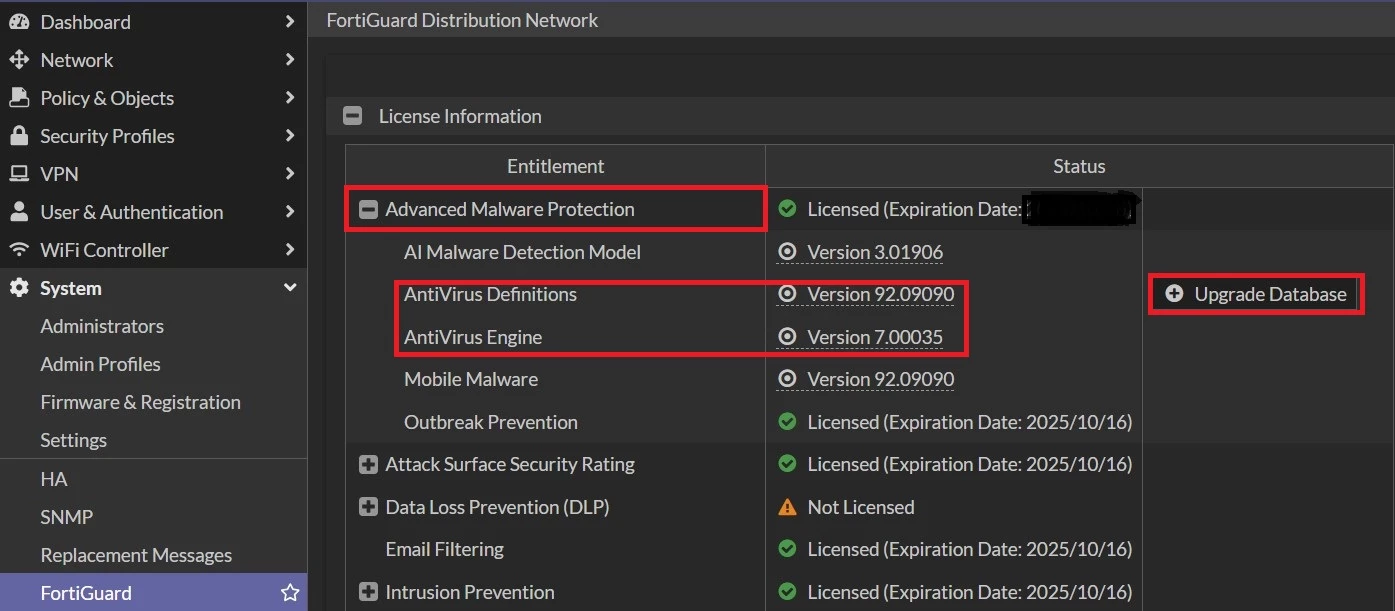
FortiOSv7.6.x: The Option for updating the Antivirus Definition remains the same, but the Graphical user interface has changed.
Note:
In certain scenarios, the Antivirus engine may fail to update if the current firmware includes an outdated or incompatible AV engine version relative to the FortiGuard signature package. This can occur when the AV engine version associated with the firmware’s GA build is no longer valid or supported by FortiGuard updates.
Related Article:
Technical Tip: Validating common FortiGuard update package objects signature)
Debug commands:
diagnose debug reset
diagnose debug app update -1
diagnose debug console time en
diagnose debug enable
Output:
2026-04-07 20:29:21 upd_manual_virdb[60]-Updating virus db
2026-04-07 20:29:21 doInstallUpdatePackage[964]-seq=0, type=AVEN(28)-FGT 64bit AVEN, len=334132
2026-04-07 20:29:21 doInstallUpdatePackage[964]-seq=1, type=AVEN(18)-FGT 32bit AVEN, len=3449176
2026-04-07 20:29:21 doInstallUpdatePackage[964]-seq=2, type=AVEN(30)-FGT SoC3 AVEN, len=2765048
2026-04-07 20:29:21 doInstallUpdatePackage[964]-seq=3, type=AVEN(31)-FGT SoC4 AVEN, len=3386552
2026-04-07 20:29:21 doInstallUpdatePackage[964]-seq=4, type=AVEN(19)-FGT SoC AVEN, len=2846008
2026-04-07 20:29:21 doInstallUpdatePackage[964]-seq=5, type=FCPC(0)-Manual Update, len=40
2026-04-07 20:29:21 doInstallUpdatePackage[1026]-Full obj found for AVEN031
2026-04-07 20:29:21 doInstallUpdatePackage[1036]-Updating obj AVEN
2026-04-07 20:29:21 installUpdateObject[306]-Step 1:Unpack obj 7, Total=1, cur=0
2026-04-07 20:29:21 __upd_obj_signature_split[4317]-Signature verify and split failed, result=0.
2026-04-07 20:29:21 installUpdateObject[330]-Failed signature verifying for obj 7, ret=-1, forced=1, len=8200136
2026-04-07 20:29:21 upd_status_save_status[1943]-try to save on status file
2026-04-07 20:29:21 upd_status_save_status[2009]-Wrote status file
2026-04-07 20:29:21 upd_manual_virdb[95]-Update failed on AVEN31(aven) (-5,2) <<<<<

