
pnobels
New Member
May 11, 2023
Question

where do we create a mapped interface name

Hi,


i'm configuring a new interface on a Fortigate cluster running 6.4.11 using Fortimanager.

Part of the process is i need to map to a normalized interface.  I can create a new normalized interface, but the mapped device does not show me the needed mapped interface name (it does show me a bunch of other ones).  It's unclear to me where this needs to be created.  When hovering over the entries it looks like this is a vlan object. 
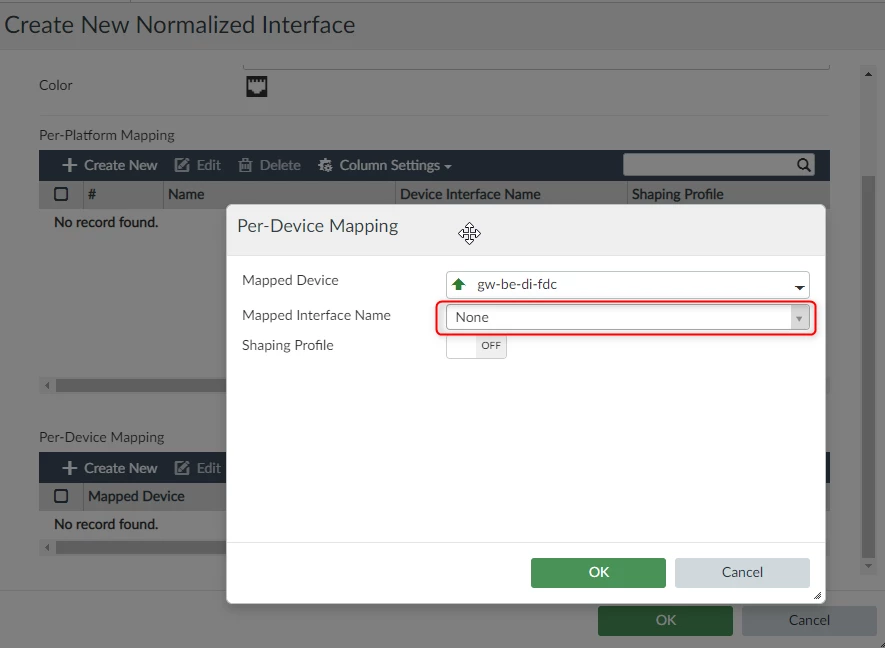
 

2023-05-11_11h27_55.png

The object needs to be created somewhere else but the question is where?  Or is a policy and device settings push needed before?  Thx!

4 replies

sw2090
SuperUser
SuperUser
May 11, 2023

hm the interface itself is device config. That must be created first. I don't think you need to push it before creating the normalized interface.

Reasons for interfaces not showing up are mainly that it is member of a device or sd-wan zone, a switch or a trunk.

aagrafi1
Explorer
May 15, 2023

The mapped interface belongs to the FG. It can be created in the FMG with various ways:

a. Initially, during the addition of the device to the FMG (create interface mappings for unused interfaces).

b. In the Device Manager, select the device, then Interface > Create new.

c. In the device manager via Provisioning templates > System templates > Interface (at the bottom of the list) > Create new.


Cheers

jim-jam
New Member
July 22, 2024

Hey Im having a similar issue here.
 But i have already created a normalized interface In the Device Manager in this process

select the device, then Interface > Create new.
but the Managed InterfaceName remains with other options 

Could you please what has to be checked after creating the interface.
Im trying to install from fortimanager

Toshi_Esumi
SuperUser
SuperUser
July 22, 2024

It might slightly different per FMG version (mine is 7.2.5). But if you want to create anew normalized interface, say "specialDMZ", a specific device,
1) Under Policy & Object->Object Configurations->Normalized Interface->Normalized Interface, click "Create New".
2) set Name "specialDMZ", and under Per-device Mapping, click "Create New"
3) select Mapped Device in the pulldown menu, then select Mapped Interface Name in the pulldown menu.
4) then hit "OK"s to go back up to the top level.

Toshi

Thought Leadership. Security Summit. Thursday, November 12th, PGA National Resort, Palm Beach Gardens, FL.
Security Operations Summit: Modernize SecOps. Operate AI-Native.AMER: November 4 | 9:00 AM PST. India and SAARC: November 5 | 10:00 AM IST. EMEA: November 5 | 10:30 AM CET. APAC: November 5 | 11:00 AM SGT
