

ammrider
New Member
February 1, 2023
Question

VPN access network drive problem

  • February 1, 2023
  • 4 replies
  • 4604 views

Hi,


Branch A and B offices have a site-to-site VPN connection, everything is OK, branch A PCs can access branch B office server files and folders if A branch PC has mapped the network drive under the Windows 10, e.g. H drive.


Recently, we have enabled the client-to-site VPN connection to branch A office so that staff can access branch A office server files if our colleagues will be worked from home, staff laptop can access branch A office files but staff laptop cannot access branch B office file server.


If use ping command:

laptop can ping branch A network (192.168.1.x) but laptop cannot ping branch B network (192.168.2.x)

I have tried to add a static route on the laptop Windows but it still doesn't work.


How a laptop can access both branch A and B server files even both offices are using site-to-site VPNtemp3.jpg (diagram attached)
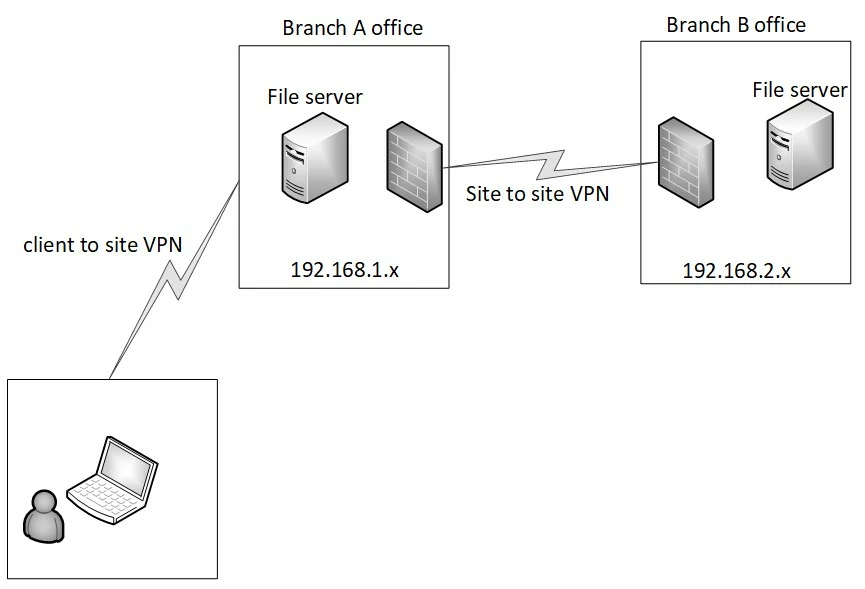
 

Branch A office using FortiGate 61F firewall.


Appreciate that if someone can help.



4 replies

srajeswaran
Staff
Staff
February 1, 2023

Below article explains the similar setup, could you please recheck if your configuration is matching with the recommendations.


https://docs.fortinet.com/document/fortigate/6.2.12/cookbook/45836/ssl-vpn-to-ipsec-vpn


ammrider
ammriderAuthor
New Member
February 1, 2023

Thanks Suraj,


I use following IPsec-VPN to connect branch FortiGate firewall configuration, connecting to branch A office is OK, just it cannot connect to branch B office network from any laptops, however, I will go thru again from below steps.


https://docs.fortinet.com/document/fortigate/6.2.12/cookbook/785501/forticlient-as-dialup-client


alif
Staff
Staff
February 1, 2023

Hi @ammrider,


A firewall policy is required to allow traffic from dialup IPsec clients to branch B office.


In case the issue persists, running debug flow will help in identifying the issue.

Hasnatriad
Staff
Staff
February 1, 2023
ammrider
ammriderAuthor
New Member
February 7, 2023

I have tried to use above solution but it still not works, I will try it again and make sure no any steps were skipped.

wasad
New Member
February 1, 2023
Hi Fortinet Support, the new version of FortiClientEMS, presumably 7.2, was to be released several months ago, but there has been no news. I have more than one ticket open for recog
wasad
New Member
February 1, 2023

FCT EMS 7.2.0 was released, you can download it from support portal.
