
YHC
Explorer
October 9, 2023
Solved

VLAN Interface

  • October 9, 2023
  • 6 replies
  • 3346 views


Hi,


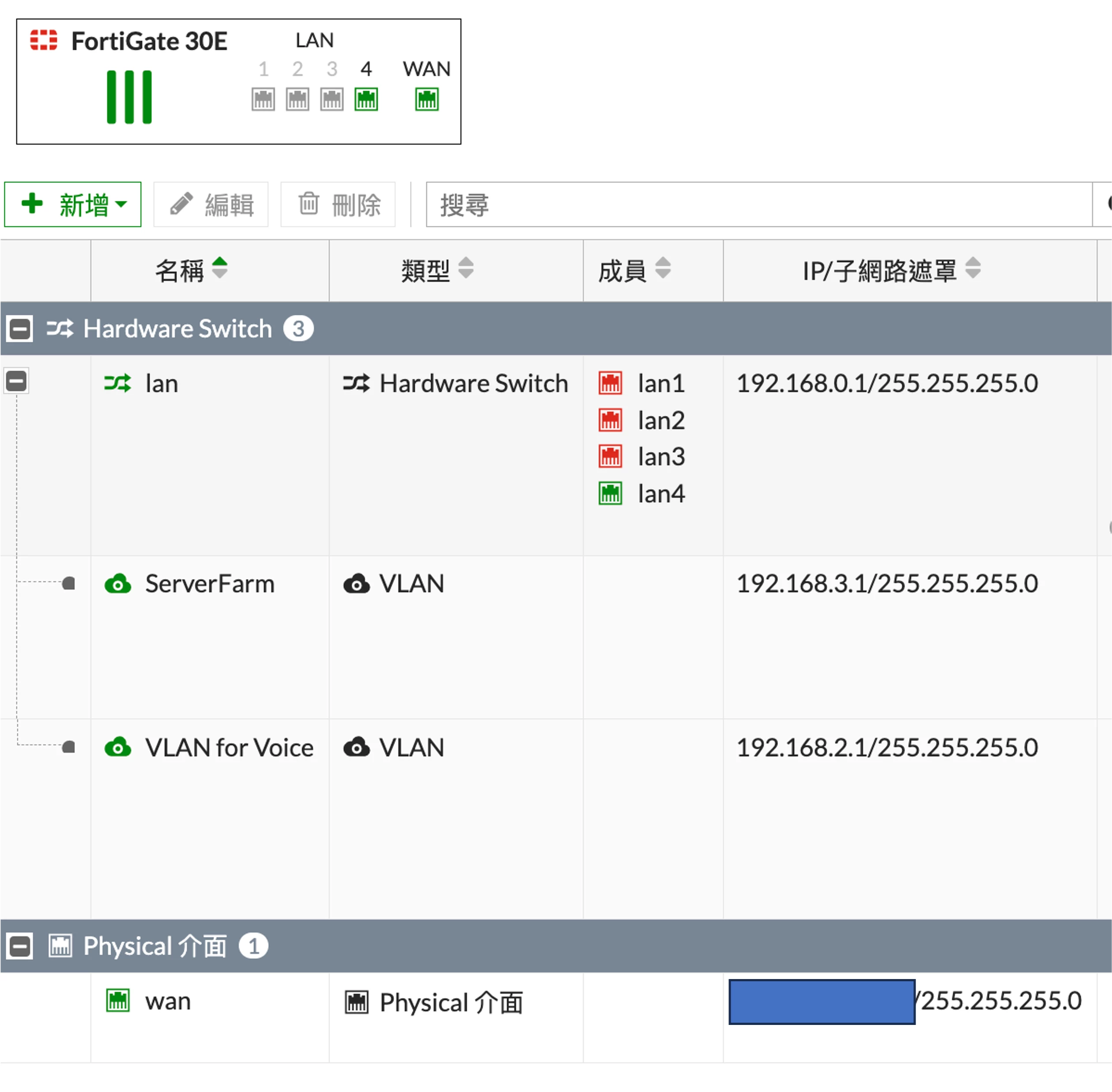
I have a FortiGate 30E and connect to a D-Link GS1900 Switch on Port 4 of FortiGate.

The default subnet is "lan"(192.168.0.x).

I have created two VLANs(192.168.2.x and 192.168.3.x) and both works now (seel below screen shots).


I would like to know:

1. Interface: For both VLANs, I can choose "lan" or "wan"(connect to the WAN physical port) as the interface.  Can anyone advice me the differences of choosing "lan" or "wan" as interface?

2. Any additional routing(static or policy) is required to make sure the two VLANs can go to internet?


Thank you.


圖片 1.png

Best answer by Toshi_Esumi

For Q2, routing shouldn't be issue since both would follow the default route to the internet. However, you have to have policies for both VLAN interfaces to get out through wan interface.

You could put both VLANs into one zone and have just one policy from the zone to wan interface. But to do that, you have to remove all existing policies referring to each VLAN interface first.

Once you start using a zone, you can't use individual VLAN interfaces for policies.


Toshi

6 replies

Toshi_Esumi
SuperUser
SuperUser
October 9, 2023

The wan must be connected to your ISP modem/router, or the cable from the ISP might be terminated at the wan port. If you put a VLAN on wan interface, that's not going to your switch and only your ISP's modem/router or their GW can see it.

Obviously you have to put those two VLANs on the lan interface since your switch is connected to one of hardswitch member member port: lan4.


Toshi

Toshi_Esumi
SuperUser
SuperUser
October 9, 2023

For Q2, routing shouldn't be issue since both would follow the default route to the internet. However, you have to have policies for both VLAN interfaces to get out through wan interface.

You could put both VLANs into one zone and have just one policy from the zone to wan interface. But to do that, you have to remove all existing policies referring to each VLAN interface first.

Once you start using a zone, you can't use individual VLAN interfaces for policies.


Toshi

YHC
YHCAuthor
Explorer
October 9, 2023

Hi Toshi,


Thanks for the reply.

Do you mean i should add a policy that allow traffic from WAN to my zone/VLAN?

Once I star to use a zone, can I still prohibit inter-VLAN traffic? 


Toshi_Esumi
SuperUser
SuperUser
October 10, 2023

That's depending one if one of/some of your devices in VLANs need to be accessed from the internet. In that case you need to have VIP(s) to change/swap the destination IP from wan's public IP to the local server IP. You should enable only specific TCP/UDP ports for the VIP/DNAT.


Toshi

JackieDouglas
Explorer
October 9, 2023

Thank you, I will try it. I appreciate you for answering.

Thought Leadership Security Summit. Outpace New Threats with AI - enhanced defense. Tuesday, Septmeber 15, 8:30 AM - 2:30 PM PT. The Golf Club at Newcastle, WA.
Fortinet Flag the Hack. Wednesday, August 26, 9:00 AM - 5:00 PM ET, COSM, Atlanta, GA.
Virtual event | September 2026. SASE summit. The age of autonomous trust. Register here!



