
FusionScott
Visitor III
February 7, 2023
Solved

Virtual Server will not save load balancing method

  • February 7, 2023
  • 10 replies
  • 5657 views

I'm trying to follow the solution here: https://community.fortinet.com/t5/Support-Forum/Fortigate-Virtual-IP-One-public-IP-for-two-internal-web-servers/m-p/208937/thread-id/191897


When I change load balancing method to HTTP Host and hit OK, it just reverts back to static. No errors. It removes the http host field from all Real Servers as well.

Fortigate 200D v6.05
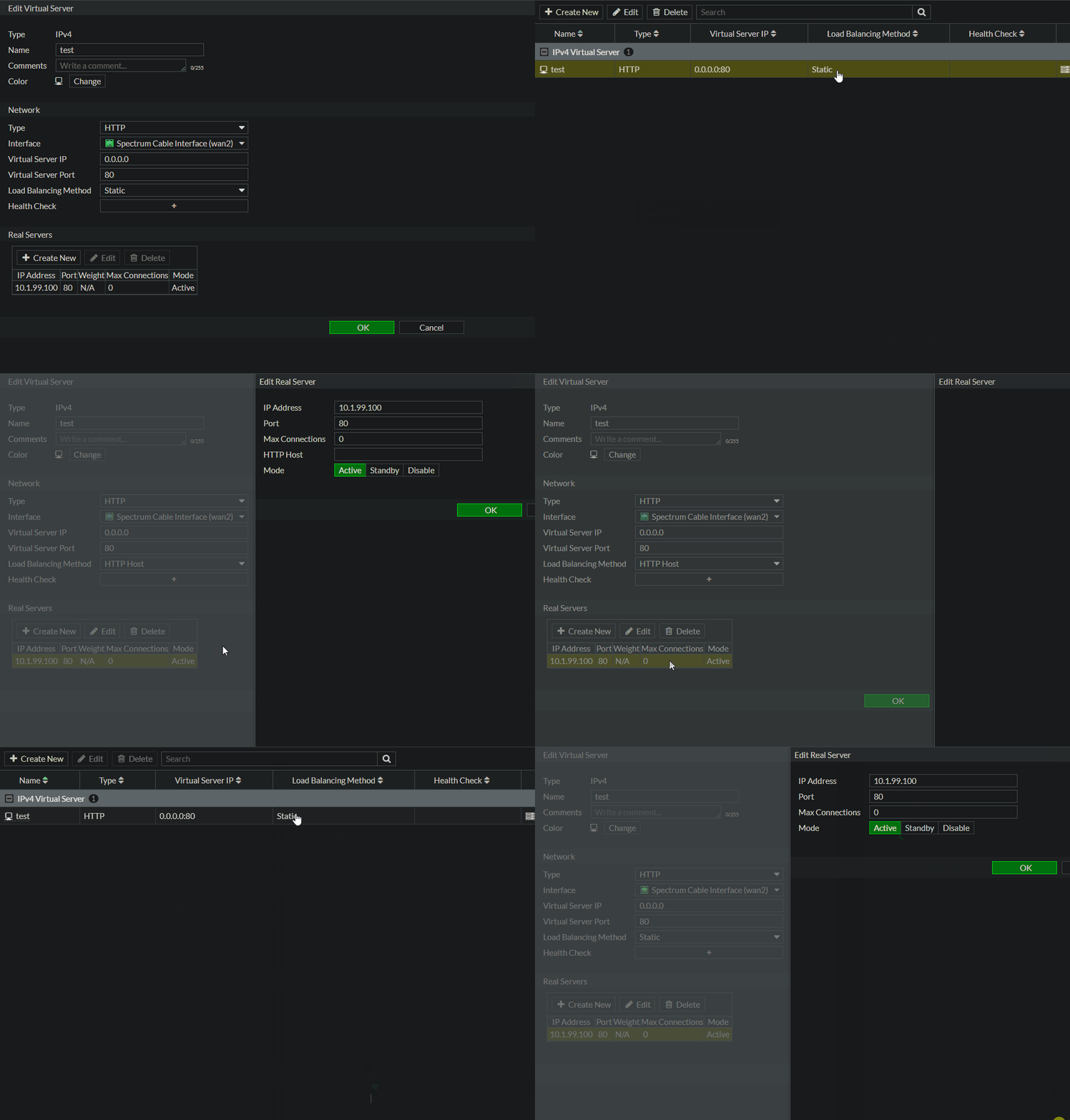
 

fortigate_wont_save.gif

Best answer by FusionScott

The Fortigate has to be in "Proxy mode" to allow "http-host" as a load balancing method. I have confirmed this fix.

10 replies

gfleming
Staff
Staff
February 7, 2023

What version of FortiOS?

FusionScott
Visitor III
February 10, 2023

As mentioned in my post, 6.05

abarushka
Staff
Staff
February 7, 2023

Hello,


You may consider to configure in CLI and check whether the issue persists. Moreover, you may consider to upgrade to newer version of FortiOS in 6.0 FortiOS branch.

FusionScott
Visitor III
February 10, 2023

I cannot upgrade this device without renewing the support contract. I have in the budget for later in the year a new device.

Debbie_FTNT
Staff & Editor
Staff & Editor
February 8, 2023

Hey FusionScott,

have you tried via CLI? If this is a GUI-only issue, then CLI should work. If this is a deeper issue, CLI might throw up additional error messages.
CLI commands should be this roughly:
#config firewall vip
#edit <virtual-server>
#set lbd-method http-host
#config realservers
#edit 1
#set http-host <host>
#end
#end

FusionScott
Visitor III
February 10, 2023
Connected   FG200D3916818052 # config firewall vip   FG200D3916818052 (vip) # edit test   FG200D3916818052 (test) # set lbd-method http-host   command parse error before 'lbd-method' Command fail. Return code -61   FG200D3916818052 (test) #  
abelio
SuperUser
SuperUser
February 10, 2023

@FusionScott wrote:


Connected   FG200D3916818052 # config firewall vip   FG200D3916818052 (vip) # edit test   FG200D3916818052 (test) # set lbd-method http-host   command parse error before 'lbd-method' Command fail. Return code -61   FG200D3916818052 (test) #  


Hi,
you need specify which type of balancing before pick the method

config firewall vip
    edit test
        set type server-load-balance
         set server type http
         set lbd-method http-host

     ......
and continue as Debbie suggested above


abelio
SuperUser
SuperUser
February 10, 2023

Hi,
maybe you need play with CLI a bit; everything is documented under 6.0 CLI guide in docs.fortinet.com.

It seems a typo error,  is 'ldb-method' and not 'lbd-..."

 Use '?' in each command instance, and you'll can see which options are available.

I mean:

config firewall vip
   edit test
        set type server-load-balance
        set server-type http
        set  ?

and you'll see:

# set 
id                           Custom defined ID.
uuid                         Universally Unique Identifier (UUID; automatically assigned but can be manually reset).
comment                      Comment.
type                         Configure a static NAT, load balance, server load balance, DNS translation, or FQDN VIP.
ldb-method                   Method used to distribute sessions to real servers.
src-filter                   Source address filter. Each address must be either an IP/subnet (x.x.x.x/n) or a range (x.x.x.x-y.y.y.y). Separate addresses with spaces.
extip                        IP address or address range on the external interface that you want to map to an address or address range on the destination network.
*extintf                      Interface connected to the source network that receives the packets that will be forwarded to the destination network.
arp-reply                    Enable to respond to ARP requests for this virtual IP address. Enabled by default.
*server-type                  Protocol to be load balanced by the virtual server (also called the server load balance virtual IP).
persistence                  Configure how to make sure that clients connect to the same server every time they make a request that is part of the same session.
nat-source-vip               Enable/disable forcing the source NAT mapped IP to the external IP for all traffic.
*extport                      Incoming port number range that you want to map to a port number range on the destination network.
gratuitous-arp-interval      Enable to have the VIP send gratuitous ARPs. 0=disabled. Set from 5 up to 8640000 seconds to enable.
srcintf-filter               Interfaces to which the VIP applies. Separate the names with spaces.
http-multiplex               Enable/disable HTTP multiplexing.
http-ip-header               For HTTP multiplexing, enable to add the original client IP address in the XForwarded-For HTTP header.
monitor                      Name of the health check monitor to use when polling to determine a virtual server's connectivity status.
max-embryonic-connections    Maximum number of incomplete connections.
color                        Color of icon on the GUI.


The options beginning with '*'  are mandatories

Hope it helps


FusionScott
FusionScottAuthorAnswer
Visitor III
February 13, 2023

The Fortigate has to be in "Proxy mode" to allow "http-host" as a load balancing method. I have confirmed this fix.

Thought Leadership Security Summit. Outpace New Threats with AI - enhanced defense. Tuesday, Septmeber 15, 8:30 AM - 2:30 PM PT. The Golf Club at Newcastle, WA.
Virtual event | September 2026. SASE summit. The age of autonomous trust. Register here!


