Umesh
Explorer II
October 28, 2022
Solved

VIP - Optinal filter

  • October 28, 2022
  • 6 replies
  • 2343 views

Hi team,


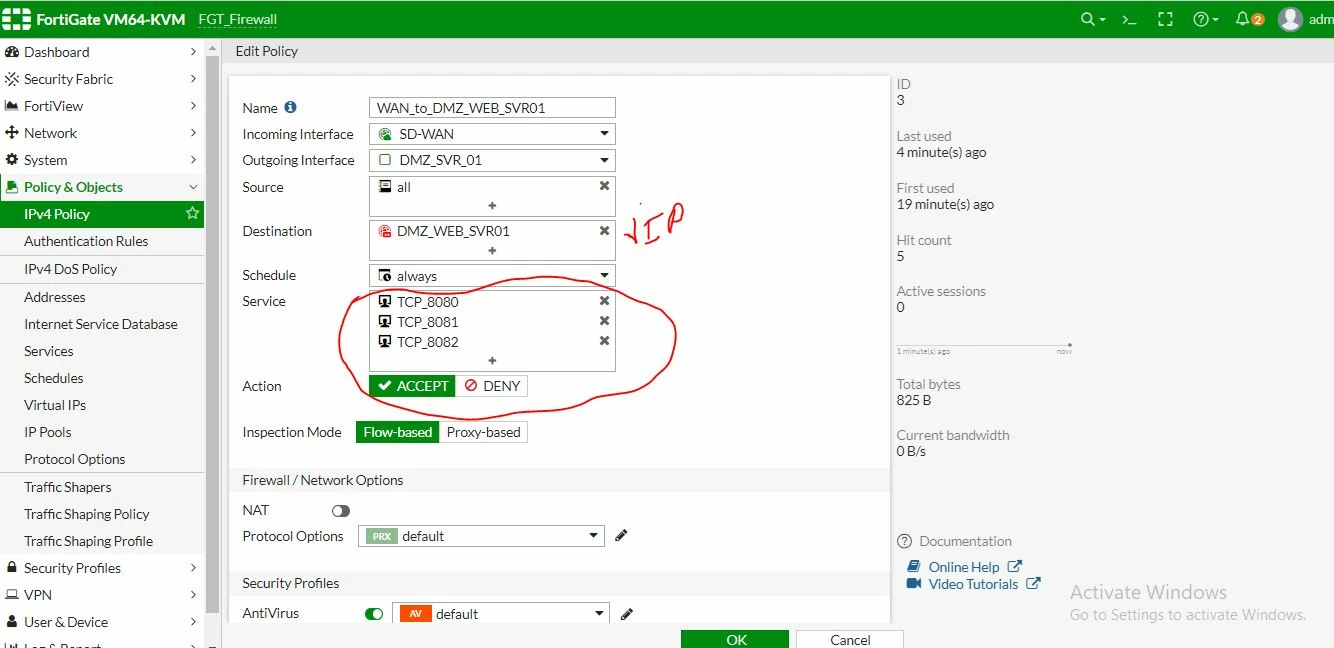
I am unable to solve below issue can you please help me. let me tell what I am doing -


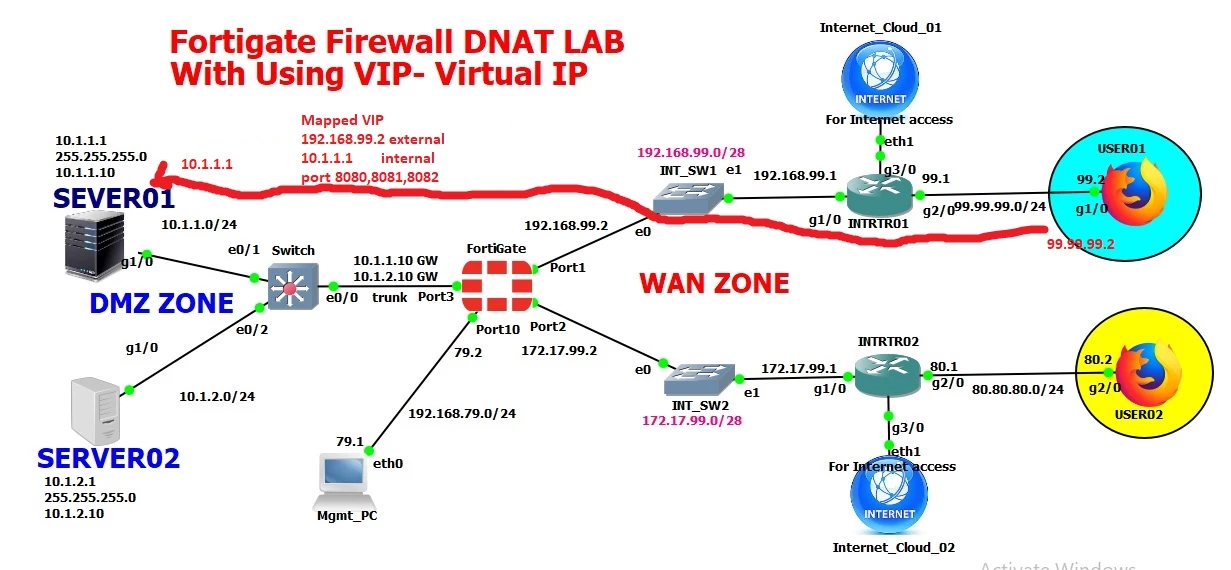
WAN IP 192.168.99.2

Internal Server IP - 10.1.1.1

Remote user's public IP - 99.99.99.2 which is trying to access my internal server via port 8080

which is mapped on fortigate Firewall

external IP - 192.168.99.2

Internal IP - 10.1.1.1

with port no - 8080,8081,8082

please find the snapshots for more clarifications -
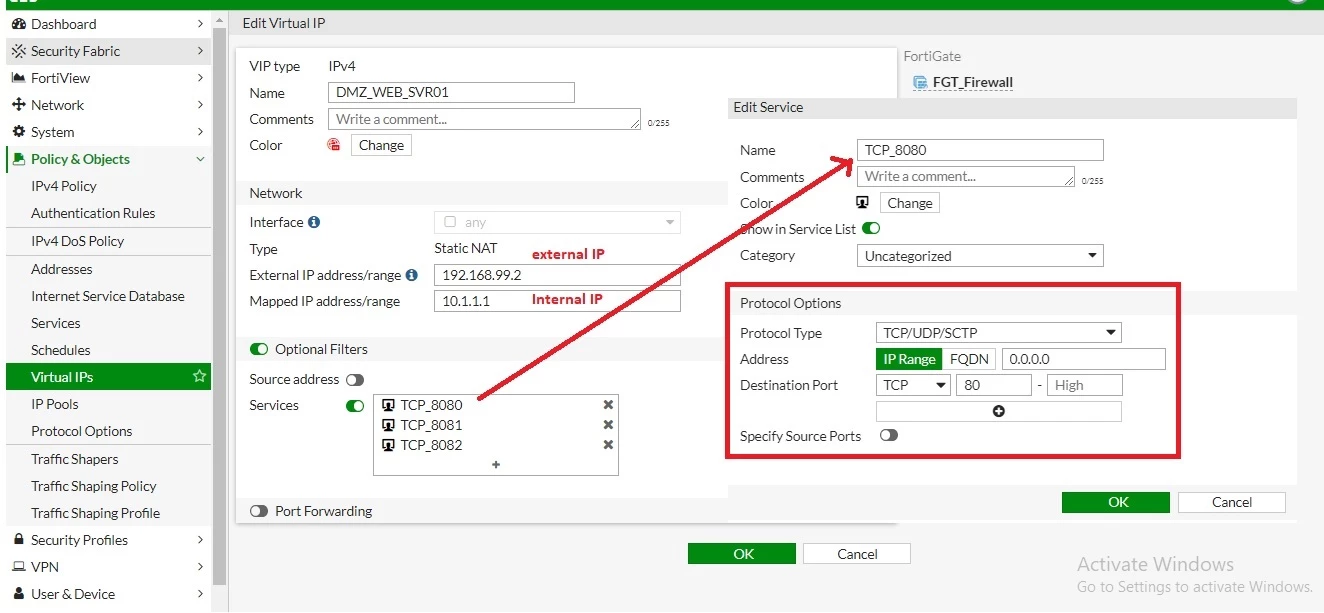
VIP1.jpgVIP2.JPGVIP.JPG

Best answer by gfleming

Your TCP_8080 service shows that you are defining TCP port 80, not 8080. Please change destination port to 8080.


And as others have mentioned please ensure TCP packets are hitting your WAN interface. If this is a lab likely it's working OK. But if this is truly coming from the internet you'll need to ensure there is a downstream device doing DNAT to your private IP.


6 replies

Anthony_E
Staff
Staff
October 31, 2022

Hello Umesh,


Thank you for using the Community Forum.

I will seek to get you an answer or help. We will reply to this thread with an update as soon as possible.


Regards,

Best Regards
parteeksharma
Staff
Staff
October 31, 2022


Dear Umesh,

As I could see the fortigate wan IP is a a private IP address (192.168.99.2), if the fortigate have private IP address range on wan interface most probably the traffic from internet might not even reach to fortigate, as private IP addresses are not routable on internet. To check and confirm if fortigate is receiving traffic or not, kindly use sniffers and debugs to troubleshoot.

Please check below link to apply sniffers and debug and troubleshoot:

https://community.fortinet.com/t5/FortiGate/Technical-Tip-Troubleshooting-VIP-port-forwarding/ta-p/195542


Regards,
Parteek

alif
Staff
Staff
October 31, 2022

Hi @Umesh,


Looking at the network topology, I'm guessing that you have setup a lab environment. Please run debugs/sniffer to investigate further.


diagnose debug reset
diagnose debug flow filter addr 192.168.99.2
diagnose debug flow filter port <number>
diagnose debug console timestamp enable
diagnose debug flow show iprope enable
diagnose debug flow show function-name enable
diagnose debug flow trace start 1000
diagnose debug enable


Now initiate traffic and see if traffic arrives on Fortigate.

gfleming
Staff
gflemingAnswer
Staff
October 31, 2022

Your TCP_8080 service shows that you are defining TCP port 80, not 8080. Please change destination port to 8080.


And as others have mentioned please ensure TCP packets are hitting your WAN interface. If this is a lab likely it's working OK. But if this is truly coming from the internet you'll need to ensure there is a downstream device doing DNAT to your private IP.


pepsibehavior
New Member
November 1, 2022

I've been searching for relevant blog posts to your writing. After a lengthy search, I discovered your post. I have outstanding information on study the backrooms simplification. 

Umesh
UmeshAuthor
Explorer II
November 1, 2022

Hi Graham,

After changing destination port 8080 policy is working fine.

 thank you