pacone
New Member
July 11, 2015
Solved

Unstable Gui Access

  • July 11, 2015
  • 6 replies
  • 43519 views

I have two Fortigate units that I manage. One is a 30D and one a 60D both running the same firmware v5.2.3,build670


With both units from time to time I am unable to access the web-gui. The only fix appears to be to restart them.

Whilst I am unable to access the gui, the units are still working and processing traffic outgoing.

I am not able to reproduce this, it just happens when it wants to.


On the 60D I am unable to SSH in when this occurs, it will give me an SSH login prompt, however once the username and password are entered it just sits there and does not log me in. It's kind of like the login process works, but is separate to the actual management tool itself which is not functional at the time.


On the 60D I am also unable to use FortiExplorer from an iPad using a USB cable to access the unit when this occurs.


This has happened at least 3 times, maybe more, the only fix as I said above appears to be to power off the unit and power it back on.


I have not tried the SSH or FortiExplorer login's on the 30D unit.

    Best answer by Bernard_Pauwels

    IE is a different story than CHROME. But still I see other unstable behaviour if an unsecured certificate is used.

    6 replies

    Dave_Hall
    New Member
    July 11, 2015

    On both units, check the memory usage and check the system log -- if memory usage nears 80% the fgts start to shut down various services (starting with I think virus/web scanning) and some GUI functions.  (There are several posts on this topic -- just use the search link at the top of this page.)  See also KB#11076.


    pacone
    paconeAuthor
    New Member
    July 12, 2015

    It implies in the reference material that I read, once the over usage calms down, that the services that have been turned off by conserve mode return by themselves, this does not appear to be the case with the issue I am having. They never seem to return.


    I am unable to access all types of connectivity to the unit HTTPS, SSH, FortiExplorer etc, not just web gui.


    The 30D unit would be lucky if it does 300MB per day of traffic, and memory usage seems to stick around the 45-50% mark from what I can see of it.


    Is there a way I can reliably log memory/cpu usage so I can see if the units are having busy periods that I am not aware of?

    fenixryan
    New Member
    August 6, 2015

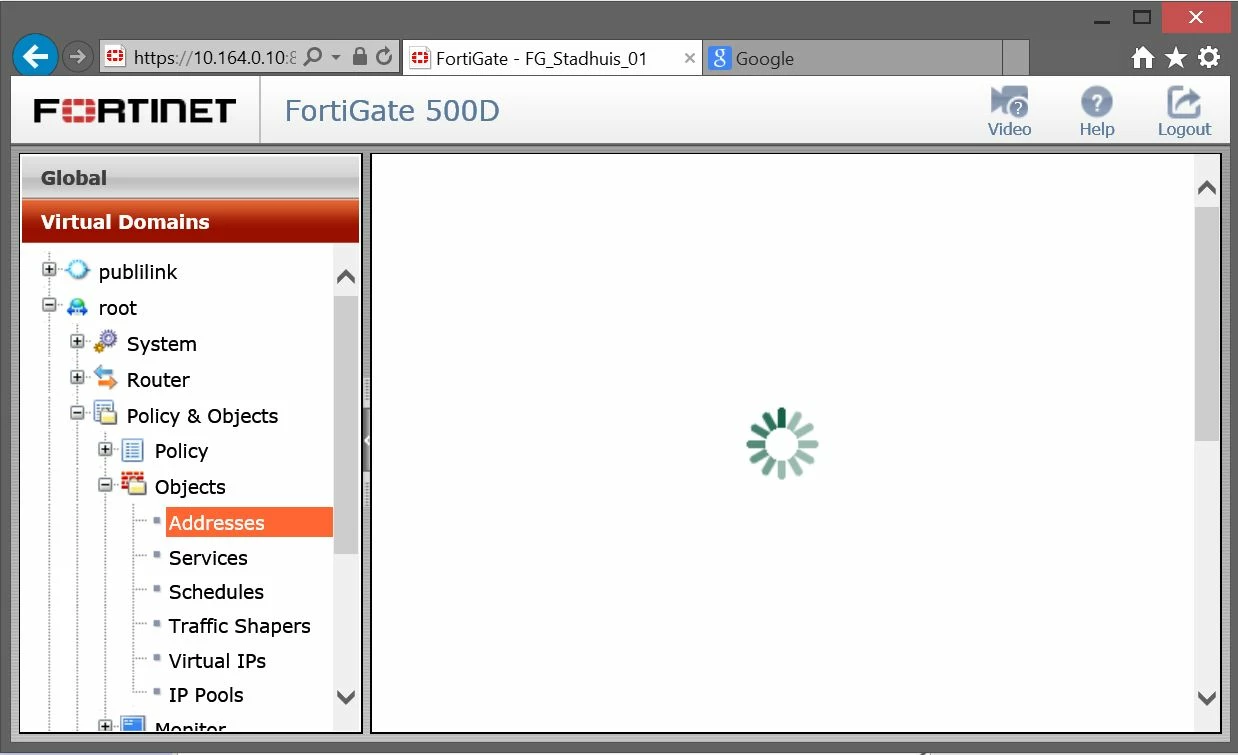
    I'm experiencing similar issues with accessing web interface, IE 11 brings up log on, I log in but none of the frames populate (and I mean they are all blank. When I use Chrome 44 the frames are displayed ok until I start drilling in and out of various settings, then the frame just comes up with what I can only describe as a page icon in the middle.


    I was on 5.2.1, but decided to lift upto latest firmware to find it's still producing the same random frame problem.


    Reboot seems to sort it for a very short time.


    Device 100D

    Flyshuffle
    New Member
    August 6, 2015

    fenixryan wrote:

    I'm experiencing similar issues with accessing web interface, IE 11 brings up log on, I log in but none of the frames populate (and I mean they are all blank. When I use Chrome 44 the frames are displayed ok until I start drilling in and out of various settings, then the frame just comes up with what I can only describe as a page icon in the middle.


    I was on 5.2.1, but decided to lift upto latest firmware to find it's still producing the same random frame problem.


    Reboot seems to sort it for a very short time.


    Device 100D

    I've had similar experiences on Windows 8.1:


    IE 11 behaved the exact same way you described on our 300D running 5.2.2, but appears to work for me with 5.2.3


    Chrome 44 will work for a while, but then I will get the "file icon sad face" in the main frame and have to restart the browser where it will work for a while again. This happens on 5.2.4 and 5.2.3 on our 200D and 300D firewalls. However, I am running AdBlock and a couple of other extensions in Chrome and I haven't gone through and disabled or removed any to see if it is an extension causing the problem. I have added this to an open support case with Forticare.


    Firefox 39 with no add-ons is working fine across all of our firewalls at the moment.


    Each time I have not had to do anything different with our firewalls. Simply closing the browser or trying a different browser lets me get on my way. Memory usages is consistently under 60% for all of them, so I don't think that is an issue. 


    FortiAdam
    New Member
    August 6, 2015

    There seems to be a recent issue with Chrome and self-signed certificates.  https://www.reddit.com/r/fortinet/comments/3fumsz/chrome_certificate_errors_after_gui_login/


    If you push [ctrl+shift+i] and then watch the console whilst loading the web gui you might see similar results.

    rezendecs
    New Member
    August 21, 2015

    Somebody can solve this issues?


       After upgrade to 5.2.X, many of my Fortigates have Web Gui issues.

       The Web Gui disconnect suddenly while I'm working and before the idle timeout configuration.


    Regards,

    Paul_S
    New Member
    August 21, 2015

    rezendecs wrote:

    Somebody can solve this issues?


       After upgrade to 5.2.X, many of my Fortigates have Web Gui issues.

       The Web Gui disconnect suddenly while I'm working and before the idle timeout configuration.


    Regards,

    sharing your exact version is normally a good idea.  If your exact version is 5.2.4, then others have also mentioned this. It might be a bug that needs resolved in a future release.


    if your version is less than 5.2.4, then you should share as much info as possible. also check your browsers console for errors.

    sanketgoh
    New Member
    August 25, 2015

    Hi,


    AS you havent mentioned on which browser you are working.

    Please use firefox browser with all cookies deleted. It works perfect on firefox.

    sanketgoh
    New Member
    August 25, 2015

    Hi,


    AS you havent mentioned on which browser you are working.

    Please use firefox browser with all cookies deleted. It works perfect on firefox.

    MartinSperrin
    New Member
    October 29, 2015