
TBC
Explorer
September 28, 2022
Solved

SSL-VPN Schedule problem

  • September 28, 2022
  • 2 replies
  • 2929 views

Hello @All,


we have ssl-vpn with schedule active, but the schedule is not working.

Our configuration for testing:
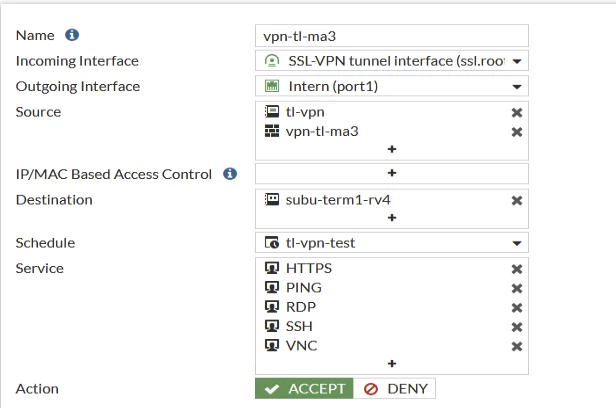
TBC_0-1664354809957.png

and the schedule:


    edit "tl-vpn-test"         set start 06:00         set end 08:00         set day monday tuesday wednesday thursday friday     next


For my understanding the login is possible from 06:00 to 08:00 (2 Hour) but the login is possible also at 10:00 o'clock.

What I'm doing wrong?


many thanks for helping

TBC

Best answer by sjoshi

Dear


Thank you for posting to the Fortinet Community Forum.


Problem Description:-
SSL-VPN Schedule problem


As per the issue description, you are able to connect to SSL VPN even in different time interval as configured in schedule in policy.


Is there any other firewall policy for ssl vpn user?

Can you share me the below logs:-
diag debug app sslvpn -1
diagnose debug application fnbamd -1
diag debug en


Also post connecting ssl vpn, please try to ping one of the internal server and run the below debug cmd
diagnose debug flow filter daddr
diag debug flow filter proto 1
diag debug en
diag debug flow show function-name en
diag debug flow trace start 999

This will help to show which policy it is matching


Let us know if this helps.

Thanks

2 replies

sjoshi
Staff
sjoshiAnswer
Staff
September 28, 2022

Dear


Thank you for posting to the Fortinet Community Forum.


Problem Description:-
SSL-VPN Schedule problem


As per the issue description, you are able to connect to SSL VPN even in different time interval as configured in schedule in policy.


Is there any other firewall policy for ssl vpn user?

Can you share me the below logs:-
diag debug app sslvpn -1
diagnose debug application fnbamd -1
diag debug en


Also post connecting ssl vpn, please try to ping one of the internal server and run the below debug cmd
diagnose debug flow filter daddr
diag debug flow filter proto 1
diag debug en
diag debug flow show function-name en
diag debug flow trace start 999

This will help to show which policy it is matching


Let us know if this helps.

Thanks

Thanks, Salon
TBC
TBCAuthor
Explorer
September 28, 2022

Hello Salon,

many thanks for fast answer.

Problem is solved! The problem was a second vpn-policy without schedule!

Your hint has brought me to.

Many thanks for it

with best regards

TBC

