
ARockey
New Member
Mar 27, 2025 10:07 AM UTC
Question

SSL-VPN

VPN Error.png

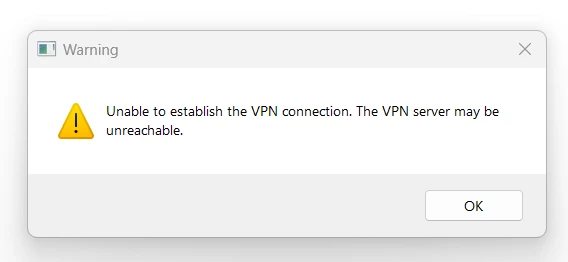
Over the past 3 weeks the VPN connection is showing the above error and can’t be stopped until you connect to a Personal Hotspot from a mobile device. This is happening to staff working in all area's outside the Wellsway school campus.

As a admin user I can stop this message from appearing every couple of seconds, but a user can not until they connect to their phone. In the past the VPN connection screen would appear and the user could just minimize it and they could get on with their work. Please could you advise how we can fix this issue. 


This problem is stopping the user from being able to work on their laptop as the message wants to be in the foreground all the time.

3 replies

adambomb1219
SuperUser
SuperUser
Mar 27, 2025 12:46 PM UTC

What do the logs on the FortiGate say?  Why would the user need to establish a VPN inside the network itself?

Translate
ARockey
ARockeyAuthor
New Member
Mar 27, 2025 1:55 PM UTC

When this happens it is not inside the network they would currently use and they don't need to use the VPN in the visiting school. The problem is that the VPN error popup will not stop and the user can't stop it appearing in front of any application they are using. To stop it happing and allow them to get on with using the laptop, would be connecting to a personnel Hotspot. Before when the VPN login screen would appear when the laptop is turned on, would be to minimize the VPN login page and this would not stop them being able to work.

Translate
adambomb1219
SuperUser
SuperUser
Mar 31, 2025 2:44 PM UTC

Do you have always-on VPN enabled on the client?

Translate
Risk and Resilience in the Age of AI. An OT Thought Leadership Summit for Houston's Critical Infrastructure Leaders. Date: Thursday, December 3, 2026. Time: 8:30 am - 1:30 pm (CT). Location: The Westin Houston, Memorial City | 945 Gessner Road, Houston, TX 77024