

jessele
New Member
April 20, 2012
Question

Software Switch not working

  • April 20, 2012
  • 3 replies
  • 5878 views
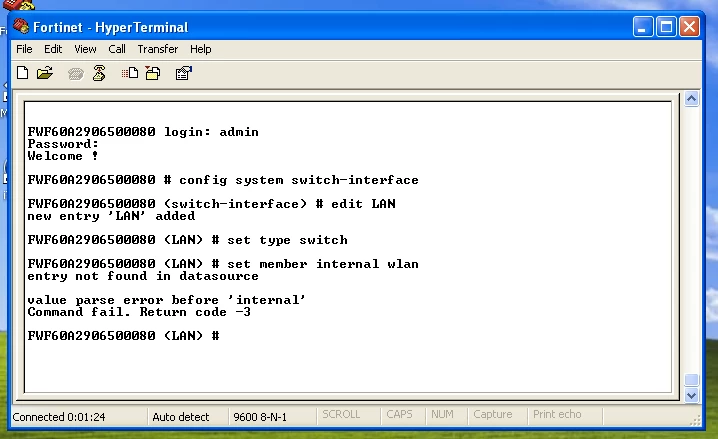
Hello! I am in the process of reconfiguring my FortiWifi 60A from scratch (factory reset) and having some issues. I' m trying to create a software switch so that my WiFi and Internal are the same network. Article that I' m following: http://kb.fortinet.com/kb/microsites/search.do?cmd=displayKC&docType=kc&externalId=FD33206&sliceId=1&docTypeID=DT_KCARTICLE_1_1&dialogID=31796920&stateId=0%200%2031798859 Can anyone shed some light on what im doing wrong? Appliance: FortiWifi 60A Firmware: 3.00-b0744(MR7 Patch 6)
    3 replies

    jessele
    jesseleAuthor
    New Member
    April 20, 2012
    Just a quick update.. I was able to finally make a software switch combining " internal" and " wlan" to a new interface called " LAN" . Unfortunately, I' m unable to get out to the net :( Here are the steps I took to create it: 1. Create your WiFi network (SSID/Password) - You' ll have no control over this after you combine interfaces. 2. Delete all firewall policies pertaining to the interfaces that you are trying to combine (in my case - internal and wlan) 3. Delete dhcp server listed under internal interface These are the commands I used to create the " Software Switch" (I' ve highlighted the CLI commands that differ from the guide): config system switch-interface edit <New network that you are creating> set type switch set member internal wlan set vdom root config system interface edit <New network that you are creating> set ip 192.168.1.99 255.255.255.0 set allowaccess ping https ssh set type switch set vdom root After I created that, I logged into the web interface to create the dhcp server for the combined interface. The guide CLI commands are not correct and i could not figure it out. Kept getting errors using this CLI " setdns-service default" (Unkown Action). Now onto the policy... I created a policy " LAN (internal/wlan combined) -> wan1 (internet connection) and vice versa. What am i missing to get me out to the net?
    Fullmoon
    New Member
    April 20, 2012
    How about static routing for your WAN interface configured already? Are sure that your fortigate box able to get out? try to do it via cli " console execute ping yahoo.com" no quotation mark
    jessele
    jesseleAuthor
    New Member
    April 20, 2012
    I have not set up Static Route for my wan interface. Do I need to? Also, I pinged yahoo abs got 5 sent and 5 recieved. Any other thoughts? Thanks, Jesse
    andyh
    New Member
    April 25, 2012
    Hi jesse, I' ve had this stump me too at one point... Did you by any chance have to remove ' all' from the firewall address objects? Firewall Objects- Address- All - is it there and defined as 0.0.0.0 ?

