
Pablo1
New Member
July 23, 2024
Solved

SNMP do not response

  • July 23, 2024
  • 12 replies
  • 7235 views

Hello Team!


I am using a FortiGate 40F model FG-40F with a configuration which consist of a VDOM root (management, operation mode NAT) and a VDOM transparent (operation mode transparent).
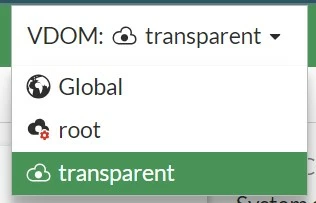
 

VDOMs.jpg


The VDOM root is only use to give access to internet:

 
VDOMroot.jpg
 

The VDOM transparent is only use to stablish a firewall between a network called LAN and a network called WAN:
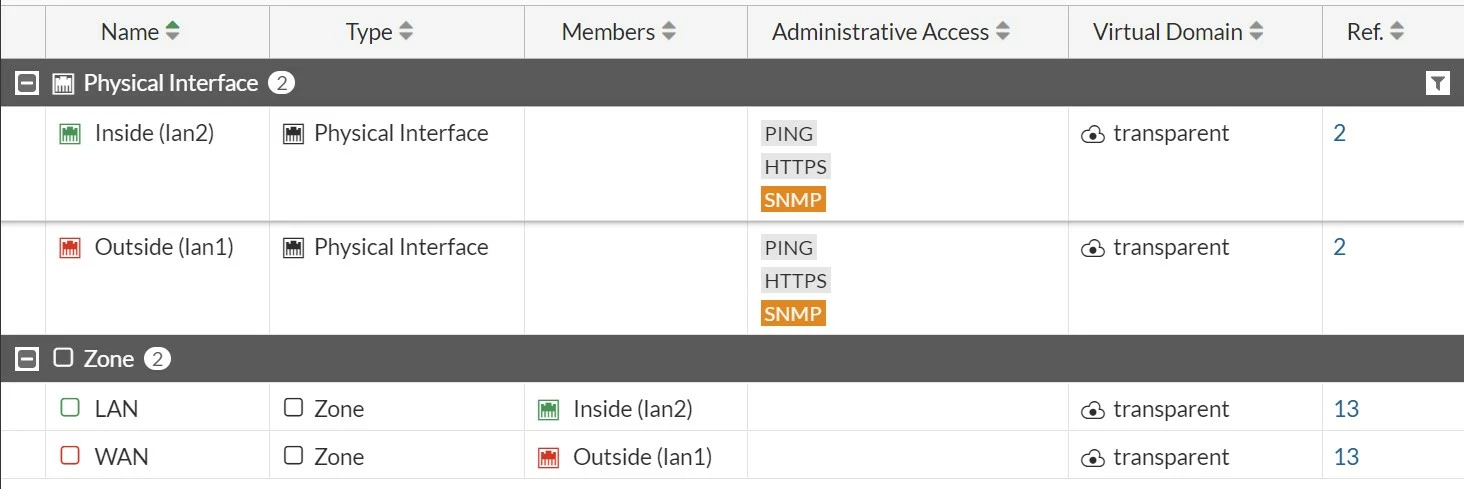
 

VDOMtransparent.jpg


My objective is to monitor the Fortinet sending get SNMP from a PC connected to the port 2 (Inside lan 2).

I have configured the System > SNMP in this way:
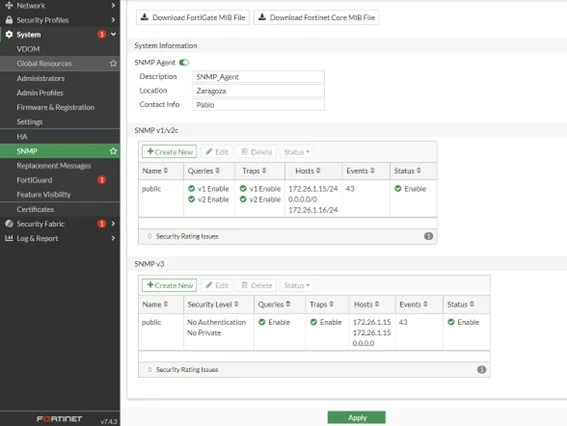
 

SNMPconfig.jpg


My problem is that the Fortinet receives the SNMP get but not answer me:
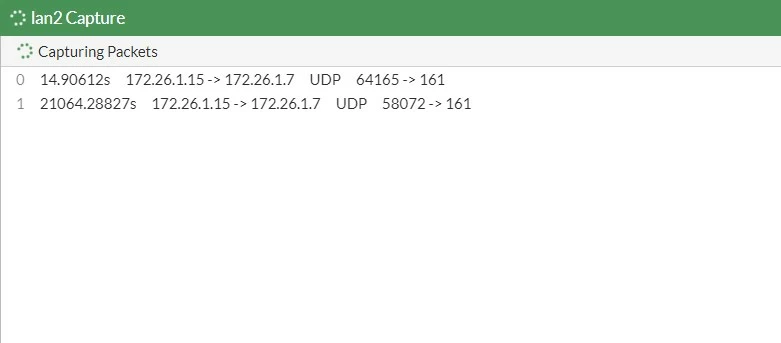
 

lan2capture.jpg


I am sending the get SNMP with iReasoning Browser:
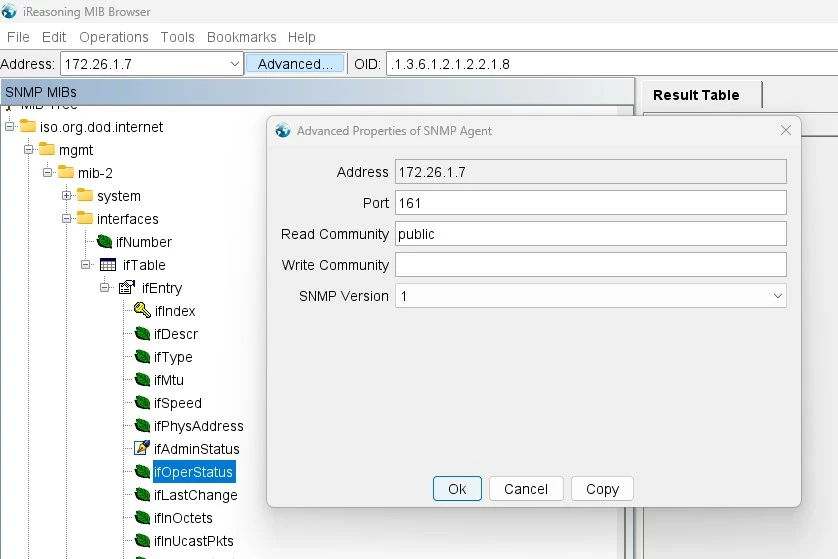
iReasoning.jpg


I amnot using HA or trusted hosts (I have tested to add my pc to trusted hosts but the behaviour does not change), I have checked the threads: SNMP don't response traffic, SNMP response and SNMP no response: timed out but I can not solve the problem. I give you more information that could be interesting:
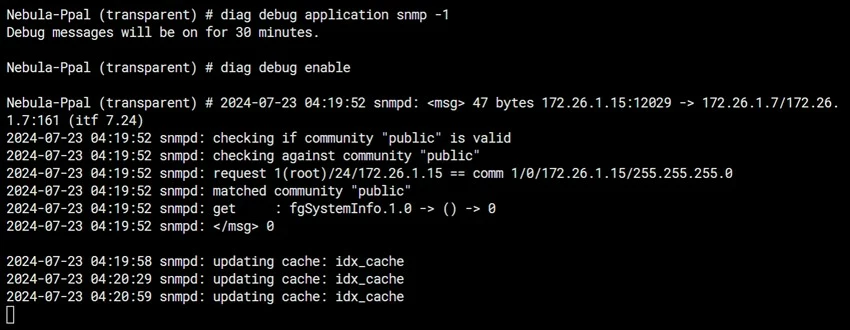
debug.jpg


I hope that you can help me, thanks in advance.


Best answer by ozkanaltas

Hi @Pablo1 ,


Normally this is possible. 


https://docs.fortinet.com/document/fortigate/6.2.16/cookbook/986787/nat-and-transparent-mode


https://community.fortinet.com/t5/FortiGate/Technical-Tip-Connect-2-Transparent-VDOMs-with-NAT-VDOM-between/ta-p/201940


Can you change vdom link type PPP to Ethernet. 


config system vdom-link edit <VDOM_NAME> set type ethernet end end


12 replies

ozkanaltas
Valued Contributor III
July 23, 2024

Hello @Pablo1 ,


In which vdom is the IP address from which you made the SNMP query?


If you send a query to the management address on the transparent vdom, this may be the reason for the lack of response. Can you try querying an interface in the root vdom?

Pablo1
Pablo1Author
New Member
July 23, 2024

Hi ozkanaltas, 


My PC (172.26.1.15) is connected directly to the port 2 (172.26.1.7 Inside lan2 which belongs to VDOM:transparent).


I have tried to change my PC IP to 172.32.60.2 and connect to the WAN port (172.32.60.4 which belong to VDOM:root) and after add SNMP administrative access to the WAN port the SNMP works. However, I cannot use this configuration in my project, WAN Port cannot have SNMP Access and my port connection must be port 2, namely, VDOM: transparent.

Is possible to create any configuration or add anything by console to obtain SNMP answer from the VDOM: transparent?

Thanks for your answering.

ozkanaltas
Valued Contributor III
July 23, 2024

Hi @Pablo1 ,


I think this is related to transparent vdom and vdom infrastructure. 


I think the easiest is to create a vdomlink between the transparent vdom and the management vdom. You can open snmp access in the interface on the management side of this link and make queries to this interface.


https://community.fortinet.com/t5/FortiGate/Technical-Tip-Configuring-SNMP-when-VDOM-is-enabled/ta-p/194853


https://community.fortinet.com/t5/Support-Forum/SNMP-on-a-non-management-interface/m-p/253360/highlight/true#M210932


AEK
SuperUser
SuperUser
July 23, 2024

Hello Pablo

- I assume the lan2 interface (172.26.1.15) in in the root VDOM.

- In lan2 interface configuration > Administrative Access, did you enable SNMP?

- Can you try with the standard snmpget or snmpwalk command? Mine gives the following:

$ snmpget -v2c -c public 172.16.50.1 fgSystemInfo.1.0      
FORTINET-FORTIGATE-MIB::fgSysVersion.0 = STRING: v6.2.16,build1392,240129 (GA)

$ snmpwalk -v2c -c public 172.16.50.1 fgSystemInfo    
FORTINET-FORTIGATE-MIB::fgSysVersion.0 = STRING: v6.2.16,build1392,240129 (GA)
FORTINET-FORTIGATE-MIB::fgSysMgmtVdom.0 = INTEGER: 1
FORTINET-FORTIGATE-MIB::fgSysCpuUsage.0 = Gauge32: 0
FORTINET-FORTIGATE-MIB::fgSysMemUsage.0 = Gauge32: 34
...


AEK
Pablo1
Pablo1Author
New Member
July 23, 2024

Hi AEK,


The lan2 interface (172.26.1.15) is in the VDOM: transparent.


Yes in the port 1 and 2 (belongs to VDOM: transparent) I have SNMP enable, but not in VDOM: root. 
Is possible to create any configuration or add anything by console to obtain SNMP answer from the VDOM: transparent?

I suppose I must execute snmpget and snmpwalk command in my pc, right? is not possible to do it in the Fortinet console? In that case, do you recommend me any program or library to do it in windows? 

Plenty of thanks.


AEK
SuperUser
SuperUser
July 23, 2024

Hi Pablo

While configuring the SNMP, the interface should be in the management VDOM to get the response from the Firewall to the SNMP Monitoring tool


Ref:

https://community.fortinet.com/t5/FortiGate/Technical-Tip-Configuring-SNMP-when-VDOM-is-enabled/ta-p/194853


AEK
Pablo1
Pablo1Author
New Member
July 24, 2024

Hi ozkanaltas and AEK


If  have understand correctly, I must creat a VDOMlink between VDOMroot and VDOMtransparent and later allow SNMP traffic with specify FW policy rules.

But I have problems to create the VDOMlink, when a try using the web I obtain the error "Input value is invalid"


VDONlink1.jpg

VDONlink2.jpg


And when I try to create by console I obtain: "VDOM link type must be changed from PPP to Ethernet" I click on yes but nothing change:


VDONlink3.jpg

VDONlink4.jpg

VDONlink5.jpg

Is possible to stablish a VDOM link between a NAT VDOM and a transparent VDOM? 

I was using like guide this thread: https://community.fortinet.com/t5/FortiGate/Technical-Tip-Configuring-SNMP-when-SNMP-Server-is-connected/ta-p/322862

Thanks.

ozkanaltas
Valued Contributor III
July 24, 2024

Hi @Pablo1 ,


Normally this is possible. 


https://docs.fortinet.com/document/fortigate/6.2.16/cookbook/986787/nat-and-transparent-mode


https://community.fortinet.com/t5/FortiGate/Technical-Tip-Connect-2-Transparent-VDOMs-with-NAT-VDOM-between/ta-p/201940


Can you change vdom link type PPP to Ethernet. 


config system vdom-link edit <VDOM_NAME> set type ethernet end end


Pablo1
Pablo1Author
New Member
July 25, 2024

Thanks to Connect 2 Transparent VDOMs with NAT VDOM... - Fortinet Community I have configured the VDOMlink, and I have added the policy rules in every VDOM:


VDONlink6.jpg

VDONlink7.jpg

VDONlink8.jpg

VDONlink9.jpg


But unfortunately the SNMP still do not response.


I have checked the mac address table and looks empty:

VDONlink10.jpg

What can be the problem? Maybe is it necessary configure any static route?


I have try to add a static route like in the following link: How to route traffic from one VDOM to ano... - Fortinet Community


VDONlink11.jpg

But the command set device gives me an error:
VDONlink12.jpg


Thanks by your time.

Pablo1
Pablo1Author
New Member
October 24, 2024

Hi All,


Thanks to your contributions I have solved the problem. It was necessary a last step regarding my last post, which consist of configure the route from my PC (or the element that execute the SNMP GET request) to the IP 11.11.11.13. 


After that run the SNMP request to the IP 11.11.11.13, namely, the virtual IP at the end of the tunnel between VDOMs located in VDOM management.


Thanks again.

Thought Leadership Security Summit. Outpace New Threats with AI - enhanced defense. Tuesday, Septmeber 15, 8:30 AM - 2:30 PM PT. The Golf Club at Newcastle, WA.
Fortinet Flag the Hack. Wednesday, August 26, 9:00 AM - 5:00 PM ET, COSM, Atlanta, GA.
Virtual event | September 2026. SASE summit. The age of autonomous trust. Register here!

