

rinaldyaulia
New Member
June 8, 2020
Question

Server certificate blocked

  • June 8, 2020
  • 1 reply
  • 8129 views

Hi All,


I have a problem with 2 websites, which blocked with messages "server certificate blocked"

It's confirmed blocked by FortiGate, since I already try to whitelist it and it could be open.


Once I've check FortiGate Document

https://kb.fortinet.com/kb/documentLink.do?externalID=FD41394


On of the SSL Checker, could we refer is https://www.ssllabs.com/ssltest/analyze.html


Checking on it, the Additional Certificate was expired
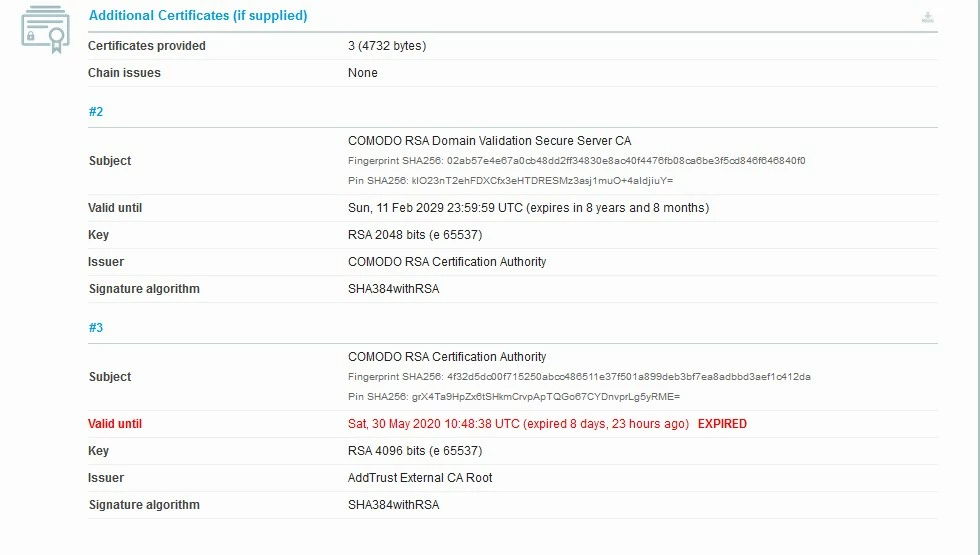
Whether it could be the issue, thus FortiGate block the website?

Is there anyway to allow the website (besides whitelist the Destination)?


Thanks,

Rinaldy

    1 reply

    abelio
    SuperUser
    SuperUser
    June 8, 2020

    Hi Rinaldy,

    your problem here is not the firewall; even when you configure no-ssl inspection at all, mostly of modern browsers will refuse connect against an ssl site with expired certificate.

    Install a free one on that server for a while or one self-signed at least


    rinaldyaulia
    New Member
    June 9, 2020

    abelio wrote:

    Hi Rinaldy,

    your problem here is not the firewall; even when you configure no-ssl inspection at all, mostly of modern browsers will refuse connect against an ssl site with expired certificate.

    Install a free one on that server for a while or one self-signed at least


    Hi Abel,

    Thank you.

    I create a whitelist policy with the destination (with no inspection), the website could be accessed.

    The problem is actually the Main certificate not expired yet, but  the additional certificate was expired when I check it on https://www.ssllabs.com/ssltest/ as I captured.


    Is it the reason why the FortiGate block it?


    Thanks,

    Best Regards,

    Rinaldy
