
Giovanna
Explorer II
June 27, 2025
Solved

Security Logs Fortigate

  • June 27, 2025
  • 1 reply
  • 945 views


I would like to share only the most relevant security logs from FortiGate to a syslog collector, and I aim to minimize the volume of data being sent.
For example I am interested in User Activity Events, but I would like to filter them further, for example, to include only admin login events.

Is there any official Fortinet documentation that lists the subcategories or log IDs included in “User
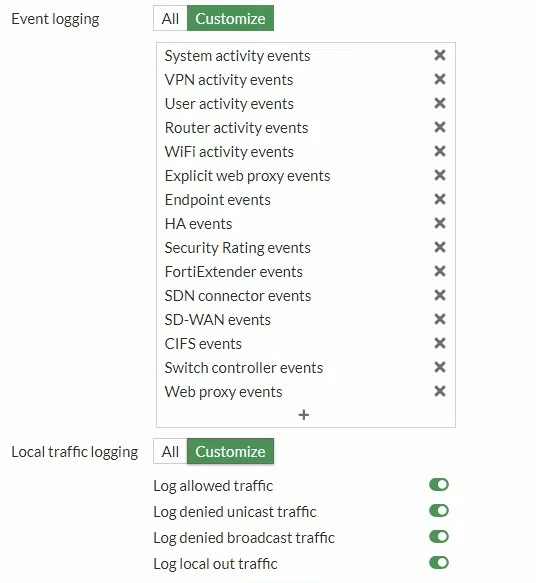
fortigate.jpg

Activity Events”, describing their purpose and content?
And more importantly:
Is it possible to apply filters directly on FortiGate (e.g., using CLI) to export only specific subcategories within a log group?

Any example or reference would be greatly appreciated.

Best answer by smkml

config log syslogd filter
set filter "logid(xxx)"
end


Or refer below KB for comprehensive explanation or free style method.

https://community.fortinet.com/t5/FortiGate/Technical-Tip-In-log-filter-settings-the-logic-is-AND-between/ta-p/230236

1 reply

smkml
Staff
smkmlAnswer
Staff
June 27, 2025

config log syslogd filter
set filter "logid(xxx)"
end


Or refer below KB for comprehensive explanation or free style method.

https://community.fortinet.com/t5/FortiGate/Technical-Tip-In-log-filter-settings-the-logic-is-AND-between/ta-p/230236

Giovanna
GiovannaAuthor
Explorer II
July 3, 2025

Hi, is there maybe a command to use in order to not share the selected logs and share all the others, something like:

config log syslogd filter
set filter not "logid(xxx)"
end

? Many Thanks!


funkylicious
SuperUser
SuperUser
July 3, 2025
"jack of all trades, master of none"

