damianhlozano
Explorer II
February 4, 2026
Solved

Modify VIPs easily

  • February 4, 2026
  • 7 replies
  • 382 views

Hello team!!!


I need create a tutorial for limited users with no Fortigate knoledge to modifý easily the IP address in many VIPs.  This is for manually redirect traffic to another computer (Different IP)

If I guide the users to modify manually all VIPs in "Policy & Objects -> Virtual IPs", there are to much posibilities to the user to make a mistake, so I need for example, to create an script to modify the VIPs and guide to the users to execute this script.

These is a Fortigate 100F, which I think that have not hard drive

Actually could be better to create something to be executed from the gui


Automation stitch seems not be working to change the Fortigate settings.

I have not knoledge about APIs and I have not enough time to learn.


Any idea will be apreciated!!

Thanks in advance.

Regards,

Damián

Best answer by brandonziots

If you don't trust the techs with CLI I'm not sure how safe you can make the change without developing a small web app that makes configuration changes on the FortiGate via API. However, I did notice that you stated you didn't have time to learn APIs.

My only other solution recommendation is to make the change via an Automation Stitch on the FortiGate (Security Fabric > Automation). Automation Stitches are typically used to send notifications or apply configuration changes based on triggers such as particular logs. However, there is a "Test Automation Stitch" GUI functionality that would allow you to push the hard-coded CLI change on command. You would configure the trigger as time-based to only occur once in 10 years (max amount of time from current date you can set the trigger), that way the automation action only executes via the manual "Test Automation Stitch" action, except for in 10 years when the equipment will already be replaced/EOL. 

Here's an example configuration:


config system automation-trigger
edit "10_years_out"
set trigger-type scheduled
set trigger-frequency once
set trigger-datetime 2037-01-01 00:00:00
next
end
config system automation-action
edit "Failover VIP1"
set action-type cli-script
set script "config firewall vip
edit \"52.37.128.124_to_[new IP]\"
set extip 52.37.128.123
set mappedip \"[new IP]\"
set extintf \"any\"
next"
set accprofile "super_admin"
next
end
config system automation-stitch
edit "Failover VIPs"
set trigger "10_years_out"
config actions
edit 1
set action "Failover VIP1"
set required enable
next
end
next
end

This Automation stitch will execute the CLI script action:

config firewall vip
edit "52.37.128.124_to_[new IP]"
set extip 52.37.128.123
set mappedip "[new IP]"
set extintf "any"
next


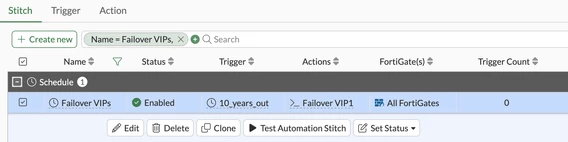
To manually execute the trigger, you right click on automation stitch and select Test Automation Stitch:


Screenshot 2026-02-05 at 17-29-44 FortiGate - AzFW01.png


7 replies

brandonziots
Explorer
February 5, 2026

If you already know what exact changes need to be made, you can just prep the change via CLI and give the CLI changes to the staff to run. For example:

config firewall vip
edit "52.37.128.124_to_[new IP]"
set extip 52.37.128.123
set mappedip "[new IP]"
set extintf "any"
next
edit "52.37.128.124_to_[new IP]"
set extip 52.37.128.124
set mappedip "[new IP]"
set extintf "any"
next
...
end

Then the staff just need to be able to open the CLI and paste the "script". You can also create a reversal CLI config that the staff can apply to reverse the change.

damianhlozano
Explorer II
February 5, 2026

Hello!!


Yes, I know what exact changes need to be made and I know how to create the "script"

This is the first option that I thought, but I think that maybe should be there something safer, because if this does not work, we will have problems.

There is a phone number for the customers which have 24x7 support, where they can call when they have a critical situation.  The technical support people does not know about Fortigates, if they copy the "script" and paste this in cli and some text could not be pasted correctly, maybe they will not reallice that there were an error, which will lead to the need to escalate the case, which will need to take more time to solve the issue.

I had in the past many problems copying text to the cli, I dont know if there is a safe way to copy the text to the cli. (in both ways: accessing through SSH and HTTPS)


I dont know about the reversal CLI config, searching on the web I found something about "Configuration safe mode", is there something else?  How can I find this?


Do you know a safer way to make the changes?


Regards,

Damián

brandonziots
Explorer
February 5, 2026

If you don't trust the techs with CLI I'm not sure how safe you can make the change without developing a small web app that makes configuration changes on the FortiGate via API. However, I did notice that you stated you didn't have time to learn APIs.

My only other solution recommendation is to make the change via an Automation Stitch on the FortiGate (Security Fabric > Automation). Automation Stitches are typically used to send notifications or apply configuration changes based on triggers such as particular logs. However, there is a "Test Automation Stitch" GUI functionality that would allow you to push the hard-coded CLI change on command. You would configure the trigger as time-based to only occur once in 10 years (max amount of time from current date you can set the trigger), that way the automation action only executes via the manual "Test Automation Stitch" action, except for in 10 years when the equipment will already be replaced/EOL. 

Here's an example configuration:


config system automation-trigger
edit "10_years_out"
set trigger-type scheduled
set trigger-frequency once
set trigger-datetime 2037-01-01 00:00:00
next
end
config system automation-action
edit "Failover VIP1"
set action-type cli-script
set script "config firewall vip
edit \"52.37.128.124_to_[new IP]\"
set extip 52.37.128.123
set mappedip \"[new IP]\"
set extintf \"any\"
next"
set accprofile "super_admin"
next
end
config system automation-stitch
edit "Failover VIPs"
set trigger "10_years_out"
config actions
edit 1
set action "Failover VIP1"
set required enable
next
end
next
end

This Automation stitch will execute the CLI script action:

config firewall vip
edit "52.37.128.124_to_[new IP]"
set extip 52.37.128.123
set mappedip "[new IP]"
set extintf "any"
next


To manually execute the trigger, you right click on automation stitch and select Test Automation Stitch:


Screenshot 2026-02-05 at 17-29-44 FortiGate - AzFW01.png


damianhlozano
Explorer II
February 5, 2026

Hello!!


I didnt know about "config system auto-script" in CLI nor about "Configuration -> Script" in the GUI, I think this is the best option so far.

Please let me know if someone knows something better.


Regards,

Damián


Thought Leadership Security Summit. Outpace New Threats with AI - enhanced defense. Tuesday, Septmeber 15, 8:30 AM - 2:30 PM PT. The Golf Club at Newcastle, WA.
Fortinet Flag the Hack. Wednesday, August 26, 9:00 AM - 5:00 PM ET, COSM, Atlanta, GA.
Virtual event | September 2026. SASE summit. The age of autonomous trust. Register here!