
xxx22
New Member
April 20, 2024
Solved

IPsec tunnel stability issue - two 40F

Hello, I have a problem with the stability of the IPsec tunnel between two Fortigate 40F, on both the system version is 7.4.3. The tunnel can work for a few days without a problem, and then it becomes very unstable, you can see large ping fluctuations, packet losses, sometimes it will return to slight stability, but you can still see that the pings are a bit higher than normal. The problem is solved by re-establishing phase 2.


Both locations have fast and stable fiber optic connections from the same provider. There are no errors in the logs on both sides, for Fortigate the tunnel is stable.

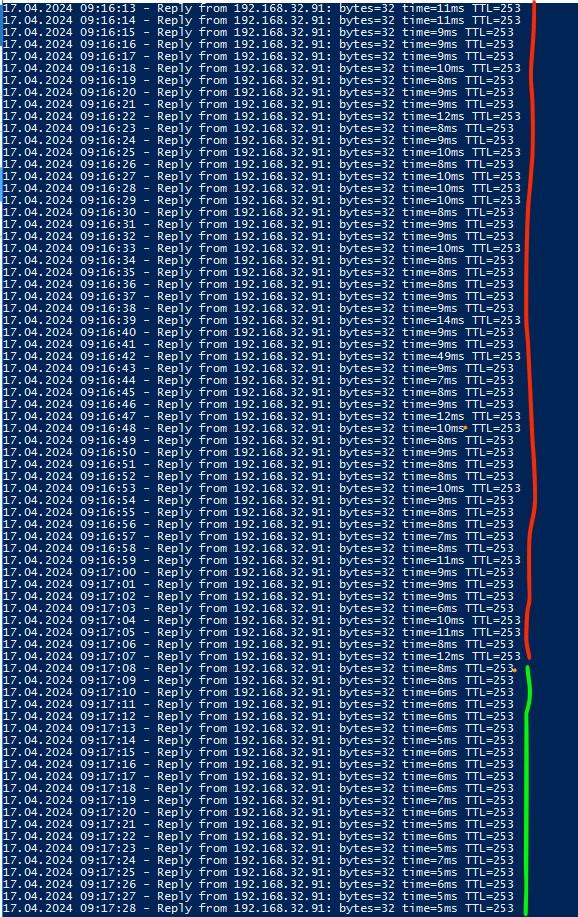
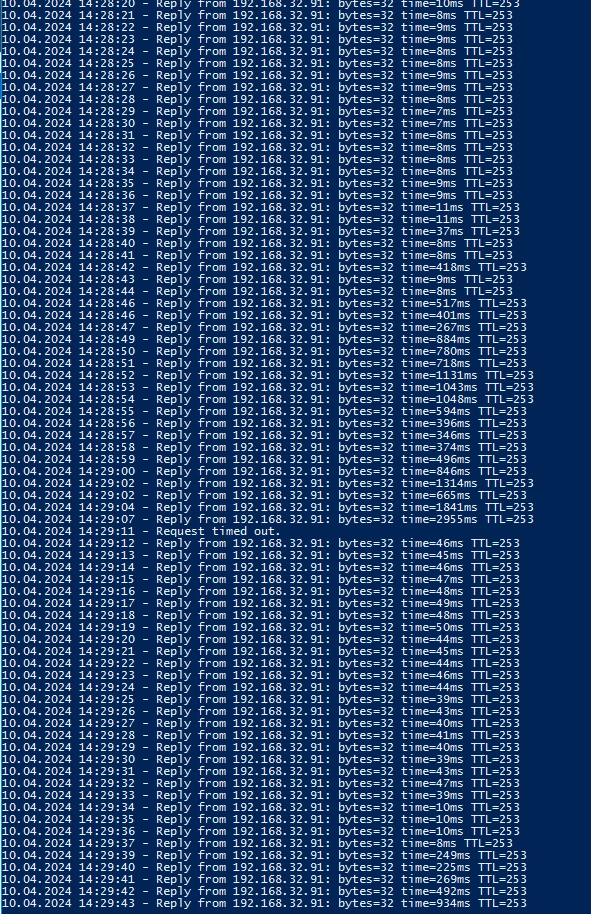
In the first screenshot, the red line indicates the moment when the tunnel stabilizes after the problems, and the green line indicates when I re-establish phase 2, the pings are immediately smaller and more stable. The second screenshot shows the moment of jerking and switching to the backup SD-WAN tunnel. I will add that the problem occurred even when only one IPsec tunnel was established. Configuring SD-Wan for IPsec eliminated the moment of failure for users.


Replay Detection is disabled, IKEv1, Dead Peer Detection - on demand, auto-negotiate enable

It looks to me like the tunnel encountered some kind of synchronization problem and then couldn't get back to full working order. Sometimes it stays quiet for a few days, and sometimes the problem returns several times a day.
 

Zrzut ekranu 2024-04-17 o 09.17.29.pngZrzut ekranu 2024-04-10 o 14.29.44.png


xxx22
xxx22Answer
New Member
April 28, 2024

I think I found the solution. There have been no problems with the tunnel for a week. My research shows that Fortigate from version 7.4.2 has a bug.


In my case, only disable Hardware Acceleration took effect. It's possible that disabling Replay Detection was also part of the problem.


https://community.fortinet.com/t5/FortiGate/Technical-Tip-FortiGate-Disable-Hardware-Acceleration/ta-p/191256


Thanks for help! 

6 replies

lgupta
Staff
Staff
April 21, 2024

Hello @xxx22, Good day!


Is this a new deployment or an existing one?

Are you aware of any trigger point that caused this behavior?

Please make sure that Phase2's "Key Lifetime" is same on both the peers.


https://community.fortinet.com/t5/FortiGate/Troubleshooting-Tip-Troubleshooting-IPsec-Site-to-Site-Tunnel/ta-p/195672


https://community.fortinet.com/t5/FortiGate/Troubleshooting-Tip-IPsec-VPNs-tunnels/ta-p/195955


I would have suggest you to open a proactive ticket with TAC and call-in when this issue resurfaces.

Thank you so much.

kumarh
Staff
Staff
April 21, 2024

Can you collect the packet capture on both Fortigate by running below commands:


diagnose sniffer packet any "(host 10.5.20.146 and esp) or (host 10.10.10.100 and icmp)" 6 0 a

Also, share the output of below commands:

diagnose npu np6xlite dce 0
diag npu np6 dce 1


xxx22
xxx22Author
New Member
April 21, 2024

I will be back with packet capture as the issue reoccurs


FG-1 # diagnose npu np6xlite dce 0
STAT_IVS_COPY_CNT:0000000000002359[9a]

FG-1 # diag npu np6 dce 1
Invalid NP6XLite ID


FG-2 # diagnose npu np6xlite dce 0
DROP_IHP1_PKTCHK:0000000000000018[5b] STAT_IVS_COPY_CNT:0000000000395115[9a]

FG-2 # diag npu np6 dce 1
Invalid NP6XLite ID

amrit
Staff & Editor
Staff & Editor
April 21, 2024

Capture ESP traffic on the wan interface of the firewalls(When issue is present): 

di sniffer packet any 'host <remote gateway ip>' 6 0 a and decrypt the esp traffic using Wireshark. This capture can also be performed from GUI network--> diagnostics. In the decrypted pcap verify the timers. 
2. During the issue ping the remote gateway IP from each of the firewall and verify the latency : exec ping-options repeat-count 100 

exec ping <remote gatewa ip> . If you have multiple wan links source the traffic via correct link 

3. Check Interface counters for wan 

fnsysctl ifconfig <tunnel interface name>

fnsysctl ifconfig <wan interface name>

4. Collect IKE debug 

di de app ike -1 

di de en 

5. Take the pcaps on the LAN interfaces of the Fortigate and verify latency while transferring the packets to the tunnel or wan interface 

6. Check if disabling np offload under phase-1 of the tunnel resolves the problem

xxx22
xxx22AuthorAnswer
New Member
April 28, 2024

I think I found the solution. There have been no problems with the tunnel for a week. My research shows that Fortigate from version 7.4.2 has a bug.


In my case, only disable Hardware Acceleration took effect. It's possible that disabling Replay Detection was also part of the problem.


https://community.fortinet.com/t5/FortiGate/Technical-Tip-FortiGate-Disable-Hardware-Acceleration/ta-p/191256


Thanks for help! 

Thought Leadership. Security Summit. Thursday, November 12th, PGA National Resort, Palm Beach Gardens, FL.
Security Operations Summit: Modernize SecOps. Operate AI-Native.AMER: November 4 | 9:00 AM PST. India and SAARC: November 5 | 10:00 AM IST. EMEA: November 5 | 10:30 AM CET. APAC: November 5 | 11:00 AM SGT

