

sean3
Explorer II
July 12, 2024
Question

IPSec tunnel is down

  • July 12, 2024
  • 4 replies
  • 2467 views

hi all,

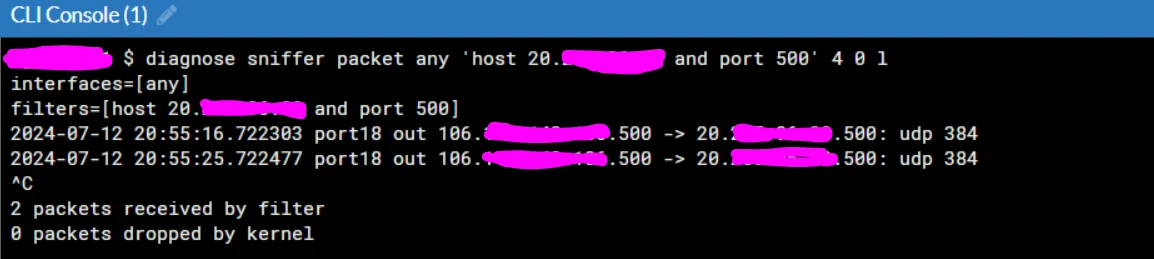
trying to create site to site ipsec vpn with the other site on Azure virtual gateway, the tunnel is down and i follow the article https://community.fortinet.com/t5/FortiGate/Troubleshooting-Tip-IPsec-VPNs-tunnels/ta-p/195955 to troubleshoot, I got the log as below screenshot when doing step Confirm that IKE traffic for port 500 or 4500 is not blocked somewhere along the path. does it mean that it is so good so far to the step? what is UDP 384 there?

udp384.PNG

    4 replies

    ozkanaltas
    Valued Contributor III
    July 12, 2024

    Hello @sean3 ,


    As per your screenshot, the Azure side is not responding to your ipsec package. Did you do all the configuration on the Azure side? 


    If you say yes, can you run these debug commands for ipsec debugging? After running these commands can you trigger the tunnel by using the bring-up button?


    diag debug disable diag debug reset diag vpn ike log-filter clear diag vpn ike log-filter name <IPSEC_NAME> diag debug application ike -1 diag debug enable


    sean3
    sean3Author
    Explorer II
    July 12, 2024

    thanks for the help!

    since Azure is managed by other team I will check it when they are available.

    Virtual event | September 2026. SASE summit. The age of autonomous trust. Register here!
