

samanka80
New Member
July 11, 2012
Question

IPsec negotiation problem

  • July 11, 2012
  • 10 replies
  • 14618 views
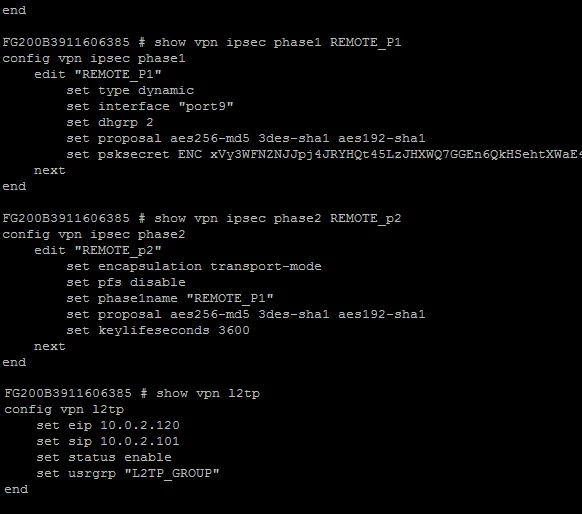
Hello I think I have configured everything for l2tp but I have problem in negotiation IPsec. here is my log: Message meets Alert condition date=2012-07-11 time=20:10:20 devname=FG200B391160 device_id=FG200B391160 log_id=0101037130 type=event subtype=ipsec pri=error vd=" root" msg=" progress IPsec phase 2" action=" negotiate" rem_ip=//my ip ---- loc_ip=//ip --- rem_port=28224 loc_port=4500 out_intf=" port9" cookies=" 7b83a9bcb71ac424/55d7ba5bd7378e7d" user=" N/A" group=" N/A" xauth_user=" N/A" xauth_group=" N/A" vpn_tunnel=" REMOTE_P1_0" status=failure init=remote mode=quick dir=inbound stage=1 role=responder result=ERROR I have configured everything, from users to plicies, but I can not connect... below is my configuration, does anybbody has any idea what is my problem??
    10 replies

    samanka80
    samanka80Author
    New Member
    July 13, 2012
    anyone? please
    ede_pfau
    SuperUser
    SuperUser
    July 13, 2012
    Hi, you' ve done everything but don' t post everything you' ve done...hard to tell from guessing what' s missing. You will probably know that you will have to have 2 policies to make this work: a) an ENCRYPT VPN policy b) an ACCEPT policy for allowing traffic from the clients to your network The details are all very well laid out in the FortiOS Handbook, pg. 1567 ff. for v4.00 MR3. If you follow this step by step you should have a working tunnel soon. If not...the please post the policies as well, the user group, the address group for the clients etc.
    emnoc
    New Member
    July 13, 2012
    Where' s your fwpolicies? Since nothing is show in the user and and xauth fields, It looks like the user is not been authenticated if I had to guess. But the vpn configs looks right here' s example of my policy edit 6 set srcintf " port15" set dstintf " EXT_NET01" set srcaddr " MGT_NET01" set dstaddr " all" set action ipsec set schedule " always" set service " ANY" set comments " L2TP_VPN for main admiistrators to management network" set inbound enable set outbound enable set vpntunnel " l2tp_dialupRA01" next Make sure to apply fwpoilicies to all interfaces and traffic types that your allowing.
    samanka80
    samanka80Author
    New Member
    July 14, 2012
    edit 6 set srcintf " port15" set dstintf " EXT_NET01" set srcaddr " MGT_NET01" set dstaddr " all" set action ipsec set schedule " always" set service " ANY" set comments " L2TP_VPN for main admiistrators to management network" set inbound enable set outbound enable set vpntunnel " l2tp_dialupRA01" next
    yes... I have done that to... you see... :(
    emnoc
    New Member
    July 13, 2012
    oh b4 I forget you need a policy for the tunnel src back in also; edit 8 set srcintf " EXT_NET01" set dstintf " port15" set srcaddr " l2tp_RA01" set dstaddr " MGT_NET01" set action accept set schedule " always" set service " ANY" next Look at this way, you allow external traffic into with action ipsec and then you allow the tunnel-srcs into the lan fwpoilices that you allow.
    samanka80
    samanka80Author
    New Member
    July 14, 2012
    oh b4 I forget you need a policy for the tunnel src back in also; edit 8 set srcintf " EXT_NET01" set dstintf " port15" set srcaddr " l2tp_RA01" set dstaddr " MGT_NET01" set action accept set schedule " always" set service " ANY" next Look at this way, you allow external traffic into with action ipsec and then you allow the tunnel-srcs into the lan fwpoilices that you allow.
    emnoc would you please leave me a policy of IPsec? in the manual it says that from inside network to outside network it' s going to be IPsec and from l2tp clients it always accept. when the second policy makes sence but I catually don' t understand how to let the outside traffic in the network and tell the remote client to use the ipsec parameters I defined. I have an accept policy to the port I connect for ipsec with this valid IP, it is accepted but either it doesn' t pass the ipsec parameters or I have some problem on my remote client.
    samanka80
    samanka80Author
    New Member
    July 14, 2012
    Hi, Thanks alot everyone for answering. it seems I have done all the things, I did everything from manual step by step and I really don' t know what' s going on maybe it' s something I should do in my remote windows, should I do anything beside choosing ipsec and entering password? I have my user groups and defined members, everything seems to be ok.... and here is the policies, do u have any idea what' s going on??
    emnoc
    New Member
    July 14, 2012
    So have you double checked the l2tp vpn client setup? If you have macosx used that with verbose mode logging and look at any errors logged info in the var directory.
    samanka80
    samanka80Author
    New Member
    July 14, 2012
    So have you double checked the l2tp vpn client setup? If you have macosx used that with verbose mode logging and look at any errors logged info in the var directory.
    I use windows, I should make a new vpn connection, right?? It is what the manual says, from manual:
    In Network Connections, configure a Virtual Private Network connection to the FortiGate unit. • Ensure that the IPSEC service is running. • Ensure that IPsec has not been disabled for the VPN client. It may have been disabled to make the Microsoft VPN compatible with an earlier version of FortiOS.
    Done the whole above, set the password and still not working... and here is my config on the host: By the way, my phase 2 encapsulation is in transport mode, is that correct?
    samanka80
    samanka80Author
    New Member
    July 14, 2012
    I just checked again and enabled xath I have the following error now: Message meets Alert condition date=2012-07-14 time=22:37:07 devname=Se... device_id=FG200B391... log_id=0101037125 type=event subtype=ipsec pri=error vd=" root" msg=" IPsec phase 2 error" action=" negotiate" rem_ip=//emmitted...... loc_ip=//emmited....... rem_port=500 loc_port=500 out_intf=" port9" cookies=" 098a217b2384fb7a/0000000000000000" user=" N/A" group=" N/A" xauth_user=" N/A" xauth_group=" N/A" vpn_tunnel=" N/A" status=negotiate_error error_reason=no matching gateway for new request and here is my phase 2:
    FortiRack_Eric
    New Member
    July 16, 2012
    I' m looking at this tread and it makes me wonder, why use l2tp? Use standard IPsec with the free FortiClient. Why use tunnel mode, use interface mode. It' s more logical, more flexible, etc, etc. For debugging use: dia debug enable dia deb application ipsec -1
    samanka80
    samanka80Author
    New Member
    July 16, 2012
    I' m looking at this tread and it makes me wonder, why use l2tp? Use standard IPsec with the free FortiClient. Why use tunnel mode, use interface mode. It' s more logical, more flexible, etc, etc. For debugging use: dia debug enable dia deb application ipsec -1
    Thanks alot, but I am asked to stablish L2TP, that' s not my desicion... in case of NO WAY I will recommend using interface mode. and thank you for the debug commands.
    samanka80
    samanka80Author
    New Member
    July 16, 2012
    HI! It' s weird! Last few days I could make connection and I had problem in my ipsec negotioation, now it does not even get to l2pt! what the....... here is my whole config, tell me if I have missed anything! config vpn l2tp set eip 10.0.2.120 set sip 10.0.2.101 set status enable set usrgrp " L2TP_GROUP" end config user group edit " L2TP_GROUP" set member " neda" " divek" next end config vpn ipsec phase1 edit " REMOTE_P1" set type dynamic ******* //the remote gateway is set to dialup clients set interface " port9" set dhgrp 2 set proposal aes256-md5 3des-sha1 aes192-sha1 set psksecret ENC xVy3WCpj6r8OQiu5KGaqM0z4uODBwAVRBE7NMv6kcoQ/B0ERBlYB0rtrPTaRgxn6QGW4zR9xhx1PNEfNSc2wXO/iEDwvzjpbtyu3kY8aUr7MqFOs next end config vpn ipsec phase2 edit " REMOTE_P2" set encapsulation transport-mode set pfs disable set phase1name " REMOTE_P1" set proposal aes256-md5 3des-sha1 aes192-sha1 set keylifeseconds 3600 **//relay is enabled it is not shown next end config firewall policy edit 64 set srcintf " port9" //wan interface set dstintf " truWorkstations" //lan interface set srcaddr " L2TPclients" set dstaddr " all" set action accept set schedule " always" set service " ANY" next end config firewall policy edit 57 set srcintf " truWorkstations" set dstintf " port9" set srcaddr " all" set dstaddr " all" set action ipsec set schedule " always" set service " ANY" set inbound enable set outbound enable set vpntunnel " REMOTE_P1" next end config firewall address edit " L2TPclients" set type iprange set end-ip 10.0.2.120 set start-ip 10.0.2.101 next end config system dhcp server edit 1 set default-gateway 10.0.2.1 config exclude-range edit 1 set end-ip 10.0.2.120 set start-ip 10.0.2.101 next end set interface " truWorkstations" config ip-range edit 1 set end-ip 10.0.2.100 set start-ip 10.0.2.2 next end set netmask 255.255.255.0 set wins-server1 10.0.5.25 set dns-server1 10.0.2.1 set dns-server2 //DNS server next end
    samanka80
    samanka80Author
    New Member
    July 16, 2012
    That' s interesting! when I paste the encrypted preshared key, I get to phase 1, but I have the " probable preshared key mismatch" error, with plain text password I am disconnected and don' t see the window trying to stabliesh the ppop link... I think there is something wrong with my protocols, looke the picture below, what should I configure?? Please, pleaseeeeee should I use the option " enable these protocols" (that didn' t work) or should I do EAP??