
luckysantiago
New Member
August 10, 2022
Solved

Internal Routing issue

  • August 10, 2022
  • 2 replies
  • 2237 views

(note: dummy WAN ips)

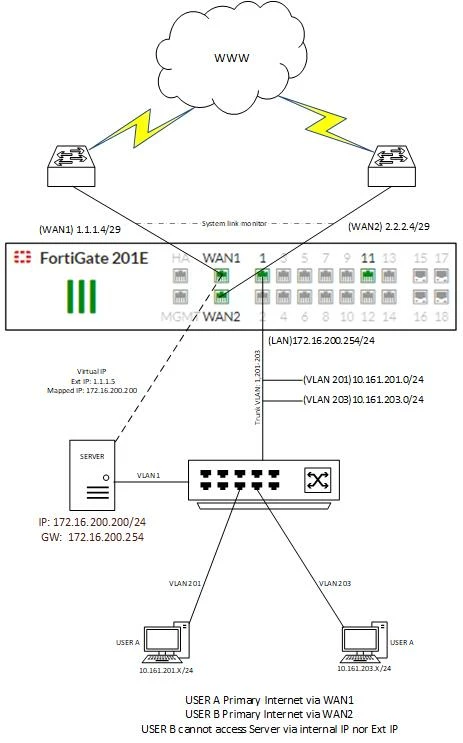
I have WAN Redundancy using system link-monitor.

WAN1: 1.1.1.4/255.255.255.248 (Primary)
WAN2: 2.2.2.4/255.255.255.248 (Backup)

Management Network: 172.16.200.254/24
Type: Software Switch
Role: LAN

Network 1: 10.161.201.0/24
Type: VLAN
Network interface 1: 10.161.201.254/24

Network 2: 10.161.203.0/24
Type: VLAN
Network interface 2: 10.161.203.254/24


Static Routes:

Dest: 0.0.0.0/0.0.0.0
Gateway: 1.1.1.3
Int: WAN1
Prio: 5

Dest: 0.0.0.0/0.0.0.0
Gateway: 2.2.2.4
Int: WAN2
Prio: 10

Policy Route:

Incoming int: Network interface 2
Source Add: 10.161.203.0/24
Dest Add: ALL
Protocol: ANY
Outgoing int: WAN2
Gateway address: 1.1.1.3


Firewall Policy:

Network Int 1 to WAN1 (Primary)
Network Int 1 to WAN2 (Backup)

Network Int 2 to WAN2 (Primary)
Network Int 2 to WAN1 (Backup)

Mgmt to WAN1
WAN to Mgmt


WAN delegation:

Network 1 uses WAN1 as primary, WAN2 as backup
Network 2 uses WAN2 as primary, WAN1 as backup

Question/Issue:

Network 2 use WAN2 as primary link, now Network 2 users need to access a Server that is sitting on the Management network with WAN 2 IP assignment, i tried creating policy route but still unreachable.

Server they are trying to reach is 1.1.1.5 which within the zone of WAN1, so i tried creating another Policy route to reach this IP via WAN 1 from Network 2 but still no luck.

Policy Route:
Incoming int: Network interface 2
Source Add: 10.161.203.0/24
Dest Add: 1.1.1.5/32
Protocol: ANY
Outgoing int: WAN1
Gateway address: 1.1.1.4
Tix7446386_2.jpg


Server has Virtual IP and IP Pool setup, and access from the external network is working fine

Best answer by luckysantiago

Thanks everyone, Hairpin NAT fixed the issue.


Resolution:
- Stop Policy Route to LAN to Server (Internal IP)
- FW Policy from LAN to DMZ, destination is VIP, NAT enabled.
- No additional Policy Route from LAN to WAN with destination public IP of Server

2 replies

Contributor
August 12, 2022

Hello @Anonymous_User ,


                         Thanks for reaching Fortinet Community. From the diagram and the requirement it seems like this is an asymmetric routing case. In such case by default FortiGate will be dropping the packets unless manually enabled on the firewall. More info regarding the very same in below link


https://community.fortinet.com/t5/FortiGate/Technical-Tip-Difference-between-asymmetric-routing-and/ta-p/194040


Hope this helps.


Thanks,

luckysantiago
New Member
August 13, 2022

Hi Aashiq,


Thanks for this, I tried enabling asymroute but unfortunately still not working.


I also got a reply from support and suggested hairpin NAT: https://community.fortinet.com/t5/FortiGate/Technical-Tip-Configuring-Hairpin-NAT-VIP-in-policy-route/ta-p/198421

Toshi_Esumi
SuperUser
SuperUser
August 13, 2022

Did the TAC person run "flow debug"? That would show you exactly why it wouldn't be able to reach.

I don't think this is "asym routing" issue. Besides, if you did that, you must have lost almost all firewall features. Unless you want the FGT just as a router, you don't want to enable asym routing.

I'm thinking more simple like "you have to do the hairpin because 1.1.1.5 is on the FGT, it would never go out wan2 to come back to wan1, but you don't have a policy from Network2 to wan1", or something like that.

Again the flow debug would show that if that's the case.


Toshi

luckysantiago
luckysantiagoAuthorAnswer
New Member
August 15, 2022

Thanks everyone, Hairpin NAT fixed the issue.


Resolution:
- Stop Policy Route to LAN to Server (Internal IP)
- FW Policy from LAN to DMZ, destination is VIP, NAT enabled.
- No additional Policy Route from LAN to WAN with destination public IP of Server

