

cmberry
New Member
September 7, 2010
Question

Interface Setup

  • September 7, 2010
  • 12 replies
  • 12086 views
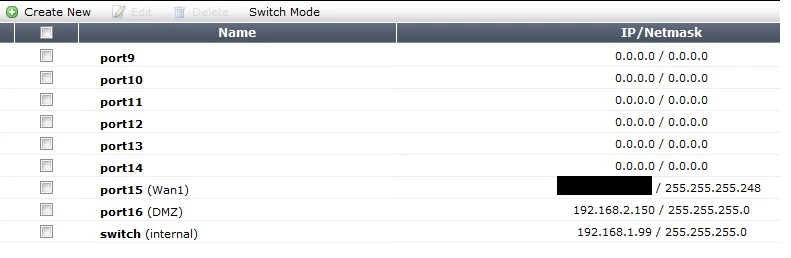
If my internal network uses only 1 port on the back of my 200B, is there any reason to use one of the switch ports vs a dedicated port? I am using MR2 Patch 2 on a 200B. I am having a few issues where a web page or download will lose its connection for about 1 second, and this happens all throughout the day and causes all sorts of issues. I do have a support ticket open on it, but I am looking to get opinions of whether my configuration could be causing some of the issues. Would there be an advantage to replace the internal network currently using the “switch” interface with for example “Port 14” with alias of “Internal”? The firewall comes with 192.168.1.99 preconfigured on the switch interface, so I kept it. What are your thoughts? My current setup looks like this: (Network>Interfaces)
    12 replies

    cmberry
    cmberryAuthor
    New Member
    September 29, 2010
    I wanted to update this thread with the progress I have made on this issue, in case anyone else is seeing failed downloads. After having a ticket opened for just over a month, I got the call today to confirm it is a BUG. Bug ID 0131322. I thought there was some part of the Fortinet site that shows all bugs and the details, but I was chatting with support today, and they said it is an internal only site, so let me give you the details of the bug from my point of view. After turning all UTM features off, and adding them back one at a time, and waiting at least 24hours between each feature being added, it was conclusively proven to be the Email Filter. Once the tech and I were 95% sure it was only within email, we tried removing all settings, and it then looked to be only within POP3, although I am not 100% sure on that point, since I only have pop3 and smtp, no imap. I then did rotations of email filter on/off in blocks of 24 hours, and proved it to be email filter 100% for me. Simple fact was, with email filter enabled on the policy, download failed ~99% of time. Email filter off=everything was fine. This may seem odd to you, since email filter should have nothing to do with http/http downloads. Which is what the tech thought too, and probably why the ticket was open for so long. With email filter on, the AV filter obviously looks at emails, so you could argue that it' s actually in the AV filter, but AV filter alone being on, you don' t see the failed downloads, and general choking of the firewall throughput. I am told the problem is with something called the " proxy worker" in conjunction with email scanning of POP3 email. The proxy worker crashes with 4.2.2 (and I also am pretty sure it effects 4.2.1), and this brief interruption causes downloads to fail, web pages to not load, and a variety of other brief but troublesome issues. So, at this point I am very happy to have a probably bug id, which means at some point in the future I would imagine a bug fix. Without email filtering on, I have infected and malicious emails pouring into inboxes for about 30 workers, fun fun!
    ede_pfau
    SuperUser
    SuperUser
    September 29, 2010
    Thanks for the update on this issue. Just a thought: could you set up a second VDOM to only process pop3, to have it AV scanned? transparent mode, just 2 interfaces, one policy, one protection profile. Might be worth the trouble instead of having no AV on mails at all.