
adrianit
New Member
Nov 9, 2026 3:57 AM UTC
Question

High CPU Utilization by httpsd Process After Upgrading to FortiOS 7.6.8

Hi everyone,

After upgrading our FortiGate 201E from 7.4.13
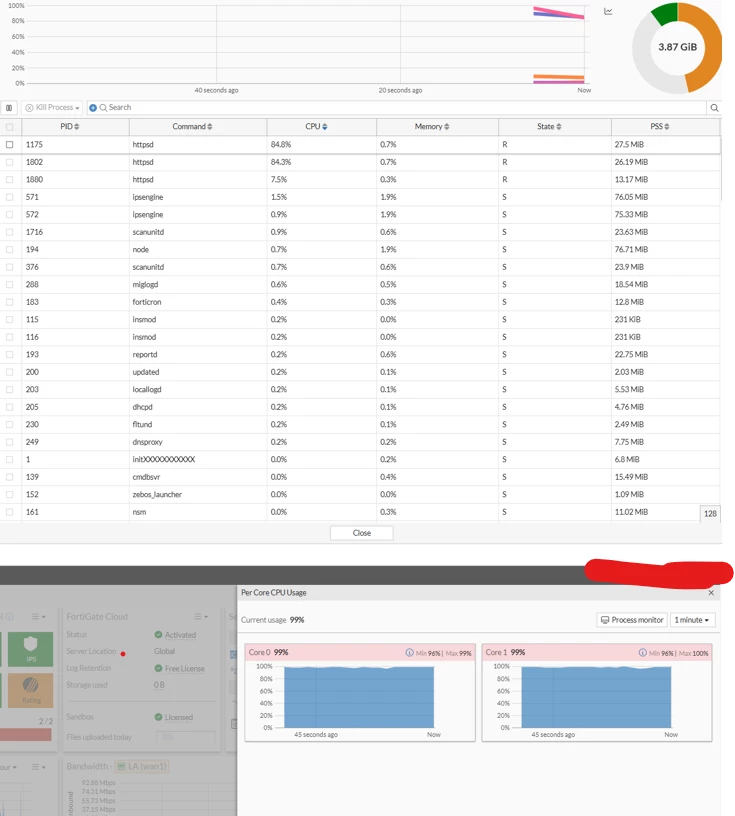
High CPU

 to FortiOS 7.6.8, CPU utilization consistently increases to around 90%, with the httpsd process identified as the primary contributor.

Restarting the httpsd daemon temporarily resolves the issue, but CPU utilization gradually increases again.

Has anyone experienced the same issue after upgrading to FortiOS 7.6.8? Is this a known firmware bug, and are there any recommended workarounds or permanent solutions?

Thank you for your help.

5 replies

funkylicious
SuperUser
SuperUser
Nov 9, 2026 5:56 AM UTC

maybe this will help - 


"jack of all trades, master of none"
sjoshi
Staff
Staff
Nov 9, 2026 5:58 AM UTC

can you try below workaround:

config log gui-display
    set resolve-apps disable
end


can you check system event logs if you see continuous admin login event

can you also share

get sys perf status

Thanks, Salon
adrianit
adrianitAuthor
New Member
Nov 9, 2026 6:47 AM UTC

Helo sir ,

Is this a known bug in FortiOS 7.6.8, or is it normal to require these configuration changes after every firmware upgrade to keep the httpsd process running properly?

Are these settings standard post-upgrade configurations or just temporary workarounds to bypass a firmware bug?

Is there a permanent fix available?

sjoshi
Staff
Staff
Nov 9, 2026 10:12 PM UTC

Issue is close to below article:


Worth to apply the workaround and let me know if it helps

Thanks, Salon
sjoshi
Staff
Staff
Nov 9, 2026 10:10 PM UTC

can you confirm for how long the device is stable once you restart httpsd process?

Thanks, Salon
Risk and Resilience in the Age of AI. An OT Thought Leadership Summit for Houston's Critical Infrastructure Leaders. Date: Thursday, December 3, 2026. Time: 8:30 am - 1:30 pm (CT). Location: The Westin Houston, Memorial City | 945 Gessner Road, Houston, TX 77024