MustphaBassim
New Member
October 22, 2022
Solved

FSSO groups

  • October 22, 2022
  • 4 replies
  • 6312 views

Hello Dears


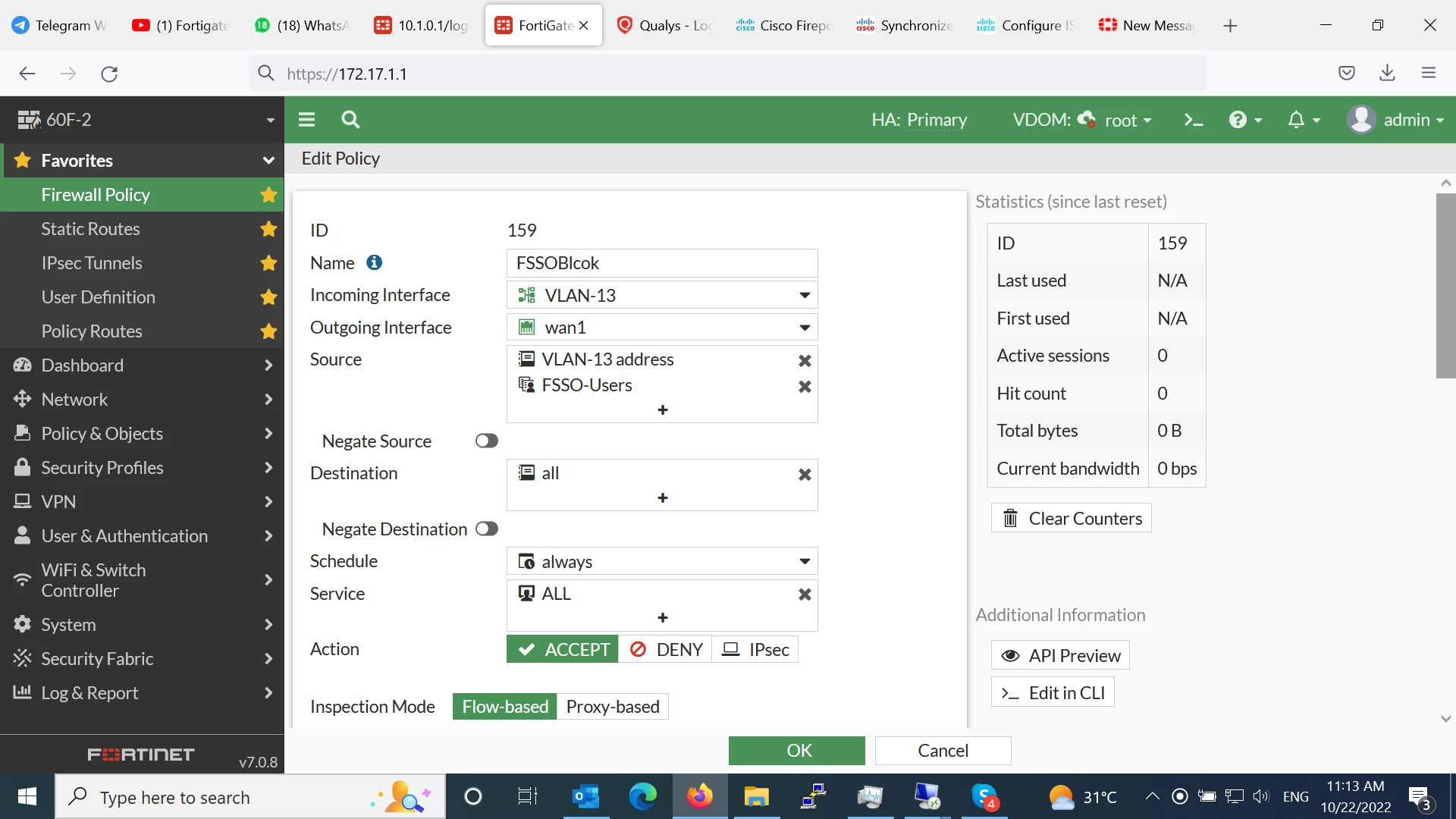
I am trying to block some users to access internet using FSSO policy but it seems not working could anyone advise about that ?


BestsUntitled.png
Best answer by AntonyChen

ok, please confirm that you choose "show all fsso logon" on that GUI

if your user not displayed mean you have sth wrong in active directory polling settings

I suggest you to read again the guide

https://docs.fortinet.com/document/fortigate/7.2.1/administration-guide/503764/fsso-polling-connector-agent-installation


if your config is OK, when you logon windows domain computer, user information must be collected by fortigate automatically and displayed on monitor section

4 replies

AntonyChen
Explorer II
October 22, 2022

I see in your captured image policy 159 action accept so why ?

MustphaBassim
New Member
October 22, 2022

i try block/deny but the seem issue

Sheikh
Staff
Staff
October 22, 2022

Hi @MustphaBassim


Do you have any deny policy as well for those users ? Firewall policies are working from top to bottom. Might be that allow policy is above then the deny policy.


Moreover, check the logs of Fortigate for more details.


regards,


Sheikh

If you have found a solution, please like and mark it as solved to make it easily accessible for everyone.
MustphaBassim
New Member
October 22, 2022

no this is the only policy and it's the first policy in the area

MustphaBassim_0-1666433408762.png


AntonyChen
Explorer II
October 24, 2022

you should check that the user you want to block was authenticated as FSSO-Users group

FSSO user must automatic authentication on firewall when the user logging on client PC on domain network without entering user name, password again to fortigate authentication portal.

I think that it;s authenticated with firewall user method, not fsso this case, please re check

MustphaBassim
New Member
October 24, 2022

hello dear and thnx for reply


as I under stand you meant i need to enable web auth on firewall then go ahead with that ?


Regards

AntonyChen
Explorer II
October 24, 2022

no man, you said that you implement fsso , then you have to check that the user you testing that policy is authenticated at right group, you can see at "firewall user monitor" in GUI that if that user is displayed and belong to Fsso-users group.
Anyway you implement fsso using active directory polling or fsso-agent installed on server computers to sync the authentication to firewall?

Markus_M
Staff & Editor
Staff & Editor
October 24, 2022

Hello,


fitting debug here:

diag debug console timestamp enable

diag debug app fssod -1

diag debug app auth -1

diag debug app smbcd -1

diag debug enable


should show you which users are actually picked up.

I do recommend using the Agent based polling instead, leaves the FortiGate free for its firewalling job and is more flexible in terms of understanding logon events.

https://community.fortinet.com/t5/FortiAuthenticator/Technical-Tip-Windows-event-IDs-used-by-FSSO-in-WinSec-polling/ta-p/189910

https://community.fortinet.com/t5/FortiGate/Technical-Tip-FSSO-local-poller-fssod-limitations-compared-to/ta-p/197980?externalID=FD38897


Best regards,


Markus

Markus_M
Staff & Editor
Staff & Editor
October 24, 2022

and another note: the firewall user monitor is important. If the user is not there or not correct, the policy objects WILL not work. First make sure the users are listed. If they are, then your firewall can use these groups in its policies.



