


djose
New Member
July 8, 2025
Question

FortiProxy-VM 64 Memory Usage

  • July 8, 2025
  • 5 replies
  • 1368 views

Hello Fortinet Community,


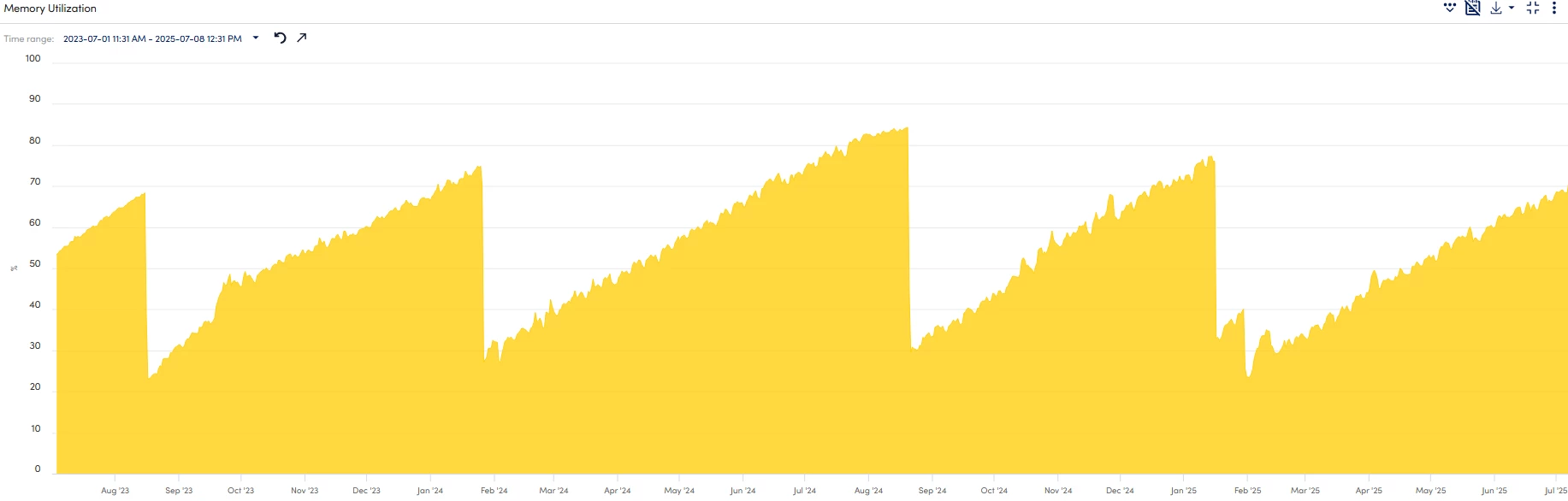
My FortiProxy-VM64 has a very typical memory utilization (printscreen below). It seems that the memory keeps increasing for periods of 6 months approximately until around 80% and then it decreases abruptly to 25%.

I do not do any periodic maintenance like reboots, cache cleaning or something similar.
 

delete.png


Is this kind of memory utilization normal under typical load? Also, could you please advise what are the recommended memory usage thresholds to watch for?


Thanks in advance for your help!

Best regards

5 replies

BillH_FTNT
Staff
Staff
July 8, 2025

Hi Djose

At first pls share the output of crashlog "dia debug crashlog read" , then 

could you run this script multiple time between some weeks, if can please share the result to me through my official email bhoang@fortinet.com
get system status
fnsysctl date
get hardware status
get sys perf status
diag sys session stat
diagnose sys session6 stat
diag hardware sysinfo memory
diag hardware sysinfo slab
diagnose hardware sysinfo shm
diagnose sys top-mem 250
fnsysctl ps
diag sys vd list | grep fib
diag sys cmdb info
diag sys top-fd 30
fnsysctl date
diagnose sys top-mem 250
get sys perf firewall statistics
diag debug enable
diagnose wad stats worker show
diagnose wad memory overused
diagnose wad memory sum
diagnose wad memory workers
diagnose wad memory report
diag test application wad 10000
diag debug disable
diagnose test application ipsmonitor 24
diagnose ips session list by-flowav-mem 50
diagnose ips session list by-idle 50
diagnose ips session list by-created-queries 50
diagnose ips dissector dump
diagnose ips raw status
diagnose ips session performance
diagnose ips session list by-mem
diagnose ips memory track enable
diagnose ips memory track-size 17 480
diagnose ips memory track-print0
diagnose ips session status
diagnose ips memory status
diagnose ips packet status0
diagnose ips memory track disable
fnsysctl df -k
fnsysctl df -m
fnsysctl ls -l /tmp
fnsysctl du -i /tmp
fnsysctl du -ax /tmp
fnsysctl du -a / -d 1
fnsysctl du -i /dev/shm
fnsysctl du -ax /dev/shm
fnsysctl ls -l /dev/shm
fnsysctl du -i /node-scripts
fnsysctl du -ax /node-scripts
fnsysctl ls -l /node-scripts
Many thanks

Bill

filiaks1
Explorer III
July 31, 2025

Yup seems like memory leak bug to me. Upgrading to the latest version may be the solution and @BillH_FTNT  's suggestion as well.

VinayHM
Staff
July 31, 2025

Please check the current firmware version running on the device and any known issues related to memory leaks.

koletmo6
New Member
July 31, 2025

I upgraded my 60E at home to 6.4.1, and after a few days it went into conserve mode. It's not using any UTM features, only basic firewalling.

VinayHM
Staff
July 31, 2025

Version 6.4.1 is outdated and no longer supported by TAC. Please upgrade to the latest version. Before upgrading, ensure you follow the upgrade path and review the release notes.

Thought Leadership Security Summit. Outpace New Threats with AI - enhanced defense. Tuesday, Septmeber 15, 8:30 AM - 2:30 PM PT. The Golf Club at Newcastle, WA.
Virtual event | September 2026. SASE summit. The age of autonomous trust. Register here!