Wurstsalat
Explorer
April 20, 2022
Solved

FortiOS Explicit Proxy rule based on client(!) HTTP header

  • April 20, 2022
  • 2 replies
  • 7432 views

Hi there,


we want to establish Microsoft approach of a "mikro vm" with "application guard" and edge (+chrome+firefox). So in best case we can use one proxy for all use cases, free internet through application guard and restricted internet through default browsing.

Microsoft Edge and Microsoft Defender Application Guard | Microsoft Docs


When we enable ApplicationGuardTrafficIdentificationEnabled ( Microsoft Edge Browser Policy Documentation | Microsoft Docs ) the browser in the sandbox sends for his requests an additional http header "X-MS-ApplicationGuard-Initiated". So if i can believe in wireshark, yes this header is send but...it seems not to have any effect on the fortigate


We tried the following rule and used as "source"a proxy address (to be honest, we tried several other things but this seems to be the right way...from my understanding)
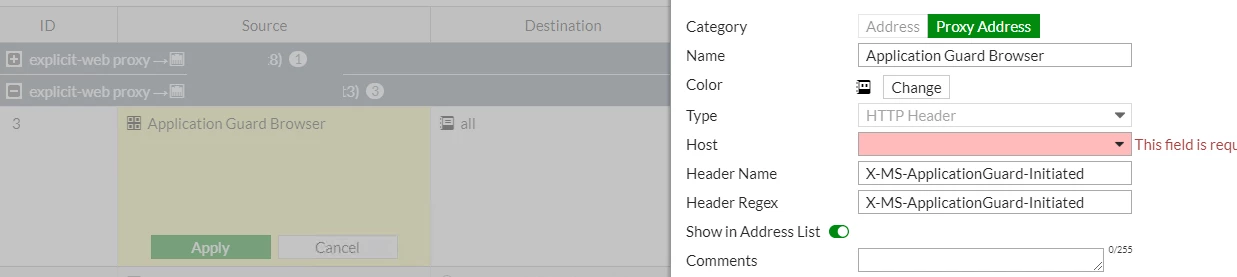
Wurstsalat_0-1650455389442.png

Just to mention, when we set the host in gui, after we apply, and reopen it, this field is empty again...but when we check in the cli, it is all there.
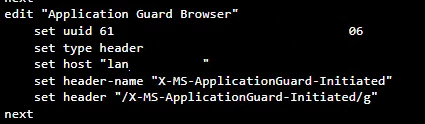
Wurstsalat_0-1650455789984.png


So anyway, we set this as source but the rule seems not to have any effect. Any ideas how we can archive this to be handleb by fortigate?


Kind regards

Best answer by pminarik

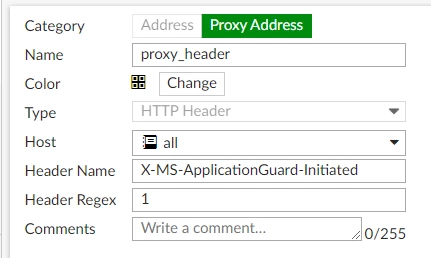
"X-MS-ApplicationGuard-Initiated: 1" should be trivial to match:

HTTP host header proxy address objectHTTP host header proxy address object

(replace the Host option with whichever source-IP address object you need).


The HTTP/HTTPs part is a good question.
Are these headers supposed to be included in the outer request to the proxy (proxy will always see them), or are they supposed to be included in the inner request? (they would be sent to the real destination server, and DPI would be needed to see them inside encrypted traffic)

Only the first one (outer request to proxy) makes sense to me, but I'm not a MS expert. :)

2 replies

Debbie_FTNT
Staff & Editor
Staff & Editor
April 20, 2022

Hey Wurstsalat,

I'm admittedly not very familiar with how FortiGate handles policy matching based on HTTP headers.

However, I came across this somewhat older forum thread: https://community.fortinet.com/t5/Fortinet-Forum/Configuring-HTTP-header-to-allow-quot-youtube-for-education-quot/td-p/90964

-> you might need to enable deep inspection to get FortiGate to see the headers and act on them

-> The GUI issues you mentioned could still be present - I couldn't find that they were ever reported and fixed in our database as of now, but maybe I overlooked something

There's also this:

https://docs.fortinet.com/document/fortigate/6.0.0/handbook/109372/http-headers

But your header doesn't fall into any of the five mentioned, correct?

Wurstsalat
Explorer
April 20, 2022

Deep Inspection is active


Hm docs.fortinet.com currently down? Cant open any page on this domain...i check it later


edit
checked the document, no i dont think our header is mentioned there

Wurstsalat
Explorer
May 17, 2022

anyone else an idea on this?

pminarik
Staff
Staff
May 17, 2022

A couple questions:

1, The screenshot shows you configured a match for a header "X-MS-ApplicationGuard-Initiated: X-MS-ApplicationGuard-Initiated". Is the value of the header actually supposed to be equal to the name of the header?


2, What did you choose for the "set host ..." setting? This matches on the Host header in the request. (the FQDN of the requested website)

Wurstsalat
Explorer
May 17, 2022

1. From my understanding the header has no value but fortios expects or forces one


2. we used here the source addresses, we try to use the host header identification on source, not destination! Still put in the destination adress(es)? Which is basically "any"