

mattbrice
New Member
December 3, 2021
Solved

Fortimanager errors out

  • December 3, 2021
  • 4 replies
  • 14258 views

I'm new to Fortinet/Fortigate and am using a 40F as a lab learning device. I have just a few configs that is causing the push install to fail. All it is :

config system interface
2: delete "lan3"
3: delete "lan2"
4: delete "lan1"
5:end

All three error out with message:


"The entry is used by other 1 entries.  Command fail. Return code -23"


So how do I undo these commands?  I can't figure it out.
Best answer by axel_gonzalez_FTNT

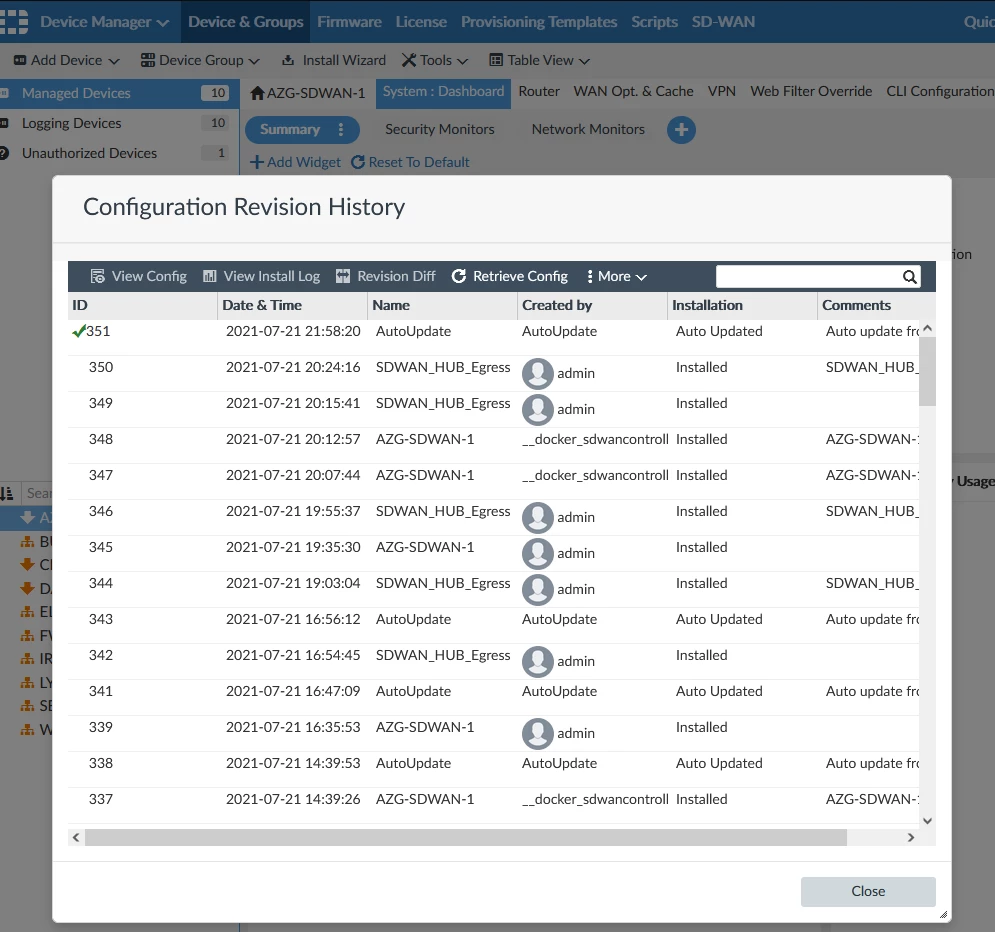
Try to retrieve configuration so that you update device layer


Device manager > Managed devices > Double click on your FGT > Configuration and Installation > Revision > Total revisions > Revision History > Retrieve config


axel_gonzalez_FTNT_0-1638559723231.png

 Once retrieve, try again

4 replies

axel_gonzalez_FTNT
Staff
Staff
December 3, 2021

Try to retrieve configuration so that you update device layer


Device manager > Managed devices > Double click on your FGT > Configuration and Installation > Revision > Total revisions > Revision History > Retrieve config


axel_gonzalez_FTNT_0-1638559723231.png

 Once retrieve, try again

mattbrice
mattbriceAuthor
New Member
December 3, 2021

No change.  Same error.


Do I need to do anything after I "Retrieve Config" ?

Toshi_Esumi
SuperUser
SuperUser
December 3, 2021

Retrieving should recover from the errors. But what exactly tried to configure? Those three interfaces are "lan" hard-switch members by default so they're not in "config system interface". Even if you broke the hard-switch to individual interfaces, those physical individual interfaces can not be removed.

Whatever you tried to configure, the FMG should not try removing those physical interfaces, unless you specifically used CLI templates or CLI scripts to "delete" them.


Toshi

mattbrice
mattbriceAuthor
New Member
December 3, 2021

I did not use CLI templates or CLI scripts.  I'm not sure how I got to my current state, to be honest.   I guess I'll try to retrieve the earliest version.

mattbrice
mattbriceAuthor
New Member
December 3, 2021

So i went back in time to original config a "Retrieve"d it and now it works. Thanks for help.

mattbrice
mattbriceAuthor
New Member
December 3, 2021

I think I 'retrieved' an older version that was successful.

Toshi_Esumi
SuperUser
SuperUser
December 3, 2021

"Retrieve Config" AX meant is to retrieve the current config from the device and create a new revision at the FMG. Going back to the older version is "Revert" in the menu under "More" in Revision screen.

