
1mm
Explorer III
November 24, 2023
Question

Fortigate Virtual Server

  • November 24, 2023
  • 2 replies
  • 3894 views

Hello, We have virtual Fortigates (Active-Standby HA) installed in ESXi environment. We would like to deploy Virtual Server for Load balancing our DNS. 
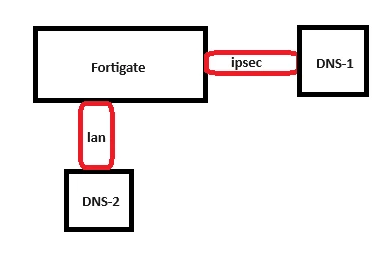
fortigate.png

IP address of DNS-1 - 10.0.0.1

IP address of DNS-2 - 10.0.1.1

Virtual IP will be IP of loopback - 10.0.2.1


How do I need to provide access from policy side?

Do I need to "enable" Virtual server (Apply some policy) how it done when you configure IPsec\Remote access vpn?

Do I need to provide any accesses from or to Virtual IP?

Do I need to allow access from different interfaces to Virtual IP for dns request? 



2 replies

MethodNet
New Member
November 24, 2023

For clarification, are you saying that the DNS servers will create an IPsec tunnel to the FortiGate and you want to load balance across the two IPsec tunnels?  If so, will they be dial-up tunnels with FortiClient or will they be behind 2 additional firewalls?

1mm
1mmAuthor
Explorer III
November 24, 2023

Hello @MethodNet  thanks for your reply,

No between fortigate and dns server is another router, I just didn't draw it :) 

MethodNet
New Member
November 24, 2023

That makes it easier.  I was trying to figure out how to do load balancing with dynamic IPs, that was a brain teaser.  I would say that there are 2 ways to do this.  First, you can use your FortiGate as the DNS server and forward requests to both DNS servers.  Set up the DNS servers as your system DNS servers.  That is by far the easiest way to go. and no policies are needed.


Second, you can configure a load balanced IP, not a virtual IP, and have traffic balanced between the two DNS servers.  If you haven't enabled this feature, you will need to enable it so you can see it in the GUI.  This will test the connection to the DNS servers and only send requests to the available DNS server(s).  Doing it this way will require policies from every source interface.  The best way to deal with 2 destination IPsec tunnels would be to put them in a zone so you would have a policy similar to the following:


Src Int: lan

Dst Int: DNS_Zone

Src Address: lan_Net

Dst Address: DNS_Loadbalanced_IP 

Service: DNS

1mm
1mmAuthor
Explorer III
November 24, 2023

Just Assuming.

If DNS-1 is placed after IPsec interface and DNS-2 is after LAN Interface-1 policy will bi like:

source all needed Interfaces and Source IP addresses and in destination should be Load Balancer Object, and IPsec and Lan Interface-1 as destination interface correct?

MethodNet
New Member
November 24, 2023

If you want to have policies with multiple interfaces, you can try it like that.  It is typically better to have single interfaces in each policy which is why you need a zone.  If you prefer the multiple interface option, you can try it.  I'm just not sure how well that will work out.  I can try to build it in my lab later today or this weekend to see if that will work.  You can put Lan and the VPN in the same zone as well.

