

kyle-hsuan
Explorer
January 30, 2026
Question

Fortigate static url filter

  • January 30, 2026
  • 2 replies
  • 559 views

Hi


I want to allow access only to the following URL using a Static URL Filter, and block any subdomains.


www.microsoft.com/security/encyclopedia/adlpackages.aspx 


here is my setting, but it doesn't work

still can access

www.microsoft.com 

www.microsoft.com/security 
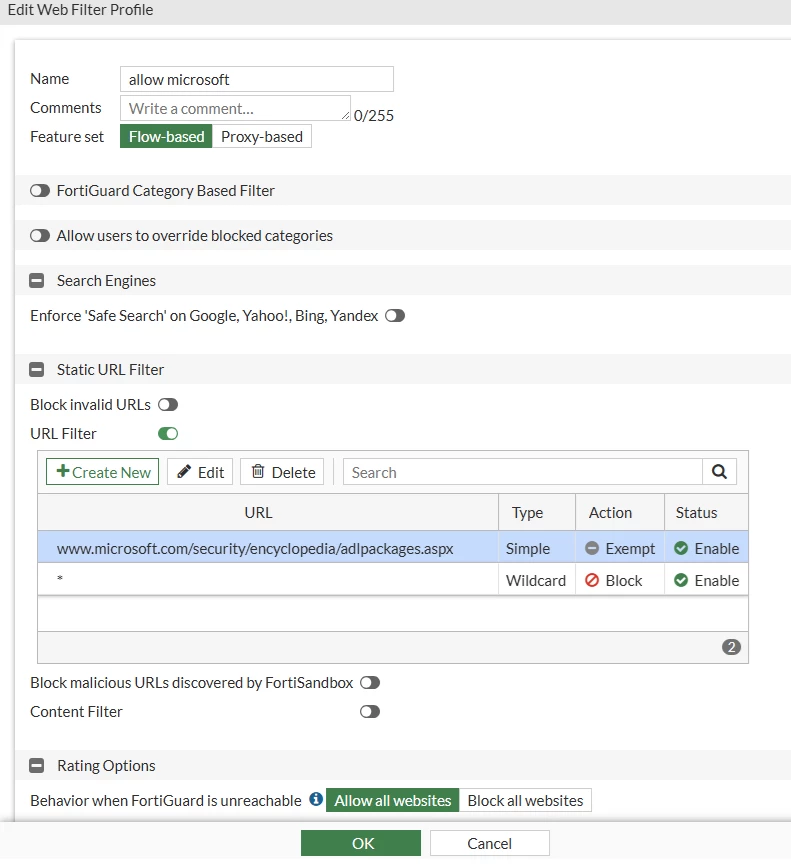
 

web filter profile.png


firewall policy.png


2 replies

funkylicious
SuperUser
SuperUser
January 30, 2026

hi,

as per https://community.fortinet.com/t5/FortiGate/Technical-Tip-URL-Filter-expressions-for-the-FortiGate/ta-p/192746 it seems that setting the firewall policy inspection mode and web-filter to proxy-mode instead of flow-mode would be more beneficial to start with.

"jack of all trades, master of none"
kyle-hsuan
Explorer
January 30, 2026

Hi

After switched to proxy mode, all URLs can't access.


funkylicious
SuperUser
SuperUser
January 30, 2026

maybe try microsoft.com/security/enciclopedia/adlpackages instead

"jack of all trades, master of none"
rp1996
Staff
Staff
January 30, 2026

I understand that you are looking to block specific URL's , please that for URL's with path you would need to use deep inspection in the policy, without deep inspection FortiGate would not have visibility to the path. 


example: fortinet.com/contact  ,  here the portion "/contact" is referred to as the path. 


Note that for deep inspection you are required to install the certificate "FortiGate CA", in trusted root CA store, else you will get certificate error. 

kyle-hsuan
Explorer
January 30, 2026

Hi


I have already enabled deep inspection, but it is still being blocked by static url filter.


