
Donglv9
Explorer
October 2, 2023
Solved

Fortigate - Show Current disk usage static.

  • October 2, 2023
  • 5 replies
  • 16262 views

I want to check the current sttatic of disk-usage in fortigate VM. 
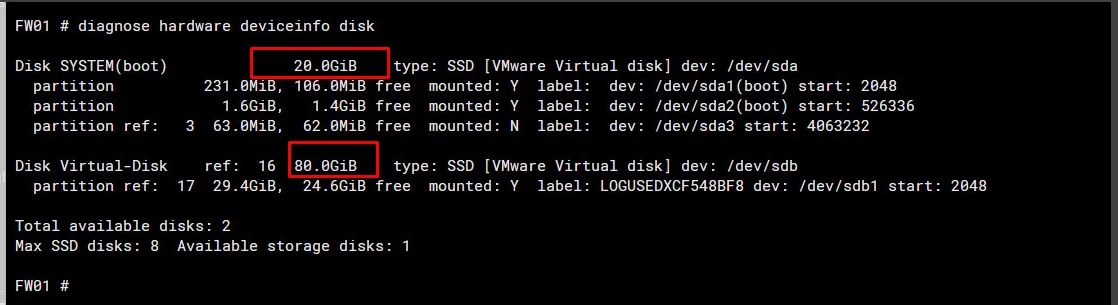
My Fortigate Vm running on VMWare have 2 disks: Disk SYSTEM (20.0GiB) and Disk Virtual-Disk(80.0GiB)
Screenshot 2023-10-02 141356.png
I tried the deviceinfo command above, but the static is confuse. How can I check the total disk-usage?


Best answer by xshkurti

@Donglv9 

According to this link:
Technical Tip: How to extend disk size for FortiGa... - Fortinet Community
Formating logdisk will make FGT to use the whole space. Havent tried it but other engineers have tested that it works.


Now to format that partition (sdb where sdb1 for log is created) follow this link:
Technical Tip: how to format disk SDA partition to... - Fortinet Community

Please give it a try. And remember to backup it first. (also guide on the second link)

If you have found a solution, please like and accept it to make it easily accessible for others.
Regards!

@xshkurti 

5 replies

xshkurti
Staff
Staff
October 2, 2023

@Donglv9


Please try commands described in this link:
Troubleshooting Tip: How to clear short of flash s... - Fortinet Community
But most probably this will come to help: 

# fnsysctl df -h


If you have found a solution, please like and accept it to make it easily accessible for others.
Regards!
@@xshkurti

Donglv9
Donglv9Author
Explorer
October 2, 2023

thanks @xshkurti 
My total 2 disk space is 100GB (20+80), I curious about my Virtual-Disk(80.0GiB) how many disks space in-used because it not show the total (80Gb) when running "fnsysctl df -h"
Or can any command show how many disks space was used in 100GB allocated?

xshkurti
Staff
Staff
October 2, 2023

@Donglv9 
What is the output of fnsysctl df -h?

Donglv9
Donglv9Author
Explorer
October 2, 2023

@xshkurti Screenshot 2023-10-02 141356.png

xshkurti
Staff
Staff
October 2, 2023

@Donglv9 
What about below command output?
exe disk list 
show system storage

Donglv9
Donglv9Author
Explorer
October 2, 2023

@xshkurti 
It doesn't show the used percentage of the 80Gb disk.Screenshot 2023-10-02 141356.png

xshkurti
Staff
Staff
October 2, 2023

@Donglv9 
I think we have the solution here.
You have a 80GB HDD but you are using only:
set size 30107 (29.4GB)
In order for you to use the whole HDD you have to change
config system storage

edit "Virtual-Disk"
set size 81920 
next

end

After this change you will use all 80 GB and see correct values.


If you have found a solution, please like and accept it to make it easily accessible for others.
Regards!
@xshkurti 

Donglv9
Donglv9Author
Explorer
October 2, 2023

@xshkurti 
I see the problem!
But can I set the size 30Gb to 80Gb on Fortigate, can you show me?
There is no command to set the size to 81920 as your comment above.
Screenshot 2023-10-02 141356.png

xshkurti
Staff
xshkurtiAnswer
Staff
October 2, 2023

@Donglv9 

According to this link:
Technical Tip: How to extend disk size for FortiGa... - Fortinet Community
Formating logdisk will make FGT to use the whole space. Havent tried it but other engineers have tested that it works.


Now to format that partition (sdb where sdb1 for log is created) follow this link:
Technical Tip: how to format disk SDA partition to... - Fortinet Community

Please give it a try. And remember to backup it first. (also guide on the second link)

If you have found a solution, please like and accept it to make it easily accessible for others.
Regards!

@xshkurti

