
excelerator
New Member
March 4, 2024
Solved

Firewall does not send syslog

  • March 4, 2024
  • 8 replies
  • 14067 views

Hi
my FG 60F v.7.0.14 is not sending any syslog at all to the configured server. This is a brand new unit which has inherited the configuration file of a 60D v.6.0.14 and was then updated following the suggested upgrade path. I already tried killing syslogd and restarting the firewall to no avail.


sg-fw # config log syslogd setting 
sg-fw (setting) # show
config log syslogd setting
set status enable
set server "172.17.100.16"
set interface-select-method specify
set interface "management"
end

sg-fw # get log syslogd setting
status : enable
server : 172.17.100.16
mode : udp
port : 514
facility : local7
source-ip :
format : default
priority : default
max-log-rate : 0
interface-select-method: specify
interface : management

Destination is reachable:

sg-fw # exec ping-options source 192.168.101.254
sg-fw # exec ping 172.17.100.16
PING 172.17.100.16 (172.17.100.16): 56 data bytes
64 bytes from 172.17.100.16: icmp_seq=0 ttl=63 time=3.0 ms
64 bytes from 172.17.100.16: icmp_seq=1 ttl=63 time=2.7 ms
64 bytes from 172.17.100.16: icmp_seq=2 ttl=63 time=2.6 ms
64 bytes from 172.17.100.16: icmp_seq=3 ttl=63 time=2.6 ms
^C
--- 172.17.100.16 ping statistics ---
4 packets transmitted, 4 packets received, 0% packet loss
round-trip min/avg/max = 2.6/2.7/3.0 ms
sg-fw # get router info routing-table all | grep 172.17
S 172.17.100.0/24 [10/0] via mgmt tunnel <redacted>, [1/0]


Other devices in the same management subnet (192.168.101.0/24 which corresponds to the "management" interface you can see in syslogd settings) are sending their syslog through the firewall without issue:

sg-fw # diag sniffer packet any 'udp port 514'
interfaces=[any]
filters=[udp port 514]
0.672813 192.168.101.250.6336 -> 172.17.100.16.514: udp 138
0.672868 192.168.101.250.6336 -> 172.17.100.16.514: udp 138
0.775093 192.168.101.250.6336 -> 172.17.100.16.514: udp 150
0.775112 192.168.101.250.6336 -> 172.17.100.16.514: udp 150
1.787286 192.168.101.250.6336 -> 172.17.100.16.514: udp 145
1.787310 192.168.101.250.6336 -> 172.17.100.16.514: udp 145


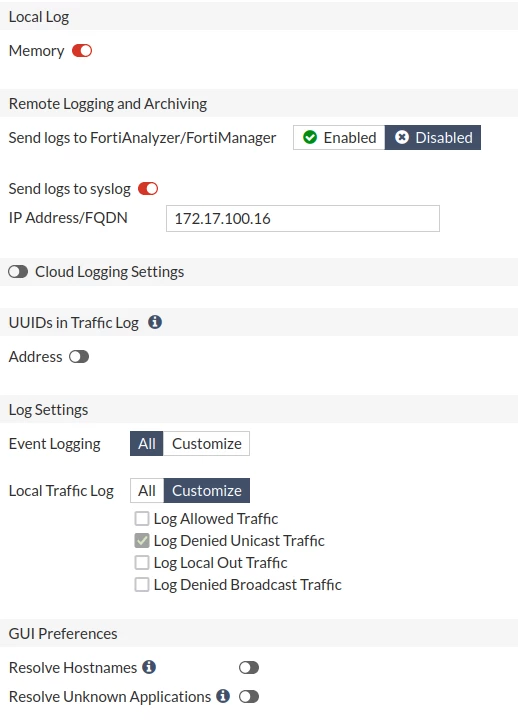
This is the relevant settings page:
 

logging.png

Please advise on any possible further troubleshooting step.

Best answer by excelerator

I resolved the issue by unsetting every attribute (interface, interface-select-method) and disabling "config log syslogd setting". Then i re-configured it using source-ip instead of the interface and enabled it and it started working again. interface-select-method: auto.


What an ugly bug...

8 replies

hbac
Staff
Staff
March 4, 2024

Hi @excelerator,


Have you ran packet sniffer on the problematic FortiGate? Do you see any traffic? 


Regards, 

excelerator
New Member
March 4, 2024

As you can see in the first post "diag sniffer" shows syslog traffic flowing through the firewall but not originating from it.

hbac
Staff
Staff
March 4, 2024

@excelerator,


I mean do you see syslog traffic originating from the FortiGate itself? What should be the source IP? You can try to set source-ip under syslog settings. 


Regards, 

excelerator
New Member
March 6, 2024

I checked ha-direct: since this is a standalone unit this setting is not even available:


sg-fw # get sys ha 
group-id : 0
group-name :
mode : standalone
sync-packet-balance : disable
password : *
hbdev :
route-ttl : 10
route-wait : 0
route-hold : 10
multicast-ttl : 600
sync-config : enable
encryption : disable
authentication : disable
hb-interval : 2
hb-interval-in-milliseconds: 100ms
hb-lost-threshold : 6
hello-holddown : 20
gratuitous-arps : enable
arps : 5
arps-interval : 8
session-pickup : disable
link-failed-signal : disable
uninterruptible-upgrade: enable
uninterruptible-primary-wait: 30
ha-eth-type : 8890
hc-eth-type : 8891
l2ep-eth-type : 8893
ha-uptime-diff-margin: 300
standalone-config-sync: disable
vcluster-id : 1
override : disable
priority : 128
monitor :
pingserver-monitor-interface:
vdom : "root"
failover-hold-time : 0


excelerator
exceleratorAuthorAnswer
New Member
March 6, 2024

I resolved the issue by unsetting every attribute (interface, interface-select-method) and disabling "config log syslogd setting". Then i re-configured it using source-ip instead of the interface and enabled it and it started working again. interface-select-method: auto.


What an ugly bug...

Athick
New Member
November 3, 2025

HA Slave unit is not sending logs to Syslog server.

Did any one facing this issue? Primary unit is sending logs but not slave unit.


But telnet and ping is OK both devices.

Device 60F ?FortiGate 7.2.7,build1577


Thought Leadership Security Summit. Outpace New Threats with AI - enhanced defense. Tuesday, Septmeber 15, 8:30 AM - 2:30 PM PT. The Golf Club at Newcastle, WA.
Fortinet Flag the Hack. Wednesday, August 26, 9:00 AM - 5:00 PM ET, COSM, Atlanta, GA.
Virtual event | September 2026. SASE summit. The age of autonomous trust. Register here!
