

Ravin_
New Member
December 10, 2024
Question

Firewall authentication auth-timeout

  • December 10, 2024
  • 2 replies
  • 1218 views

I intend to configure FortiGate such that users are required to re-authenticate every 10 hours, regardless of whether user session are active or inactive. I have applied the following commands, but the session timer seems to refresh instead of decreasing. Could advise if this configuration is correct?


config user setting
set auth-cert "Fortinet_Factory"
set auth-timeout 600
set auth-timeout-type hard-timeout
end
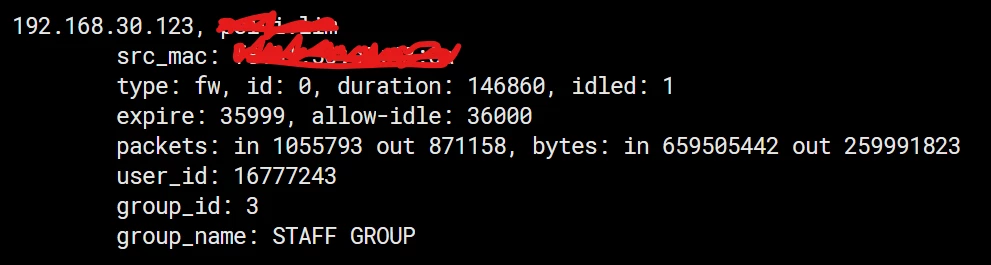
image.png

 Remark: i suspect it refreshing because of allow-idle



2 replies

dingjerry_FTNT
Staff
Staff
December 10, 2024

Hi @Ravin_ ,


Yes, it is correct.


dingjerry_FTNT_0-1733858070346.png


Ravin_
Ravin_Author
New Member
December 10, 2024

Hi @dingjerry_FTNT , But when I run again the expire time get refreshs instead of decreasing, become 36000 again 

dingjerry_FTNT
Staff
Staff
December 11, 2024

Hi @Ravin_ ,


Weird.  According to this KB:


https://community.fortinet.com/t5/FortiGate/Technical-Tip-Configure-hard-timeout-for-authenticated-user/ta-p/189617


It should be working. 


BTW, what is your FortiGate firmware version?

pminarik
Staff
Staff
December 11, 2024

The change applies only to newly-created auth sessions.

Existing ones (created before the config change) will time out according to the rules as they were when the session was created.


Make sure you either test this on brand new logons, or simply wipe all pre-existing auth sessions to avoid confusion.
