Hello again Aneeq,
I found this answer. Can you tell us if it helps, please?
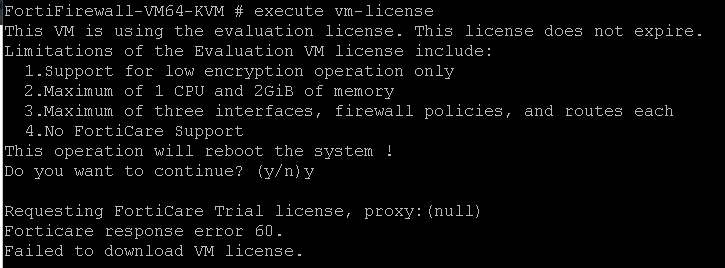
To address the issue with activating the evaluation license on your FortiGate VM in EVE-NG, follow these steps:
Troubleshooting Steps
-
Verify Internet Connectivity: Since you can ping external domains like google.com, it indicates that your FortiGate VM has internet access. Ensure that the management VDOM (if using multiple VDOMs) is correctly set and has internet access.
-
Check FortiGuard Connectivity:
-
Re-apply the Evaluation License: If the evaluation license was extended, it needs to be manually re-applied, which will cause the FortiGate to reboot. Ensure you have the correct license file and apply it through the GUI or CLI.
-
DNS Configuration:
-
Decommission Old VMs: If you have previously used other FortiGate VMs, ensure they are decommissioned in FortiCloud to avoid serial number conflicts. Follow the steps in the Decommissioning assets guide.
Additional Considerations
-
Permanent Trial License: Starting from version 7.2.1, the FortiGate-VM evaluation license is a permanent trial license. Ensure you have a FortiCare account to activate this license. More details can be found here.
-
Contact Support: If the issue persists after following these steps, consider contacting Fortinet Support for further assistance.
Follow-Up
If you continue to experience issues, please provide any error messages or additional details that may help in diagnosing the problem further.